Chapter 12: Final Recording Medium Setup, Rev. 1.5
12.3.1.1 Planning for the Rutter-ACR Float-free SFRM Capsule
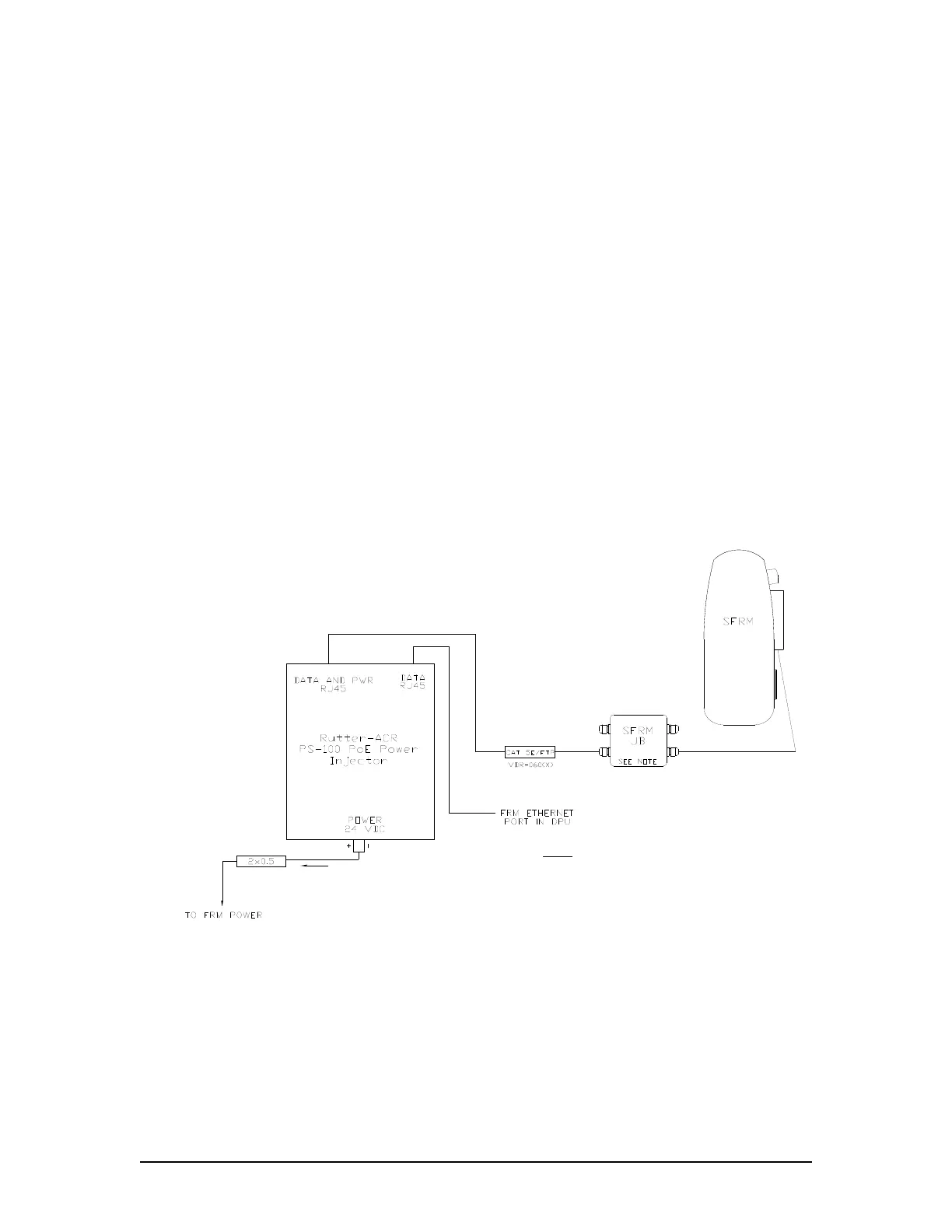
The Rutter-ACR Float-free SFRM Capsule is connected via an Ethernet interface cable to the
VDR-100G3/S. All hull penetrations for cables must be fitted with waterproof glands.
This Ethernet connection is through a PoE Ethernet connect box (PS-100) which is connected to
the FRM port of the VDR-100G3/S DMM.
For VDR serial numbers prior to 30108110376 the connection at the ACR capsule is
made via an RJ45/cable gland;
For VDR serial numbers 30108110376 and up, the connection to the PS-100 is made via
a junction box. This junction box is normally mounted on the exterior deck near the FRM
and positioned within range of the interconnect cable.
The PS-100 is mounted inside the DPU, and is connected to the VDR via a DC power cable and
an Ethernet interface cable. Ethernet cables are 10-base-T/STP (shielded twisted pair), Category
5e with flammability per IEC 95:
The DC power cable connects from the DPU terminal block 24VDC supply to the PS-100.
The Ethernet connection is via an RJ45 connector. This is connected from Ethernet port
3 on the DMM to the PS-100 Ethernet connect box.
The connection between the DMM and the PS -100 is straight through.
The cable from the PS-100 to the capsule is crossover.
NOTE: For VDR serial number 30108110376 and up this connection is made inside a
junction box.
NOTE
1. JUNCTION BOX SUPPLIED WITH VDR
SERIAL NUMBER 30108110376 AND
GREATER.
Figure 12–11 - Rutter-ACR Float-free SFRM Capsule Cable Connections
VDR-100G3/G3S Installation Manual 10/12/2008
12 - 21



 To Next Page