Appendix 4: Data Retrieval, Rev. 1.1
c. Right-click on the Local Area Connection icon and select Properties from the
pop-up menu.
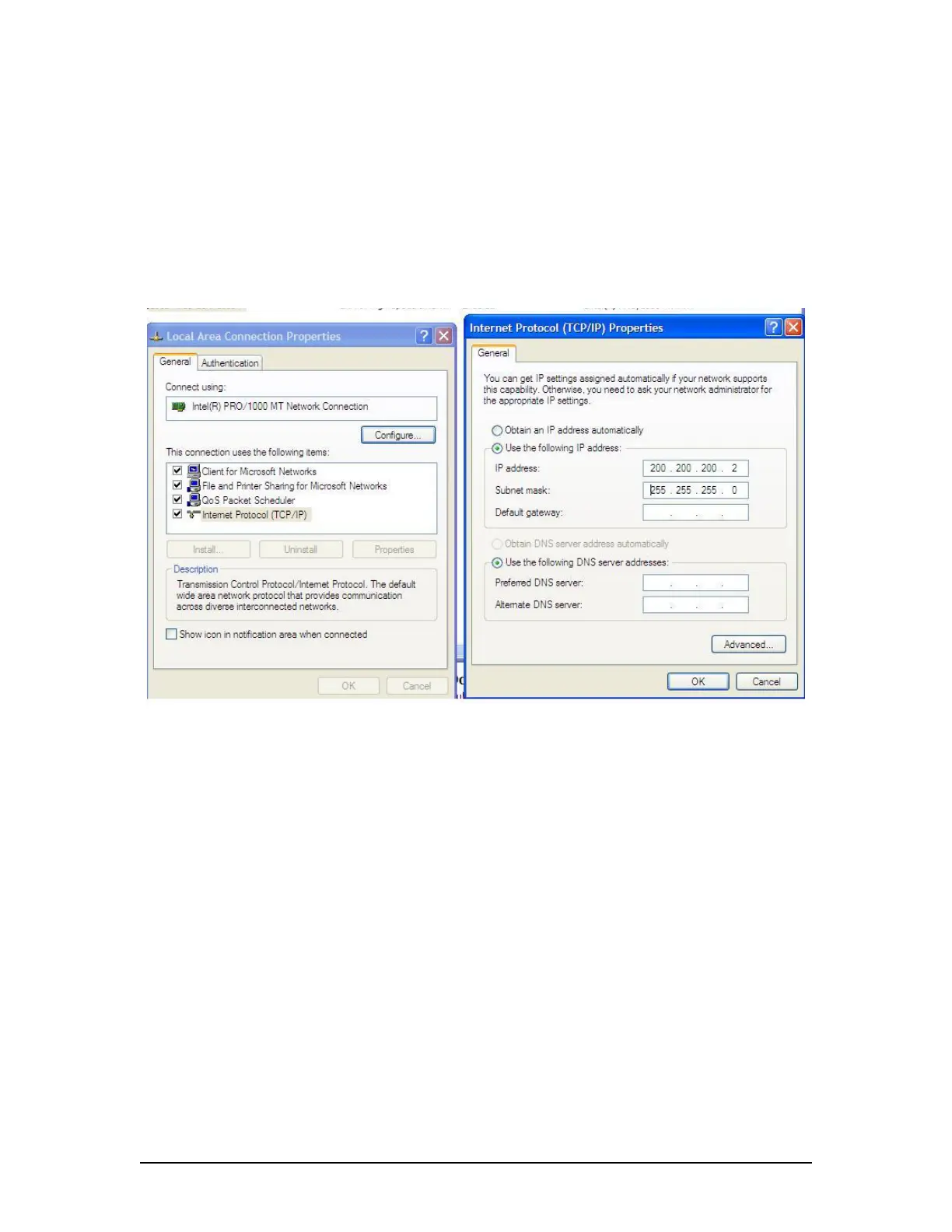
d. In the Local Area Connection Properties window, highlight “Internet Protocol
(TCP/IP)” and click the “Properties” button located directly below the available
options.
e. In the subsequent Internet Protocol (TCP/IP) Properties window, select the “Use
the following IP address” radio button and enter 200.200.200.2 (the last number
can be any number from 2 to 254, except 200.)
f. Click the “OK” button in the Internet Protocol (TCP/IP) Properties and the Local
Area Connection Properties.
Figure A4 - 1 - Establishing TCP/IP Address
A4.3 Complete vs. Partial Download
A ‘complete’ download is the process of downloading a full 12-hour data set from the DMM. As a
user may want only a ‘partial’ download, a ‘Download partial data set’ option is available. Select
either ‘Download complete data set’ or ‘Download partial data set’ in the ‘Download Settings’
window (see Figure A4 - 4 - Download Settings Window to download the desired data set).
VDR-100G3/G3S Installation Manual 06/10/2008
1



 To Next Page