Appendix 5: Playback Software, Rev. 1.1
A5.23.2 Selecting Data for Extraction
With the Data Extraction window open select a segment of data to extract and an extraction
destination.
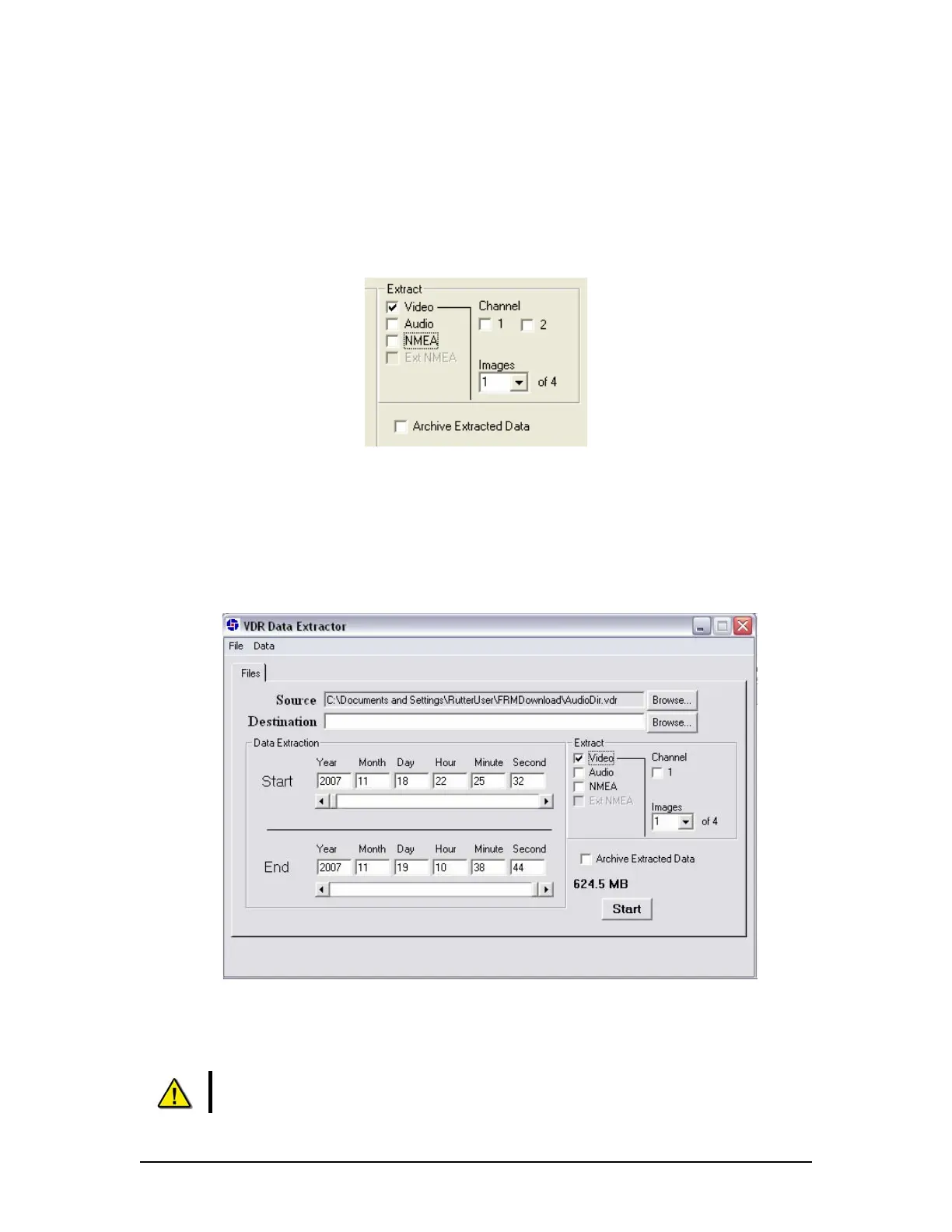
1. Three data stream options (Video, Audio, and NMEA) are available for download. Check
the adjacent checkbox to select the desired data stream. If no data stream is selected
the Start and End scroll bars will not be available.
Figure 39 – Available data Streams
2. When the “Video” checkbox is selected additional options will appear. The Data
Extraction utility may take several seconds to display this information. The user will have
the option to download individual Video channels as required (if available).
3. There is also an option to select 1 to 4 video images per minute i.e. selecting “1” allows a
user to reduce the size of the Video data extraction to one image capture per minute.
Figure 40 - Data Stream Options w/ Video Selected
4. Select a destination directory by clicking the ”Browse” button adjacent to the “Destination”
textbox. Alternatively, choose “Choose Destination Dir” from the “Data” menu.
NOTE: The destination directory MUST NOT be the same directory as the
source directory and MUST NOT contain any other files.
VDR-100G3/G3S Installation Manual 06/10/2008
25



 To Next Page