Chapter 12: Final Recording Medium Setup, Rev. 1.5
12.3.2.3 Connecting the JoTron Float-free SFRM Capsule
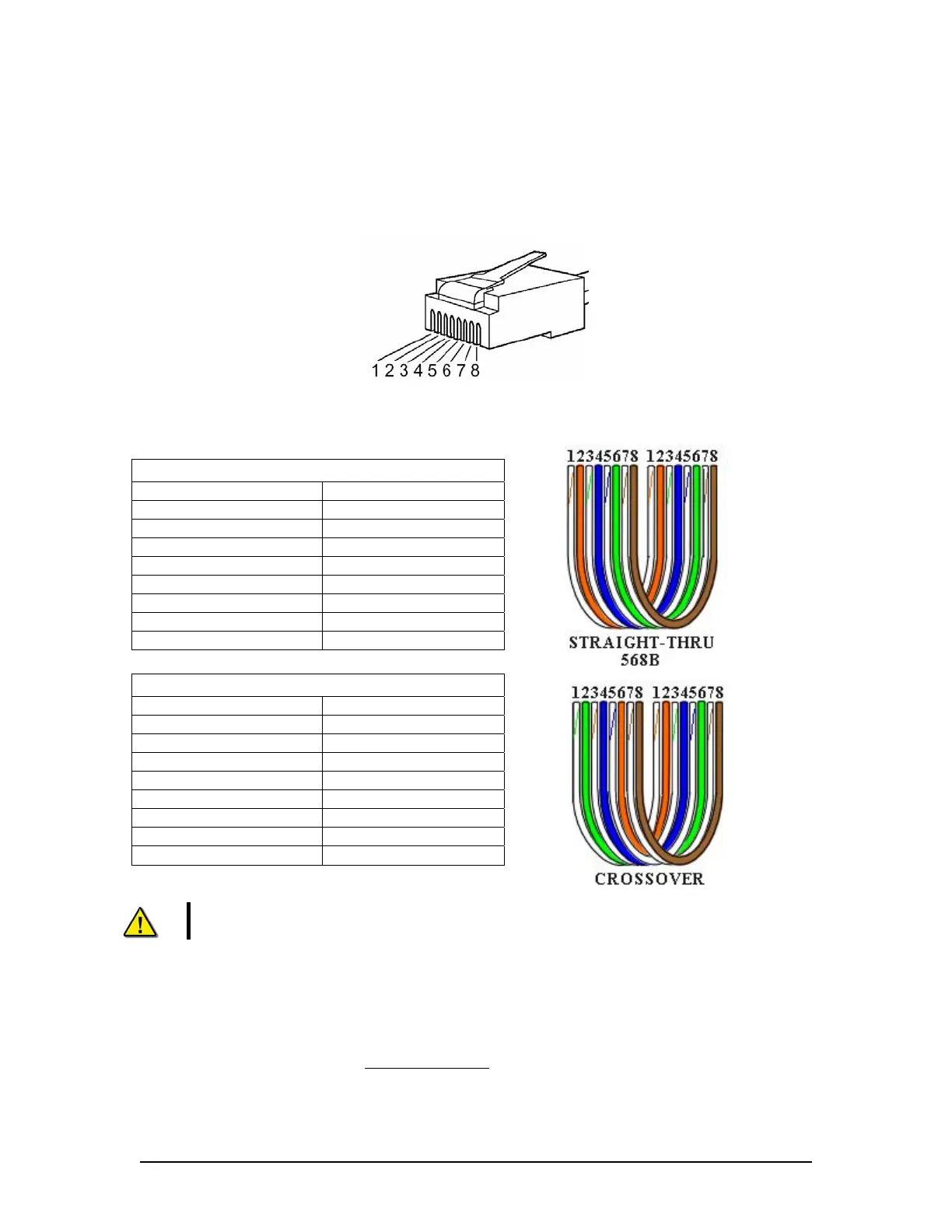
The wiring of the data connection between the VDR-100G3 and the FRM is via the RJ45
connector (illustrated in Figure 12–18 - RJ45 Connector ).
The junction box adjacent to the JoTron Float-free SFRM connects the cables provided with the
SFRM to the cables connecting to the VDR-100G3/S.
Figure 12–18 - RJ45 Connector
Rutter uses the 568B standard for all straight-thru Ethernet cables.
Rutter uses the crossover standard noted below for all cross-over Ethernet cables.
Straight through 568B
Connector 1 Connector 2
1 Tx+ white/orange 1 Tx+ white/orange
2 Tx- orange 2 Tx- orange
3 Rx+ white/green 3 Rx+ white/green
4 N/A 4 N/A
5 N/A 5 N/A
6 Rx- green 6 Rx- green
7 N/A 7 N/A
8 N/A 8 N/A
Table 12-12 Straight-through Ethernet cable set ups
Crossover
Connector 1 Connector 2
1 Tx+ white/orange 1 Tx+ white/green
2 Tx- orange 2 Tx- green
3 Rx+ white/green 3 Rx+ white/orange
4 N/A 4 N/A
5 N/A 5 N/A
6 Rx- green 6 Rx- orange
7 N/A 7 N/A
8 N/A 8 N/A
Table 12-13 – Cross-over Ethernet cable set ups
NOTE! It is highly recommended that cabling connecting the JoTron Float-free SFRM
Capsule to the VDR-100G3 is installed through a gooseneck conduit.
12.3.2.4 Test the JoTron Float–free SFRM Capsule Physical Connection
To confirm the cable connections between the FRM and the VDR:
1. Open the command prompt from Start/All Programs/Accessories/Command Prompt on
the VDR;
2. At the C:\> prompt, type ping 192.168.0.37
and hit Enter on the keyboard;
3. Observe 4 replies are received from the.JoTron Float–free SFRM capsule;
VDR-100G3/G3S Installation Manual 10/12/2008
12 - 30



 To Next Page