Appendix 2: System Configuration File, Rev. 1.1
A2.6 Proprietary Strings
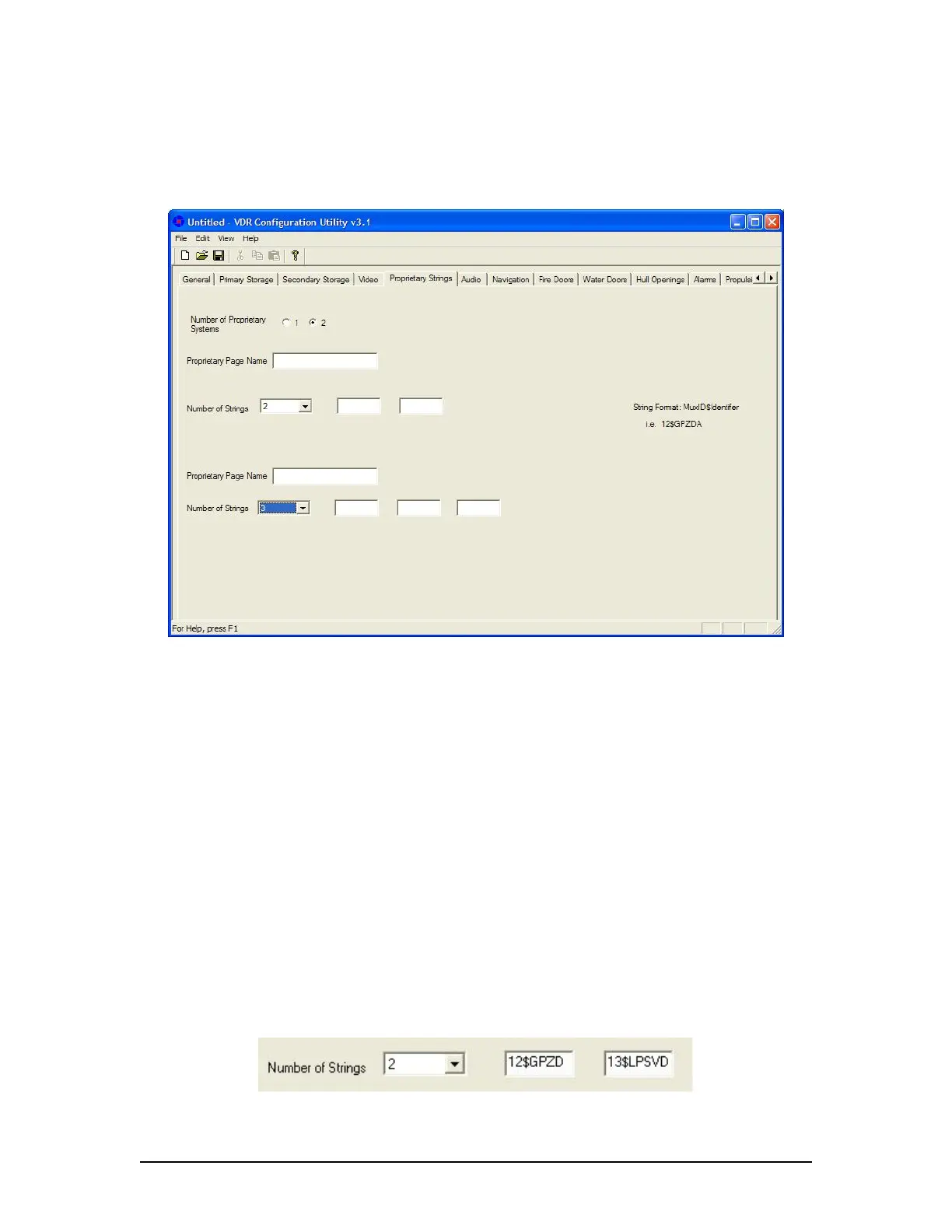
Various systems may output data strings which must be manually interpreted. The Proprietary tab
allows a user to enter these data strings which are broadcast from proprietary data sources.
Figure A2- 10 - Proprietary Strings
If proprietary strings are entered, the following fields in the Proprietary Strings tab window
must be completed:
A2.6.1 Number of Proprietary Systems
Select the radio button (1 or 2) which represents the number of Proprietary Systems for which
strings will be entered.
A2.6.2 Proprietary Page Name
Enter a name for the tab that will be created for each Proprietary system. It is necessary to enter
2 names if 2 systems are specified.
A2.6.3 Number of Strings
Use the available drop-down menu to select the number of strings available from the associated
proprietary system. The number of strings selected will cause the same number of text boxes to
appear to the right of the drop-down box. Enter the strings in these available text boxes (one per
box). Observe the example below in Figure A2- 11 - Proprietary String Format which displays
how the user would enter the proprietary string format.
Figure A2- 11 - Proprietary String Format
VDR-100G3/G3S Installation Manual 06/10/2008
12



 To Next Page