Appendix 2: System Configuration File, Rev. 1.1
A2.8.2.2 DataMux Channel Path
Enter the Mux channel that the Wind device is connected to.
A2.8.2.3 Talker ID
The first two alphanumeric characters of the NMEA sentence’s Address Field identify the Talker.
NOTE: When entering the Talker ID for a weather device, these two letters will
typically be “WI”.
A2.8.3 Configure Autopilot Device
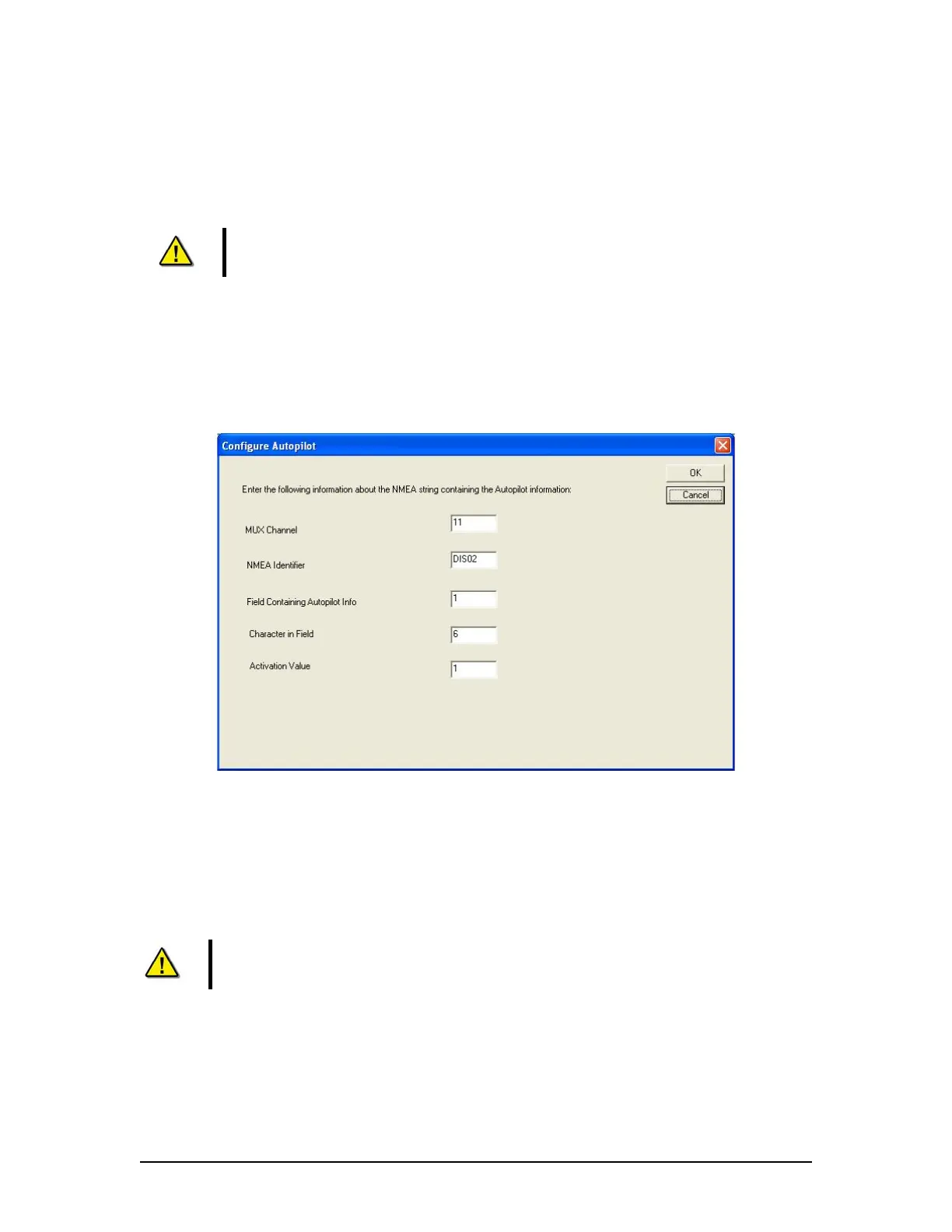
Clicking the Configure Autopilot tab opens the Configure Autopilot data entry window (See Figure
A2- 17 - Configure Autopilot below). This window requires information for recording the ship’s
autopilot. The information entered here will enable the VDR Playback to display the ON/OFF
status of the Autopilot.
Figure A2- 17 - Configure Autopilot
A2.8.3.1 Mux Channel
Enter the MUX channel that the Autopilot is connected to.
A2.8.3.2 NMEA Identifier
Enter the Talker ID and sentence formatter output by the ship’s Autopilot.
Note!: The first two alphanumeric characters of the NMEA sentence’s Address
Field identify the Talker, and the latter three characters define the data format
and type. Refer to the example that follows.
A2.8.3.3 Field Containing Autopilot Info
Enter the field of the autopilot NMEA sentence that contains the information required to determine
the autopilot status. Refer to the example below.
VDR-100G3/G3S Installation Manual 06/10/2008
18



 To Next Page