Appendix 2: System Configuration File, Rev. 1.1
The following example is similar to the example in Section A2.13.3.1 – Example Example 1 –
NMEA Engine Data on Conditional Sentence in that NMEA data is also specified.
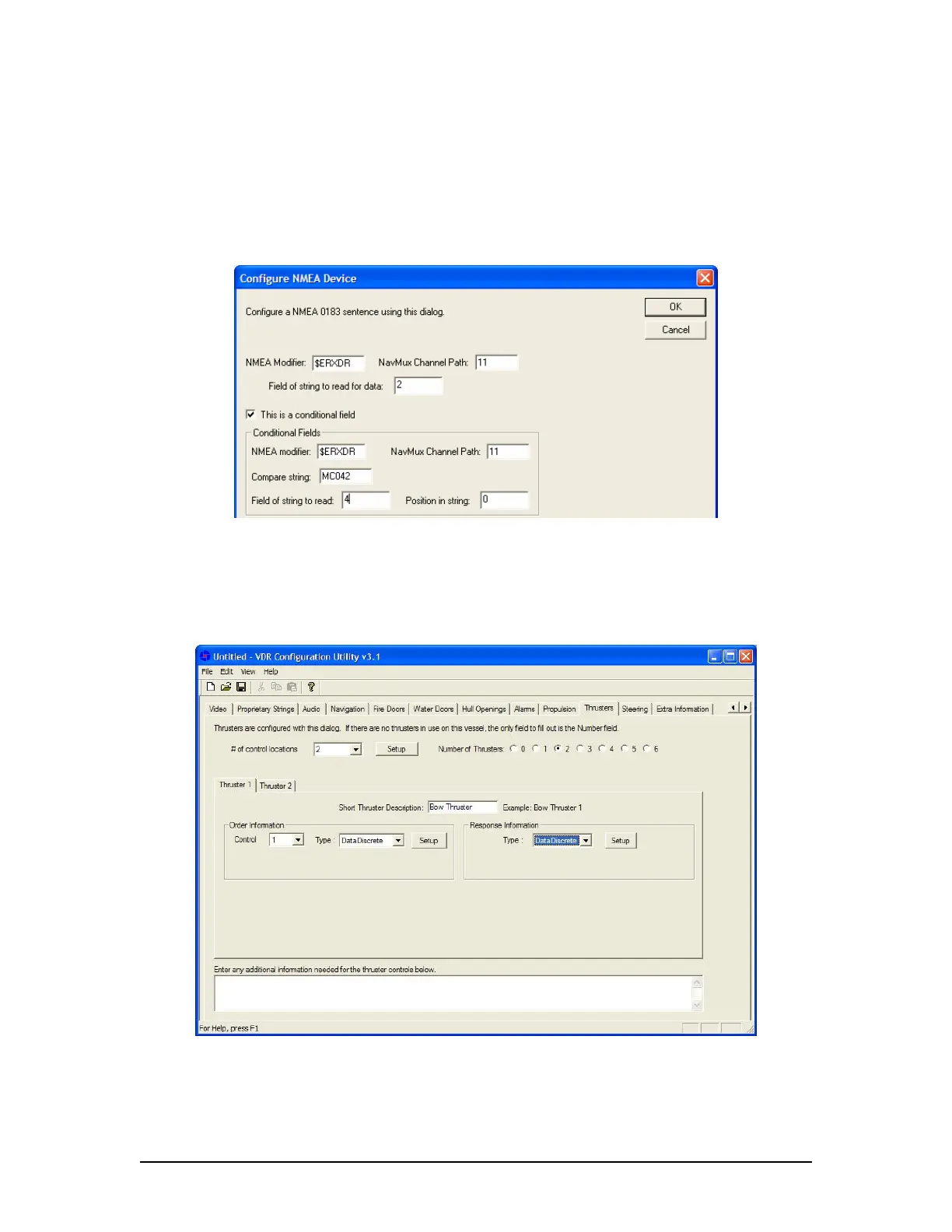
Click the Setup button to configure the NMEA device and enter the information as illustrated in
Figure A2- 32 - XDR String – Example 2. In the figure below, the playback will look in field 4 to
find the string ‘MC042’, if it is found, it will display the measurement found in field 2. If the string
‘MC042’ is not found in field 4, then the playback will assume that the string does not indicate the
engine RPM, but another value.
Figure A2- 32 - XDR String – Example 2
A2.14 Thrusters
The ‘Thrusters’ tab requires the input of configuration information for the ship’s thrusters (see
figure below). If there are no thrusters in use on the vessel, select the ‘0’ radio button adjacent
the ‘Number of Thrusters’.
Figure A2- 33 - Thrusters
VDR-100G3/G3S Installation Manual 06/10/2008
35



 To Next Page