APPENDIX 2: SYSTEM CONFIGURATION FILE
Rutter Technologies’ VDR-100G3 Configuration Utility (VDRConfig Utility) is an application tool to
help create configuration and parameter files. It is used when installing the Rutter Voyage Data
Recorder (VDR-100G3). When the correct installation parameters are entered into the fields
provided, the configuration utility will produce a <vdrcfg.txt> file. This file is used to document the
ship’s configuration and to customize the VDR Playback for data playback.
The utility uses standard Windows screens. A menu bar and tool bar help the user carry out all
basic program functions including file saving.
A2.1 Installation
There is no installation process for this utility. To open the VDR Config Utility locate and double-
click the <VDRConfig.exe > file. This executable is usually found in <C:\VDRApps> on the DMM
local hard drive.
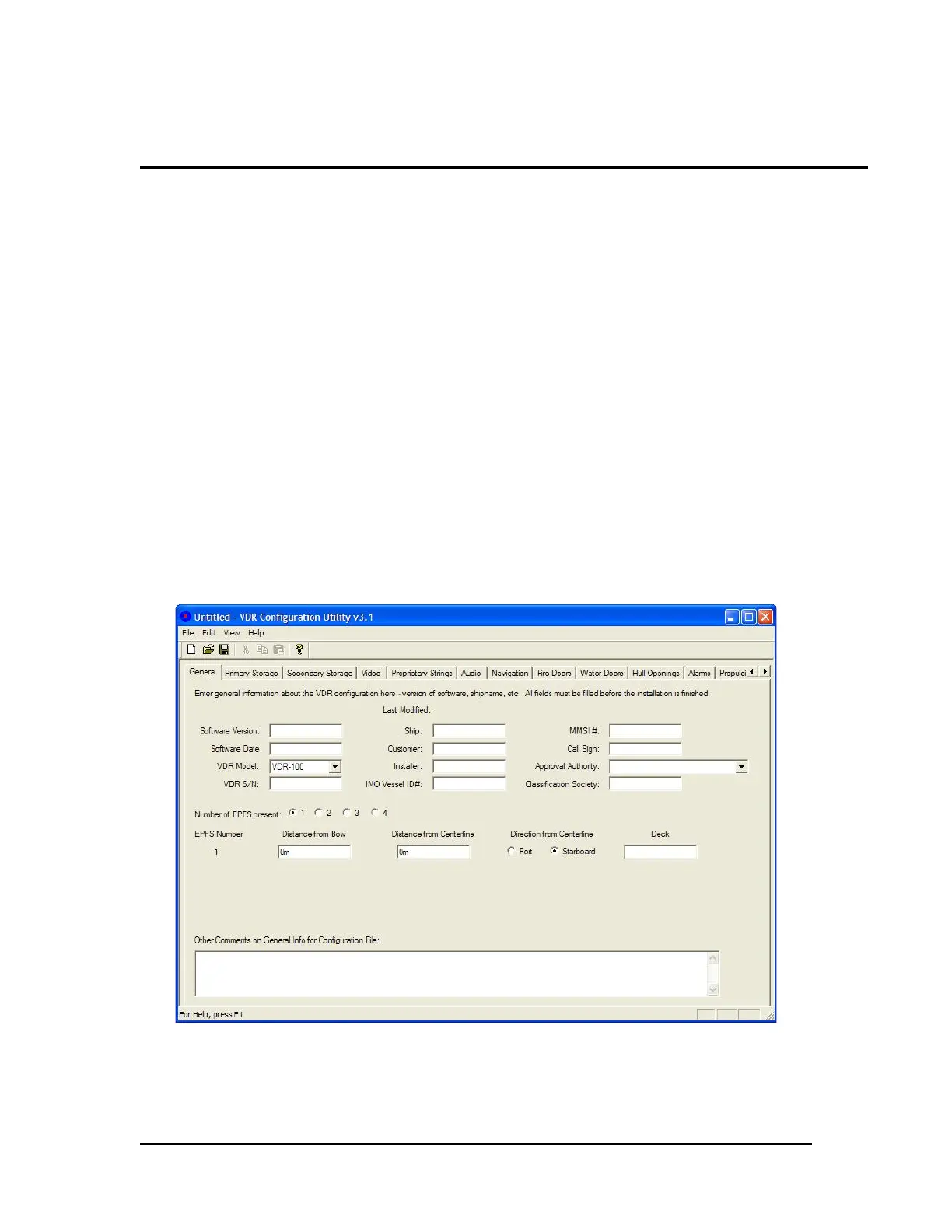
The program will open with the contents of the ‘General’ tab visible (see Figure A2- 1 - General
below). Before information has been saved, the title bar will read “Untitled – VDR Configuration
Utility vx.x” (where x.x is the versions number). After it has been named and saved, the saved file
name will appear in place of “Untitled.”
A2.2 General
The ‘General’ tab accepts general information about the installation including ship and VDR data.
Figure A2- 1 - General
VDR-100G3/G3S Installation Manual 06/10/2008



 To Next Page