Chapter 12: Final Recording Medium Setup, Rev. 1.5
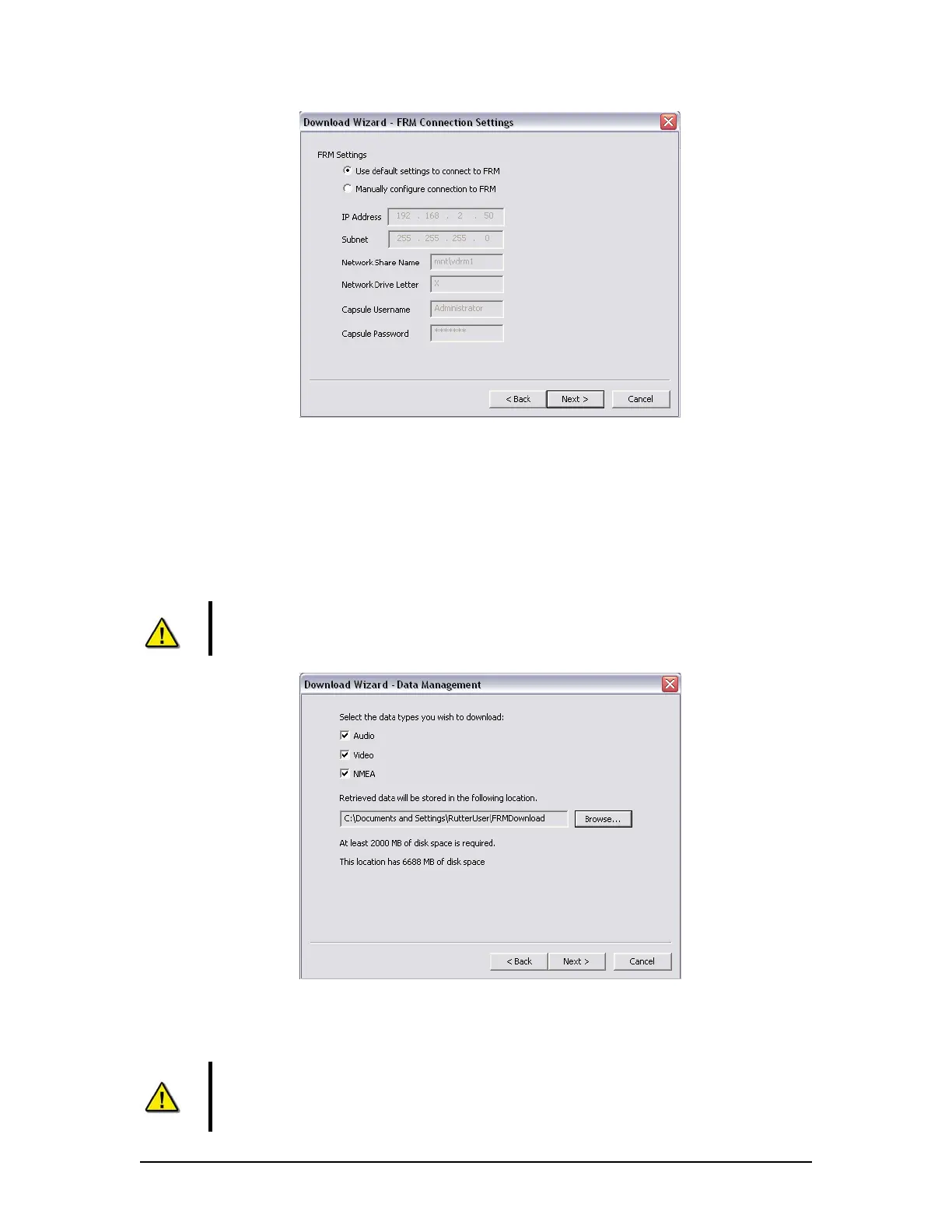
Figure 12–24 Download Wizard FRM Connection Settings Page
5. Select the data types you wish to download (Ensure all are selected).
6. Use the ‘Browse’ button to select a suitable location to extract the contents of the
FRM/SFRM to. When downloading directly to the VDR-100G3, it is recommended that
the data be downloaded to the ‘E:\’ drive. This directory is ‘shared’ and is accessible to a
Playback PC via the download port on the VDR-100G3. Alternatively, data may be copied
directly to an attached RSM or Download USB Drive.
NOTE: In either case, there must be sufficient free memory space to accommodate
the entire downloaded data set. For some FRM/SFRMs, 4GB of free memory space
may be required.
Figure 12–25 - Download Wizard Data Management Page
7. Enter the password to begin the download process. The default password is ‘VDR’ (case
sensitive).
NOTE: Depending on the FRM/SFRM design, the download process may take
anywhere from 15 minutes to 4 hours.
VDR-100G3/G3S Installation Manual 10/12/2008
12 - 39



 To Next Page