PROGRAMMING GUIDE
SINUS PENTA
365/486
40.1.2. DC BRAKING AT STOP
To activate this function, set C215 to [YES] or, in Power Down mode, set C234 (Power Down Stop Mode) as DCB.
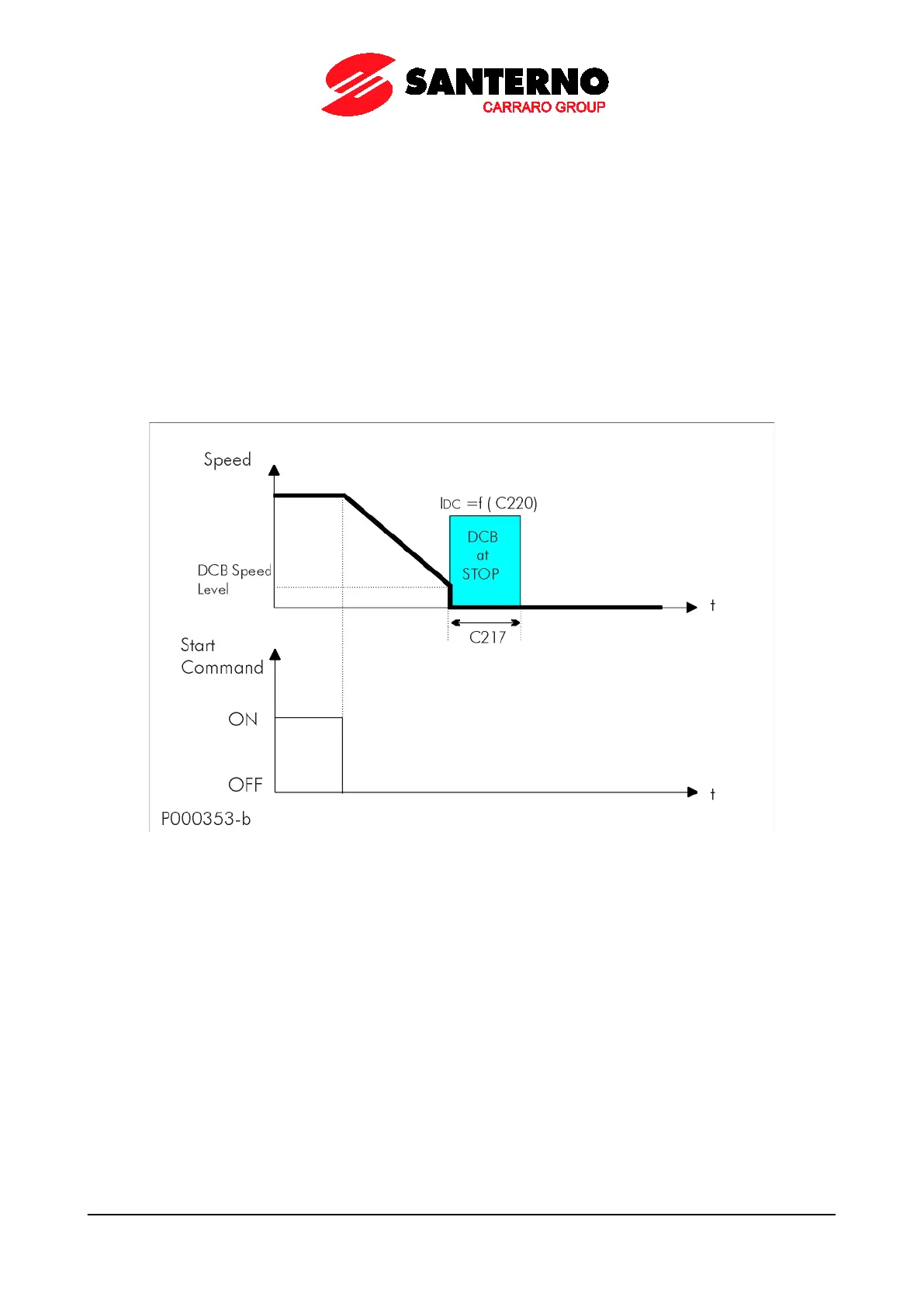
DC Braking occurs after sending a “stop with ramp” command. The speed level for DC Braking is set in C219. If the
drive is in Power Down mode and C234 is set as DCB, the speed level is set in C235 (Power Down Stop Level).
The figure below illustrates the output speed and DC Braking trends when the DC Braking at Stop function is active.
Parameters used to program this function are the following:
C215 function enabling;
C217 braking duration;
C219 motor speed at the beginning of DC Braking;
C220 intensity of DC braking.
In Power Down mode, if C234 (Power Down Stop Mode) is set as DCB:
C235 motor speed at the beginning of DC Braking.
Figure 59: DCB at Stop
Motor speed and DC Braking patterns when the DC BRAKING AT STOP function is active.



 To Next Page