SINUS PENTA
PROGRAMMING GUIDE
366/486
40.1.3. DC BRAKING COMMAND SENT FROM DIGITAL INPUT
Activate the digital input set as DCB (C160) to send a DC Braking command. DC Braking duration is determined by the
following formula:
t* = C217 * ( n
OUT
/ C219 ) with n
OUT
/ C219 equal to max. 10.
Possible cases:
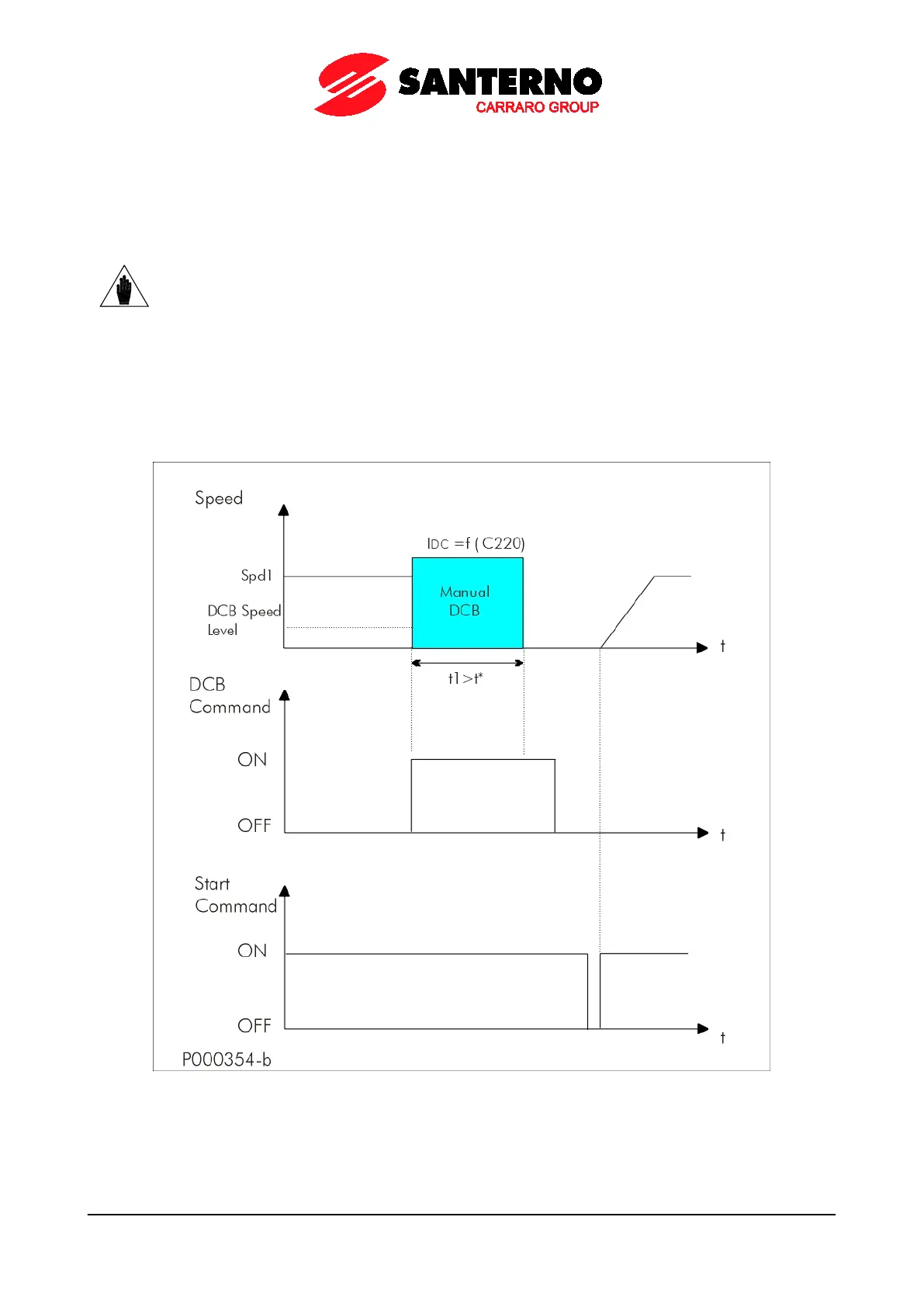
a) t1 > t* time
t1 for braking command is longer than t*.
To restart the motor following the preset acceleration ramp when DC Braking is over, just disable the DCB command
and disable and enable again the START command (see figure below).
Figure 60: Manual DCB (Example 1)
Motor Speed, DC Braking, Manual DCB Command and START Command if t1>t*.
NOTE
DC braking sent from digital input operates when the drive ist stopped in IFD and VTC
controls.
Also, Power Down mode must be disabled (C225 = 0).



 To Next Page