Chapter 7: PC SOFTWARE OFFLINE SETTINGS
7. CONFIGURATION SETTING MODE
7-14
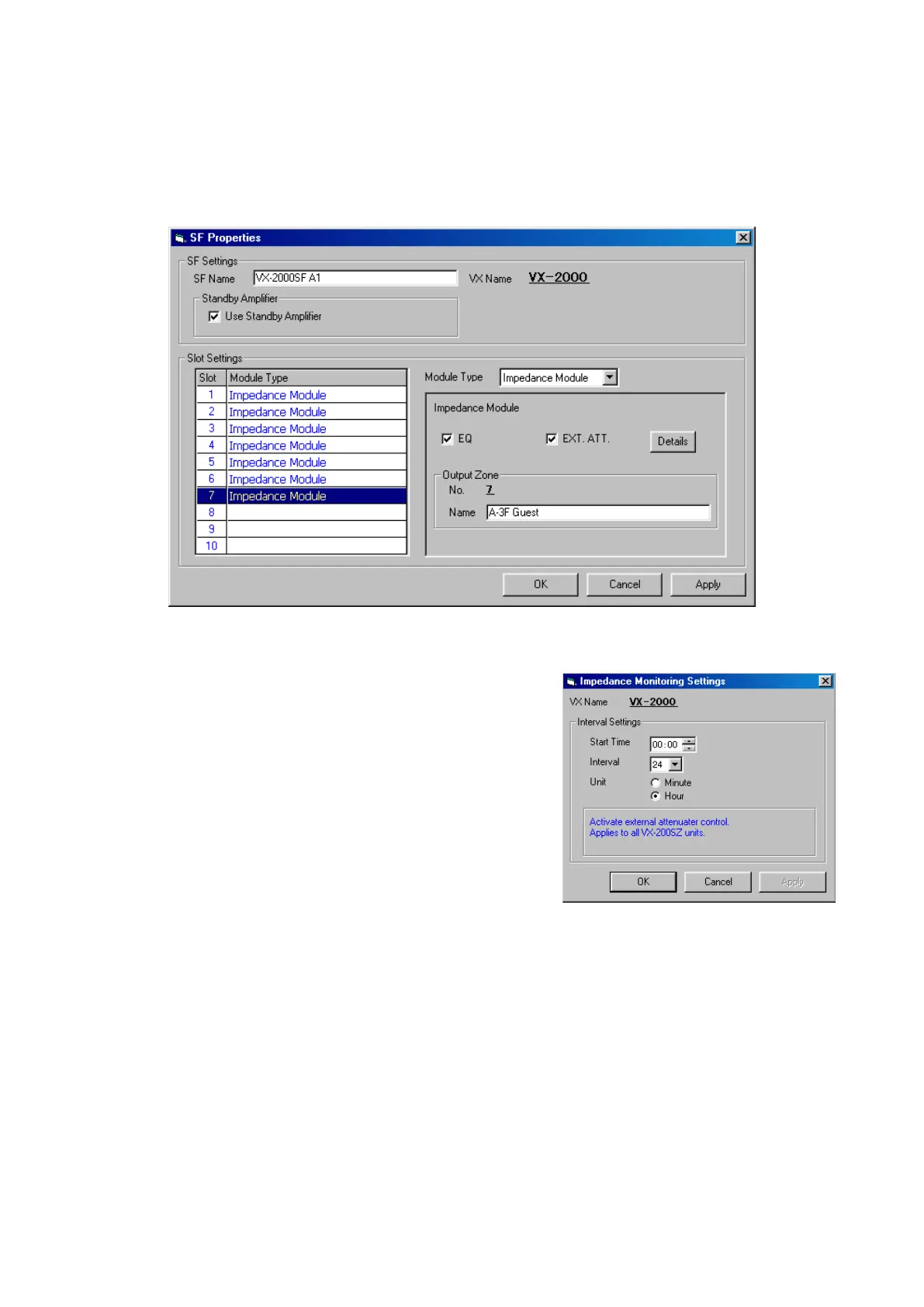
•EQ: When using the VX-200SE Equaliser Card, tick this checkbox.
•EXT.ATT.: Whenusinganexternalattenuator,tick
this checkbox.
Clicking on the [Details] button will
cause the Impedance Monitoring
Setting window to open.
Select and enter the "Start time,"
"Interval" and "Interval unit." After
setting completion, click on the [Apply]
button to save the set contents and
click on the [OK] button to close the
window.
Note: The set interval value is equally
applicable to all impedance
modules that use the external
attenuator.
•OutputZone: Enterazonename.
4-2. Select the module to be used from [Module type].
Different screens are displayed as follows depending on the selected module type.
1) None (Default setting)
2) Impedance Module
Refers to the VX-200SZ Impedance Detection module.
Continued on next page



 To Next Page