Chapter 7: PC SOFTWARE OFFLINE SETTINGS
7. CONFIGURATION SETTING MODE
7-22
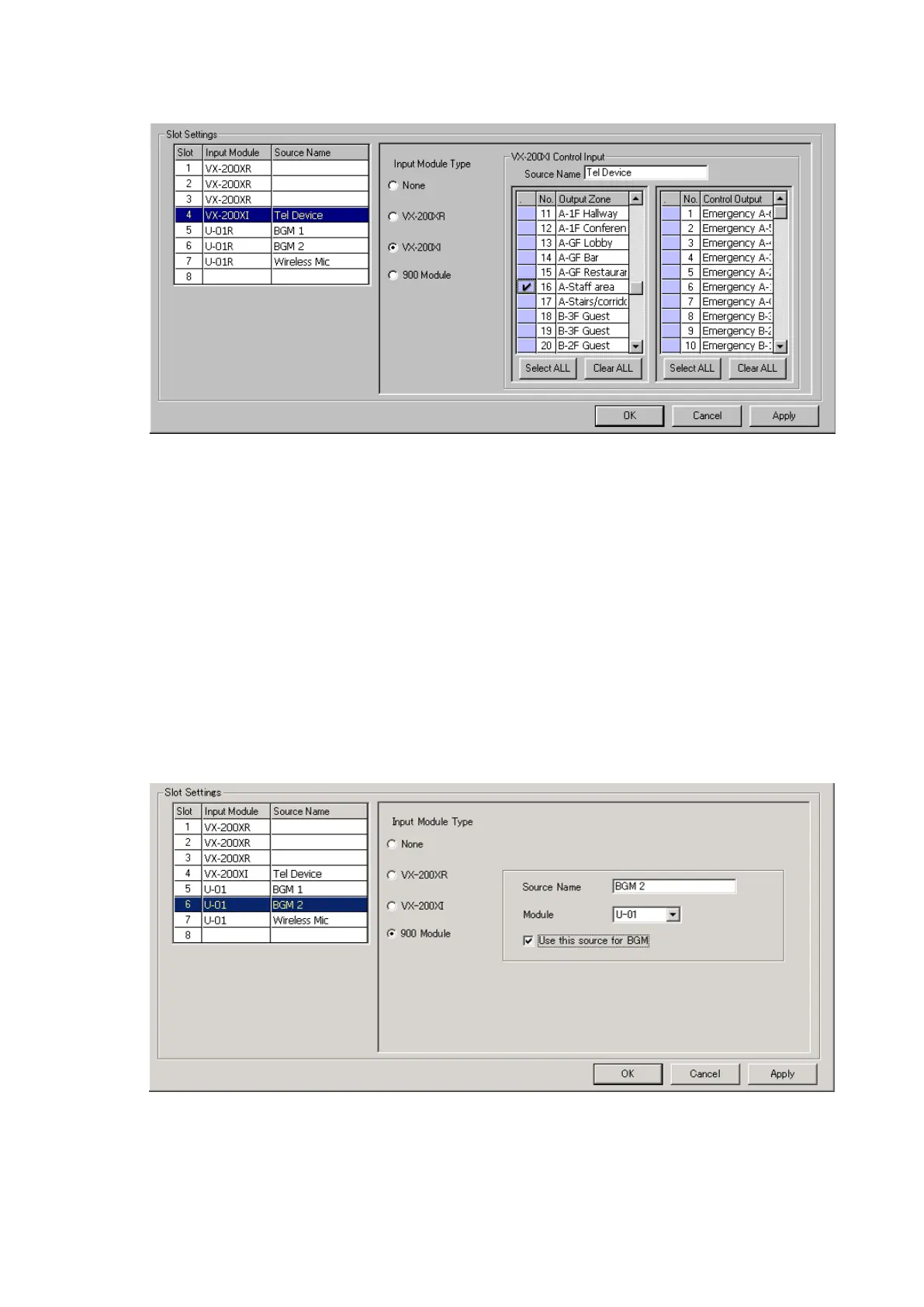
4) [900 Module]: Select when connecting music output equipment, such as a CD or cassette player.
The screen for name entry and module selection will be displayed.
Usable 900 modules: M-01F, M-01M, M-01P, M-01S, M-01T, M-03P, M-51F, M-51S,
M-51T, M-61F, M-61S, M-61T, U-01F, U-01P, U-01R, U-01S,
U-01T, U-03R, U-03S, U-61S, and U-61T
•Enteranidentifyingsoundsourcename.
•Selectthe900moduletobeused.
•When using the sound source for BGM broadcast, tick the [Use this sound source for BGM]
checkbox.
Step 7. After completing the settings of Slots 1 – 8, click on the [Apply] button to save the settings and click on
the [OK] button to close the screen.
3) [VX-200XI] (Audio Input module with control input):
Select when connecting the Remote Microphone with a control input, such as the PM-660U.
•Enteranidentifyingsoundsourcename.
•Selectthezonestowhichtheselectedsourcewillbebroadcast.
· Double-clicking on the leftmost blue box of the zone list causes the corresponding zone to be
marked with a tick.
· All zones are marked with a tick if the [Select ALL] button is pressed.
· The tick marks are deleted from all zones if the [Clear ALL] button is pressed.
•Selectthecontroloutputtobeactivatedwhenthissoundsourceisbroadcast.
· Double-clicking on the leftmost blue box of the control output list causes the corresponding
output to be marked with a tick.
· All control outputs are marked with a tick if the [Select ALL] button is pressed.
· The tick marks are deleted from all control outputs if the [Clear ALL] button is pressed.



 To Next Page