GE HEALTHCAREDRAFT LOGIQ™ S7 EXPERT/PRO
DIRECTION 5460683, REVISION 3 DRAFT (JUNE 25, 2014) SERVICE MANUAL
Chapter 3 - Setup Instructions 3-57
3-13-6-3 Changing parameters for a service
There are certain parameters that may need to be set up for each service:
Many service parameters are specific to each type of service. The parameters are described on the
following pages:
• DICOM Image Storage
• DICOM Performed Procedure
• DICOM Print
• DICOM Query/Retrieve
• DICOM Storage Commitment
• DICOM Worklist
• Standard Print
• Video Capture
• Save As
• Network storage
• USB Quick Save
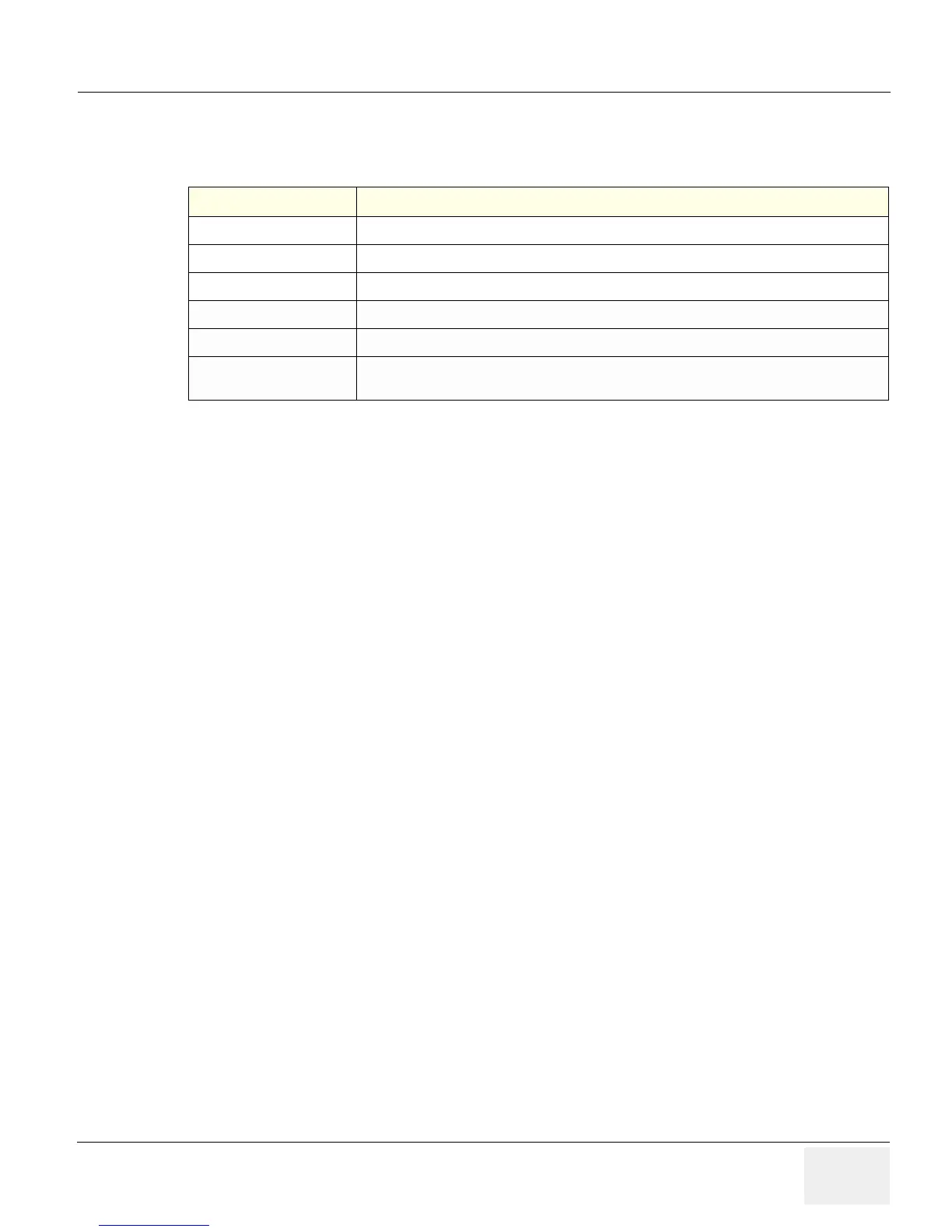
Table 3-23 Service Parameters: Common Service Parameters
Preset Parameter Description
Name Free text: give a descriptive name to the device.
AE Title The Application Entity Title for the service.
Port Number The port number of the service.
Maximum Retries Max # - the maximum number of times to try establishing a connection to the service.
Retry Interval (sec) Specify how often (in seconds) the system should try to establish a connection to the service.
Timeout The amount of time after which the system will stop trying to establish a connection to the
service.



 To Next Page
 Loading...









