GE HEALTHCAREDRAFT LOGIQ™ S7 EXPERT/PRO
DIRECTION 5460683, REVISION 3 DRAFT (JUNE 25, 2014) SERVICE MANUAL
Chapter 3 - Setup Instructions 3-31
3-8-3 Installing the Bluetooth Deskjet Printer
1.) Power off/Shutdown the system as described in: Section 3-7-3 on page 3-25.
2.) Physically connect the Bluetooth dongle as described on Section Section 3-8-3-1 on page 3-31.
3-8-3-1 Connecting the Bluetooth Dongle into the System
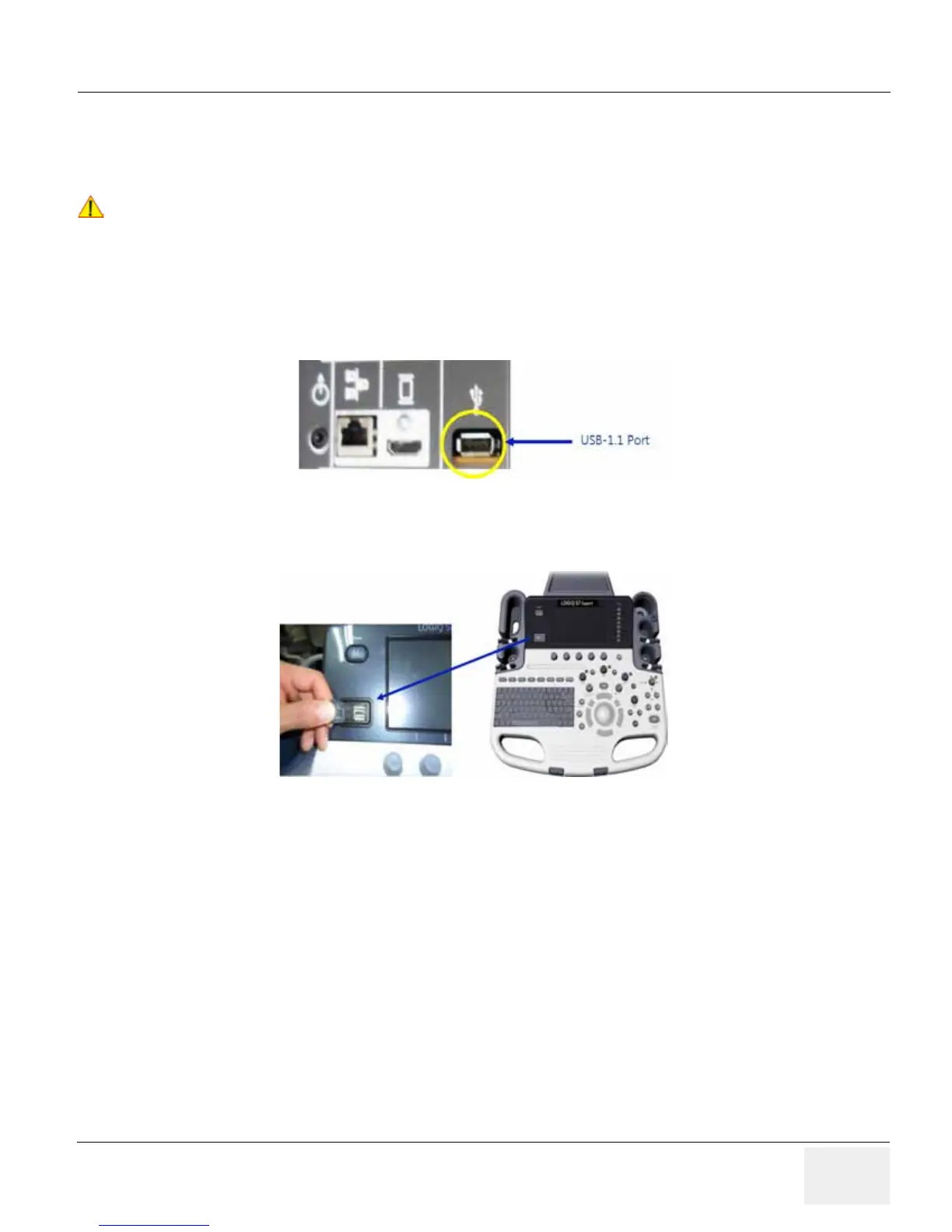
1.) Connect Bluetooth Dongle into the available USB port. There are three available USB ports on the
system. : Section 3-9-2 "External I/O Connectors" .
Figure 3-19 External I/O Connectors - on Rear of System
USB 2.0 port: Two hub ports for service and user
.
Figure 3-20 External I/O Connector
!! NOTICE:
After boot up of the system, verify the correct connection of Bluetooth device driver on the maintenance
mode, see: Section 3-8-3-2 "Verifying Bluetooth device driver" and, see: Section 3-8-3-3 "Prepare the
Printer and connect the Bluetooth Printer Adapter" for Bluetooth pairing between the system and
printer.



 To Next Page
 Loading...









