iPECS eMG80/100& eMG800 & UCP & vUCP
Administration and Programming Manual Issue 2.5
302
4.4.9.10 Customer Call Routing Table - PGM 228
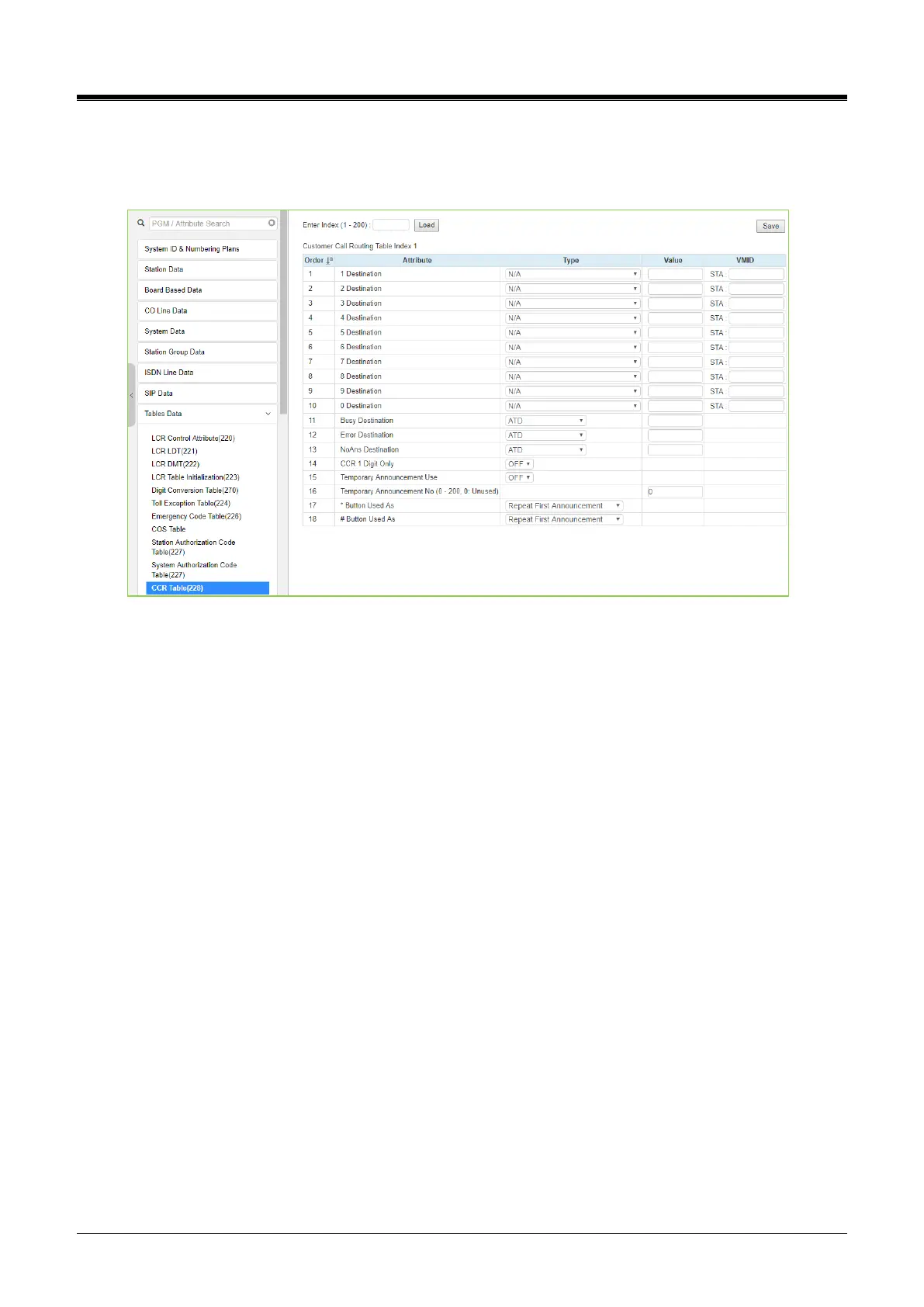
Selecting CCR Table will display the Customer Call Routing data entry page. Enter an index to select the
appropriate CCR Table and click [Load] to modify the table. Click the [Save] button after changing Value.
Figure 4.4.9.10-1 Customer Call Routing Table
The system incorporates IVR (Interactive Voice Response) capabilities called CCR (Customer Call Routing).
After or during a VSF Announcement, the caller may dial digits to select a destination or route for the call. The
CCR Table defines the destination type and value associated with the digit dialed by the caller in response to
the index, a VSF Announcement (01-200). The available destinations are shown in Table 4.4.9.10-1 below.
Up to 70 single-level Audio Text menus may be assigned or, multi-level menu structures (maximum 70 levels)
can be established using one menu as a destination for the previous level. Each CCR announcement can
have a re-route destination – Busy / Error / No Answer case.Each re-routed destination types are Tone /
Attendant / Station Group / VSF Announcement number / Station / System Speed / Networking / Voice Mail
(Station group).
The table includes a “CCR 1 Digit Only” option. When this option is enabled, the system will accept only a
single digit as the entry. When the option is OFF, the caller can dial multiple digits that are accepted as DISA
dialing.
The temporary announcement can be used in holiday or emergency cases. When Temporary Announcement
Usage is set to ON, programmed Temp Announcement is played instead of CCR table announcement. This
TemporaryAnnouncement can also be set by Remote Access - by using the [Remote Access to Mobile
Extension] feature.
After access to Mobile Extension,
To turn On Temp Announcement, 8 + CCR Announcement Number.
To turn Off Temp Announcement, 9 + CCR Announcement Number.
[*] Button Used As, [#] Button Used As has 3 available options for [*] or [#] button
Repeat First Annc
Repeat Current Annc



 To Next Page