iPECS eMG80/100& eMG800 & UCP & vUCP
Administration and Programming Manual Issue 2.5
359
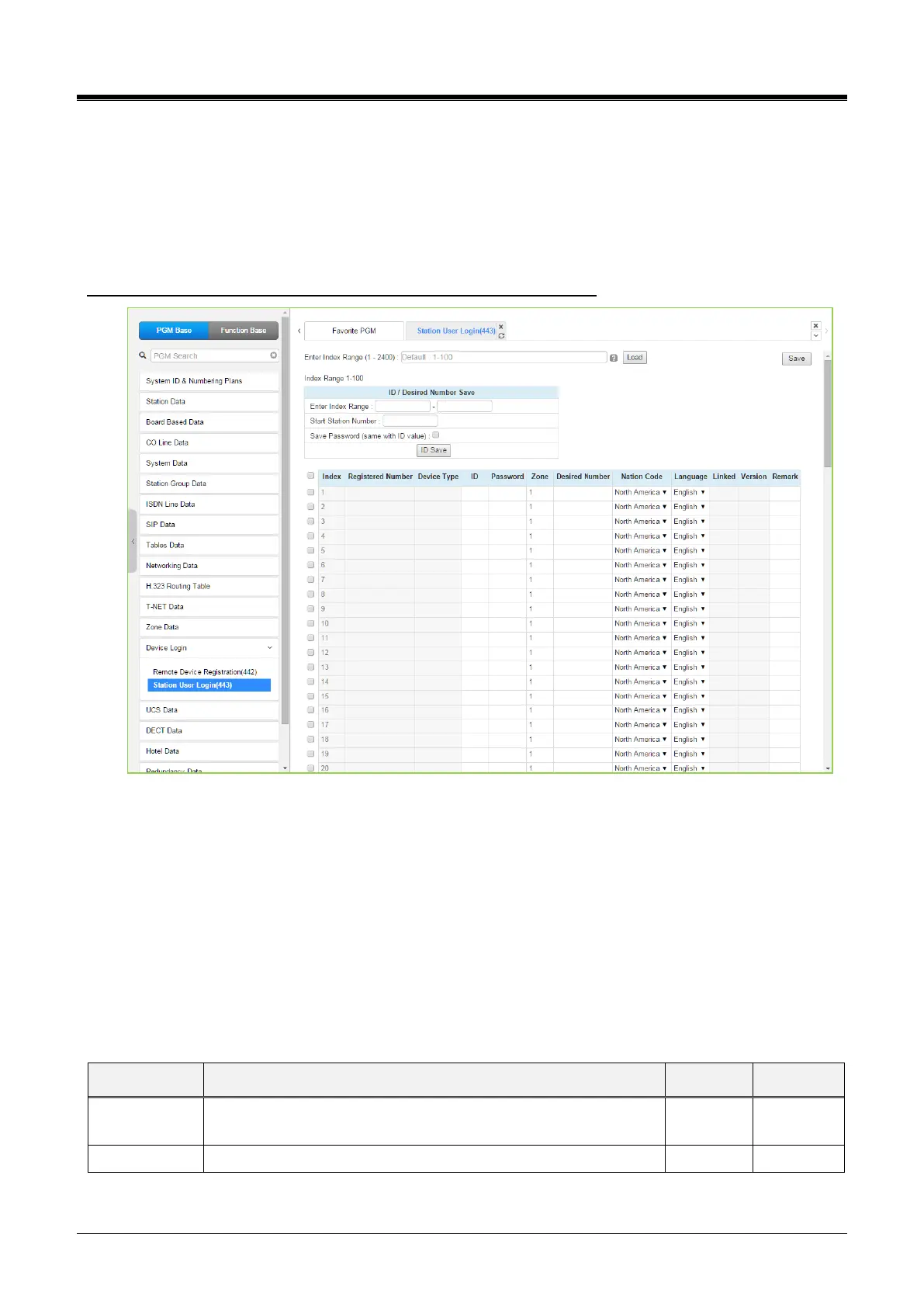
4.4.14.2 Station User Login – PGM 443
Selecting the Station User Login will display the User Login Registration data input page.
Enter an index range, then click [Load] to modify Station Login data.
For convenience, the copy, paste, and drag are available to enter or modify data. Click the [Save] button after
changing Value.
Enter Index Range: eMG80/100: 1-140 / eMG800: 1-1200 / UCP: 1-2400
Figure 4.4.14.2-1 Station User Login
Station User Login configures User credentials for registration of iPECS UCS clients and initial registration of
SIP phones. A station must register with the system each time it is connected to the system.
The ID and password are assigned along with other characteristics of the remote station such as Zone,
desired station number, country code, Language, and a remark can be defined.
The iPECS UCS Client can be configured as a link-paired station by assigning the same Desired-Number as a
registered desktop iPECS LIP Phone.
Note for the UCS Client, the UCS Standard Client Login, PGM 446, may be employed in place of PGM 443 as
a single point to configure the client information.



 To Next Page