iPECS eMG80/100& eMG800 & UCP & vUCP
Administration and Programming Manual Issue 2.5
48
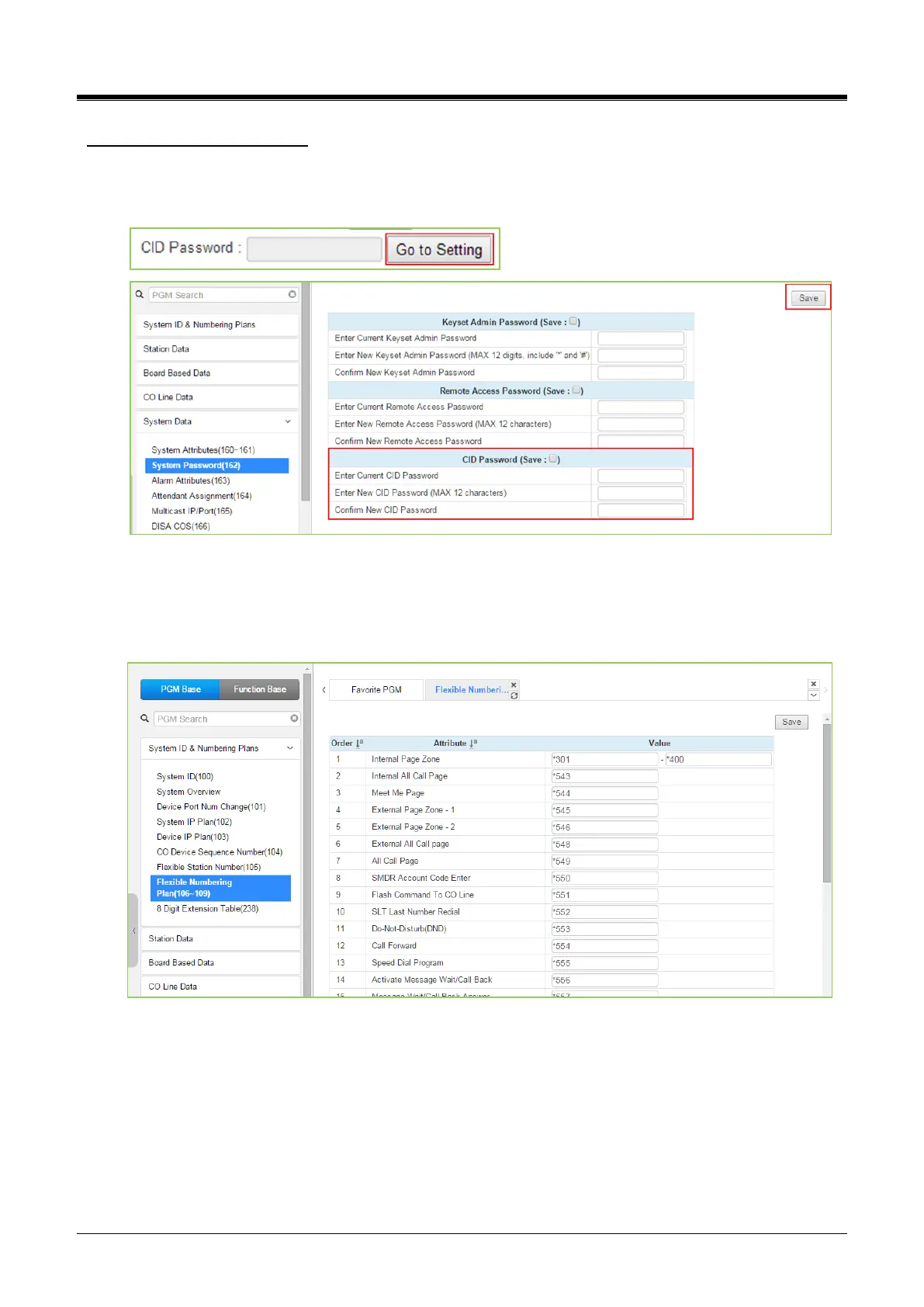
Setting CID Password directly
You can set the CID password by clicking the “Go to Setting” button. After clicking it, you will move to the
following PGM 162, set the CID password, save the CID password from the marking tick on the save box and
click the [Save] button.
4.4.1.8 Flexible Numbering Plan - PGM 106 ~ 109
Selecting Flexible Numbering Plan will display the input entry page. Selecting the blue-colored text in the
Table header will sort the table based on the selected column. Click the [Save] button after changing Value to
apply.
Figure 4.4.1.8-1 Flexible Number Plan
Feature dial codes for the system can be assigned using the system‘s Flexible Number Plan. Feature codes
should be one (1) to four (4) digits in length and must not conflict. For example, Feature codes 53 and 536
represent a conflict. The system will not update the database until correct data is entered. Table 4.4.1.8-1
provides a brief description for each feature and the default codes as they appear in Numbering Plan 2. The
default values for other numbering plans, which may be selected on the title “System ID (100)” and other
numbering plan is described in Appendix B.



 To Next Page