iPECS eMG80/100& eMG800 & UCP & vUCP
Administration and Programming Manual Issue 2.5
385
4.5 Maintenance
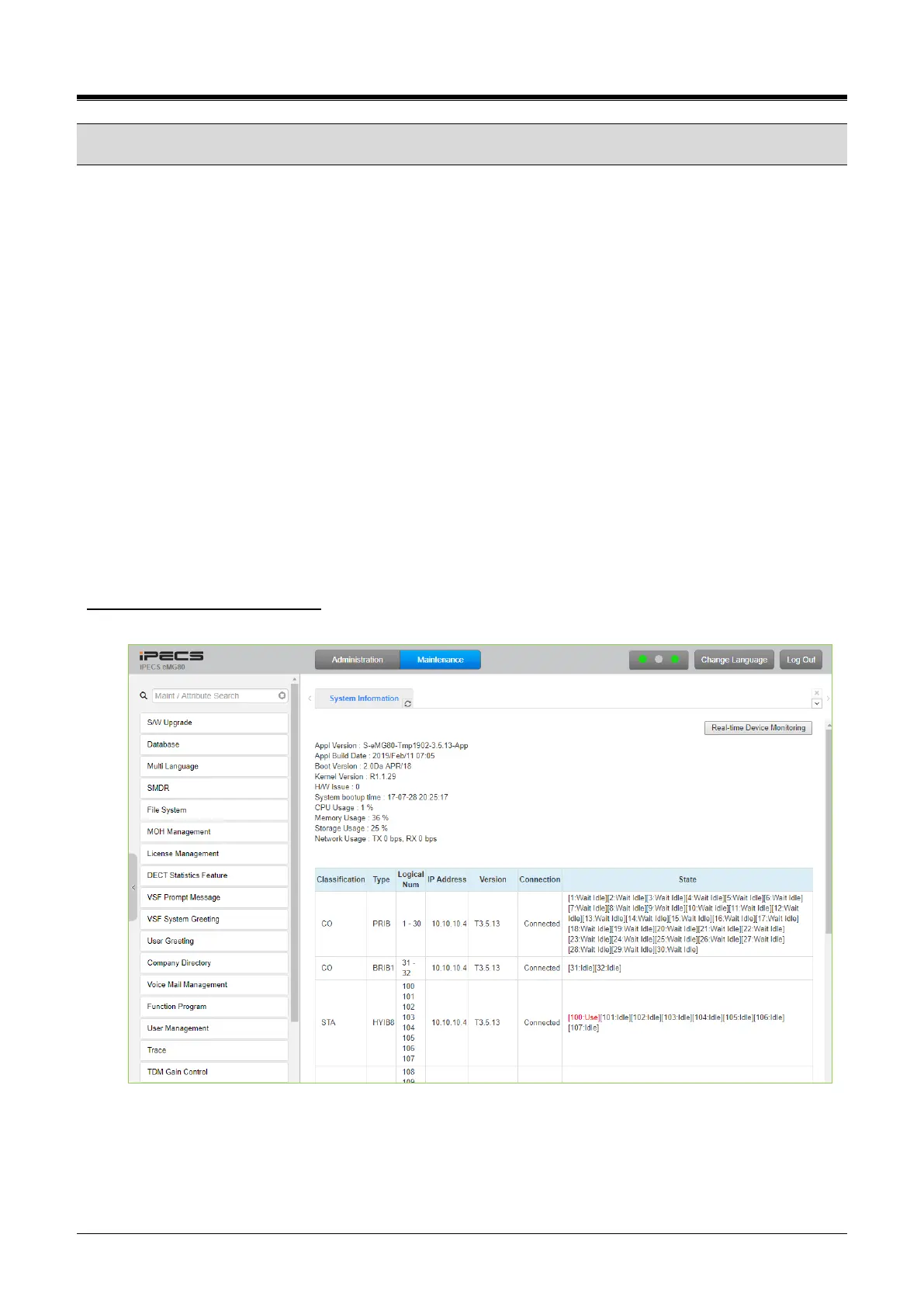
The Maintenance tab main screen displays information on the system software versions and information on
modules and terminals connected to the system.
The database upload/download, software upgrade, access control, license install, and other management
functions shown in Figure 4.5-1~ 4.5-3 are accessed from this page.
In addition, at the top of the central screen, detailed software version information and system resource status
(CPU, memory, storage, and network) are provided. Also, you can monitor the device in real-time by clicking
[Real-time Device Monitoring].
As eMG/UCP software is being upgraded regularly, we cannot guarantee the software version displayed, and
it may be different from the current version.
Among Menus on Maintenance, the following functions are not available at UCP2400.
VSF Prompt message
VSF System greeting
Voice Mail USB Backup on VSF Mail Management (for eMG80/800, UCP)
eMG100/vUCP: Voice Mail Web Backup/Restore
Real-time monitoring for Device
You can monitor the current status of the device in real-time. The new information is highlighted in red.
Figure 4.5-1 eMG80/100Maintenance Main Page



 To Next Page