iPECS eMG80/100& eMG800 & UCP & vUCP
Administration and Programming Manual Issue 2.5
64
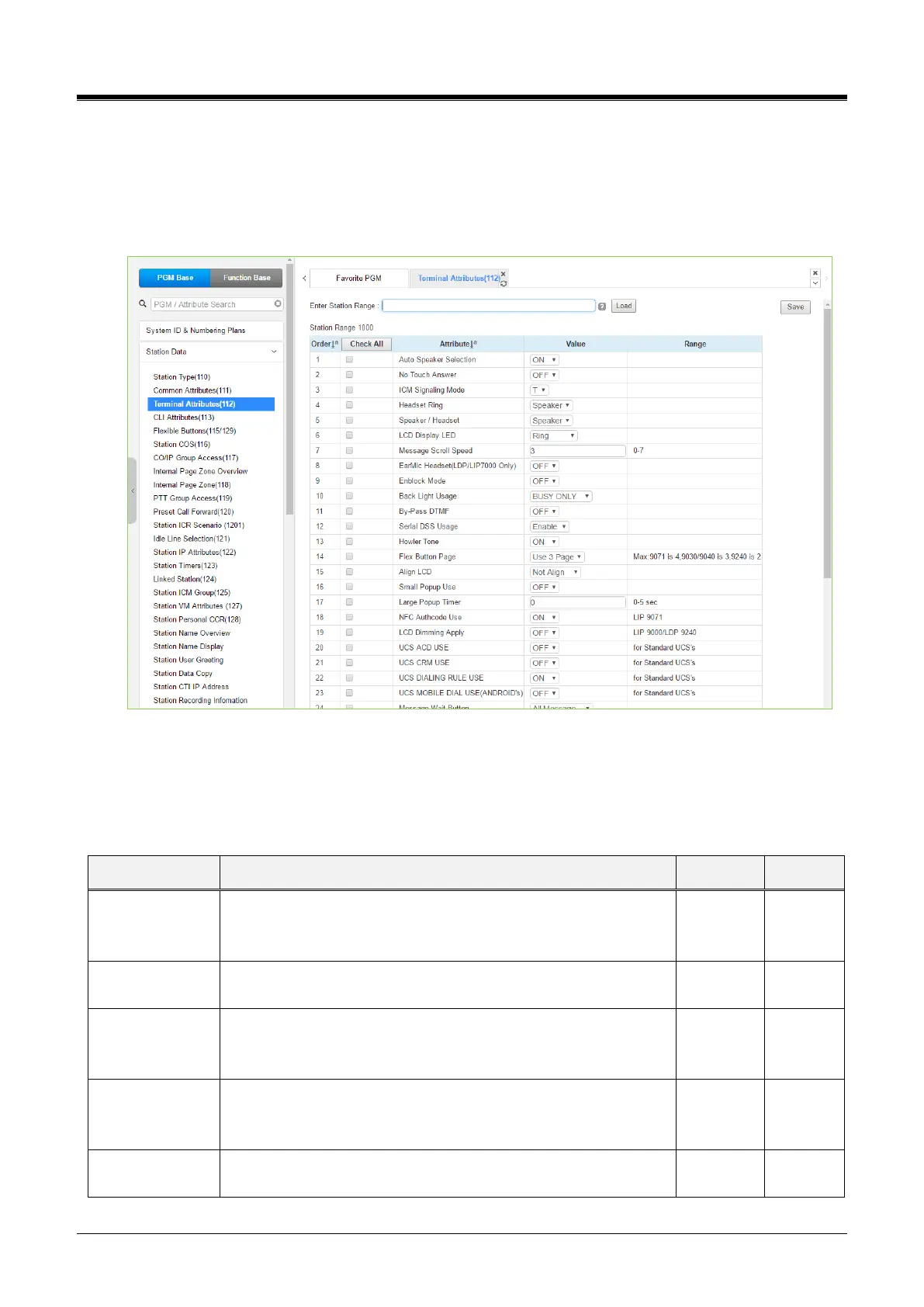
4.4.2.3 Terminal Attributes - PGM 112
Selecting Terminal Attributes will display the Terminal Attributes data input page. Enter a valid station range
and click[Load] to enter Terminal Attributes data. Use the checkboxes to indicate which attributes to define;
data for checked attributes is stored for the entire range of stations by clicking the [Save] button after
changing Value.
Figure 4.4.2.3-1 Terminal Attributes (PGM 112)
Terminal Attributes define features and functions available to the terminal itself. Generally, the entry will turn
the feature ON (enable) or OFF (disable). Refer to the following table for a description of the features and the
input required.
Table 4.4.2.3-1Terminal Attributes
Enables [SPEAKER] activation when a CO/IP Line, DSS, or
other feature button is pressed; there is no need to lift the
handset.
Enables No-touch answer, which automatically connects
transferred calls to the station’s speakerphone after a short tone.
The user may select Hands-free (H), Privacy (P), or Tone Ring
(T) for the ICM Signaling mode.
The user can select how to receive Incoming ring signals among
speakers, headsets, or Both.
The user can select between Speaker and Headset for Call.



 To Next Page