iPECS eMG80/100& eMG800 & UCP & vUCP
Administration and Programming Manual Issue 2.5
317
4.4.9.20 Flexible Button Default Table– PGM 239
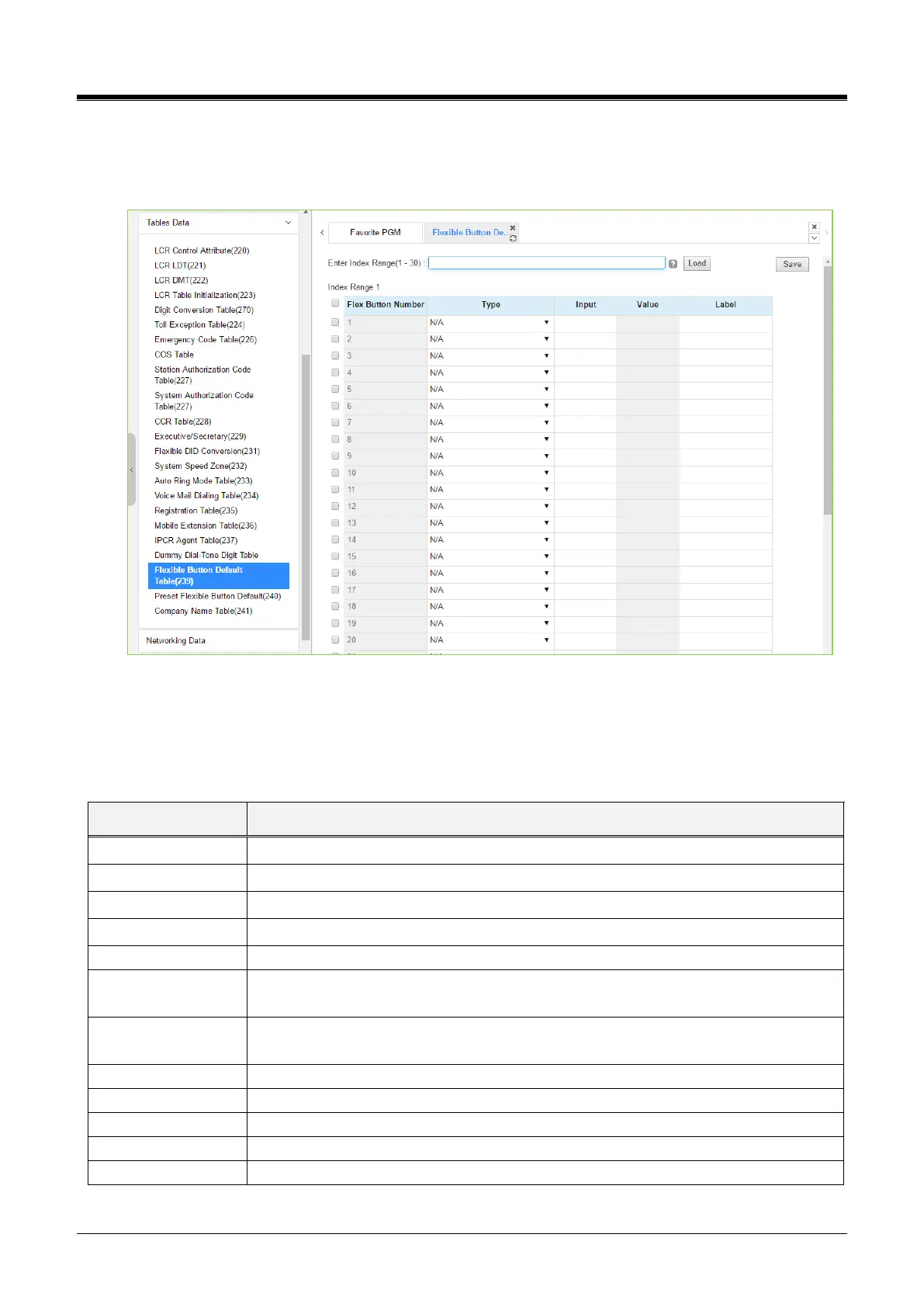
Selecting the Flexible button default table will display the below page. For convenience, the copy, paste, and
drag are available to enter or modify data. Please click the [Save] button to apply after changing Value.
Figure 4.4.9.20-1 Flexible Button Default Table
The system provides 30 default flexible button tables so the administrator can configure each table using
‘Preset Flexible Button Default (240)’. The administrator can assign the type among the below types on the
Flexible button.
Table 4.4.9.20-1 FLEX BUTTON TYPE
Empty (unassigned) may be defined by the user.
Assigns a button to access a defined CO/IP line.
Assigns a button to access a free line in the CO/IP Group.
Assigns a button to access a loop line.
Assign a button as DSS/BLF for the assigned station number.
Programming
(Numbering Plan)
Assigns a button to dial a code from the Flexible Numbering Plan. See Appendix
section.
Assigns a button to perform a User Program function from the Fixed Numbering Plan,
Appendix section.
Refer to section Network Numbering Plan Table - PGM 324.
U-Loop button for call wait of internal & external call.
Assign button for any dial digit.



 To Next Page