iPECS eMG80/100& eMG800 & UCP & vUCP
Administration and Programming Manual Issue 2.5
21
License State Display
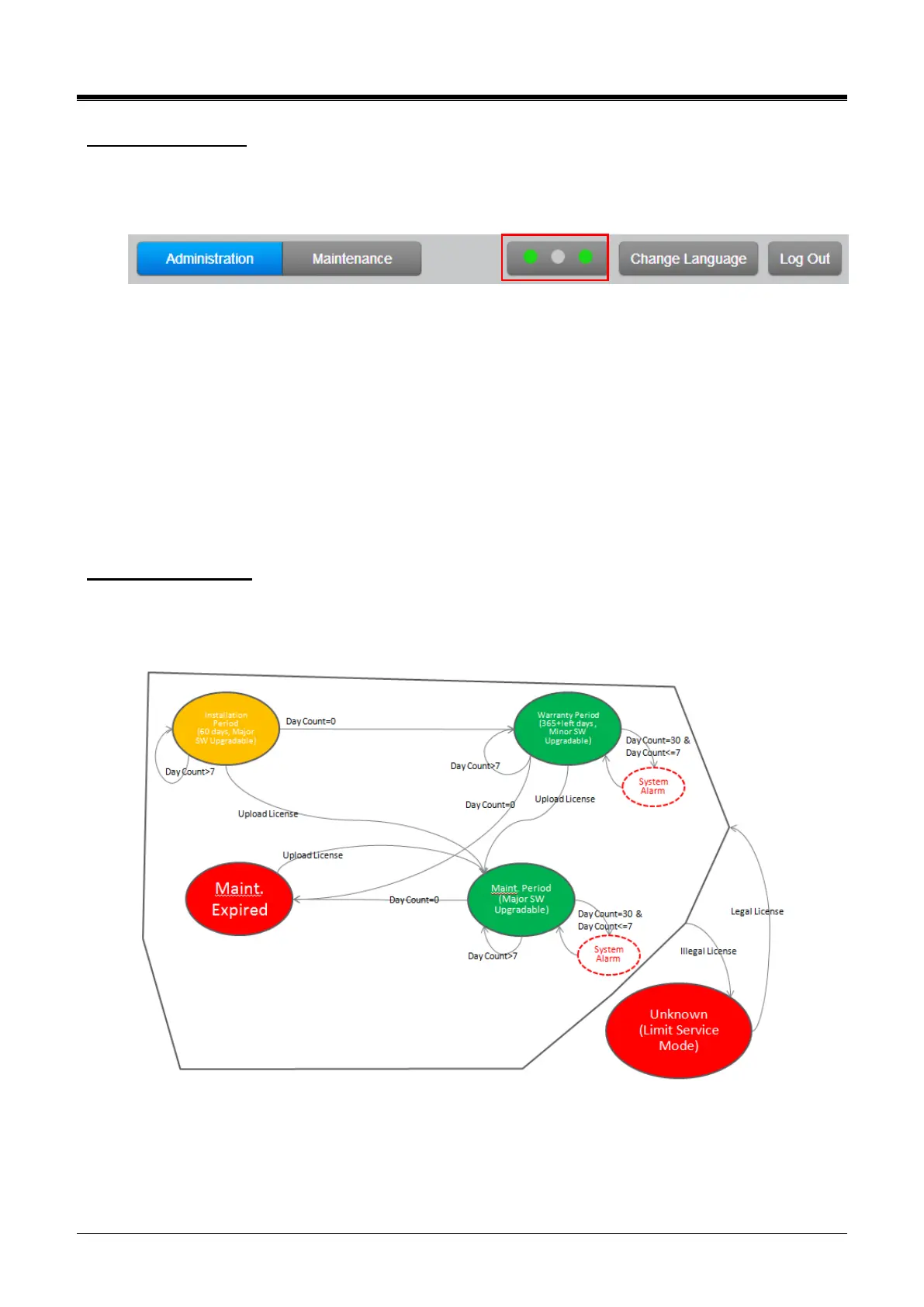
If “Installation Period” or the color of SW Maint. is GREEN, system software can be upgraded.
Major version upgrade is possible in the “Installation” or “Maintenance” Period, but Minor version upgrade is
possible in the “Warranty” Period. In other states, both upgrade and downgrade are not allowed.
First LED: SW maintenance
The second LED: Temporary License
Third LED: T-Net (eMG & UCP) /Redundancy (UCP only)
Note)
The administrator can set ‘Alarm Enable’ to OFF in System Data > Alarm Attributes (163) > Alarm
enables: OFF to turn off the alarm. For more information, refer to Alarm Attributes.
To turn off the alarm on the phone, press ‘Alarm reset’ PGM code *565 to stop. It’s a one-time thing.
Please check the exact alarm reset code in the Flexible Numbering Plan (106~109) because the code
is different according to the numbering plan?
SW Maintenance State
The following figure is the SW Maintenance state for SMB. System Alarm (Attendant alarm & E-mail
notification) occurs once 30 days before expiration and daily during 7 days before expiration.
If the system goes to the limited-service mode, the station COS is changed to 7.



 To Next Page