OPERATION 5
MHL360 E 5.11
5.5.3 Starting the diesel engine
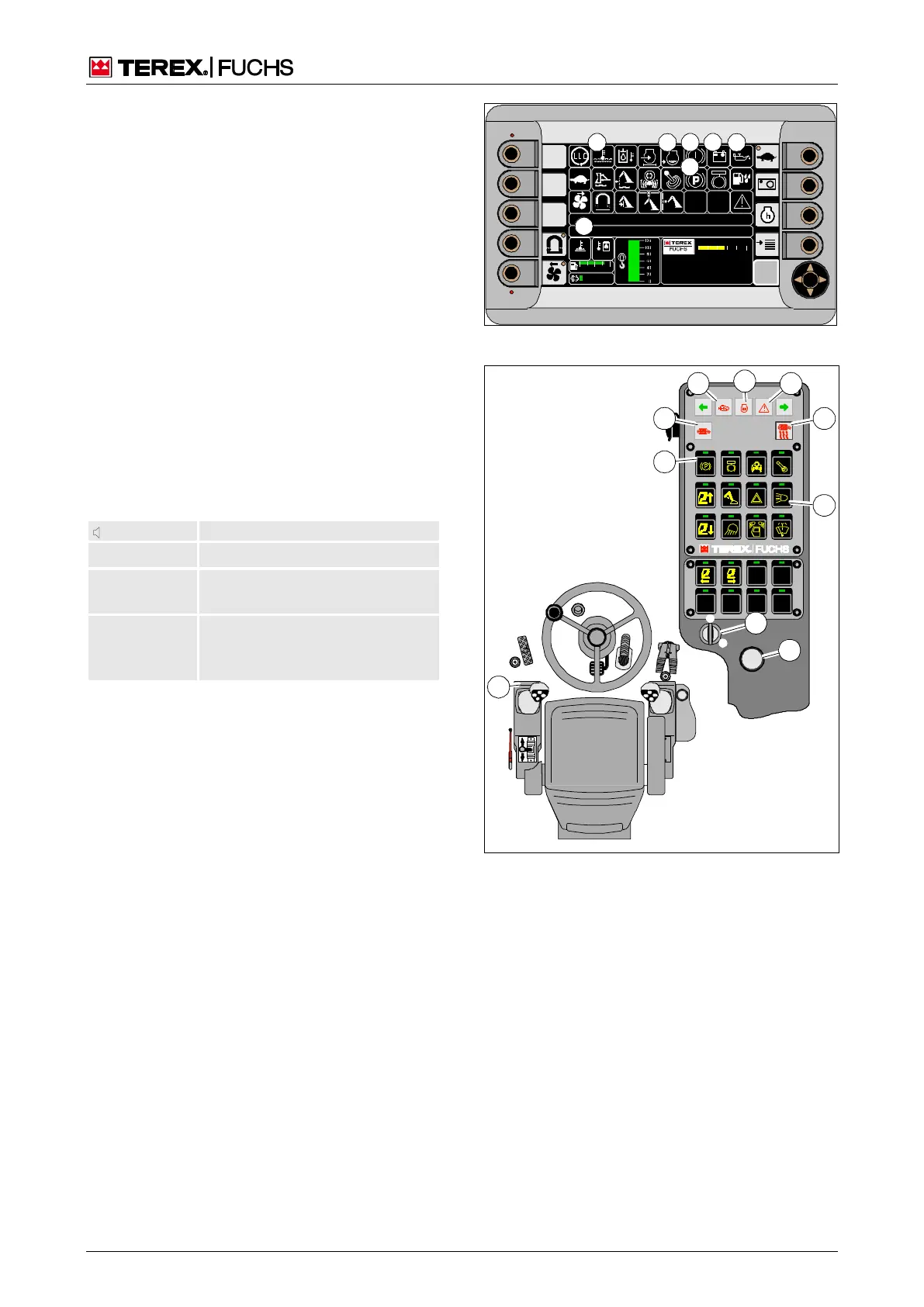
Switching on the ignition
►
Set all gearshift levers to neutral.
►
Insert the ignition key into the ignition lock
(113/29) and turn it to position I.
►
Wait on the starting phase until the main
control display (fig. 112) appears.
►
The messages (112/23) and (113/54) for
engaged foot brake must light up.
Brake pressure query
Sufficient brake pressure must be present for
the service brake to function. The status of
the service brake is indicated by a buzzer and
the indicator (112/15). As soon as the diesel
engine is running and the brake pressure has
built up, the buzzer will go silent and the indi-
cator (112/15) will go out.
Off Adequate brake pressure
Interval Brake pressure still sufficient, but
diesel engine is turned off.
tone
Inadequate brake pressure. Indi-
cator (112/15) lights up.
n Do not release parking brake.
Checking indicators
►
Indicator (113/66) for side light flashes.
Adjust as needed.
►
Check message texts (112/34) and indica-
tors.
Indicators (113/58) and (113/60) must not
light up.
Indicators (112/16) and (112/17) must ap-
pear.
Indicator (112/11): Coolant still too hot.
Indicator (112/14): Too little coolant.
Note indicators (113/56) and (113/62).
h Chapter 5.6.1 Checking the diesel parti-
cle filter status
F
09 :43 11 .03. 2 011
MH LX X X / XXX X
18 00 U PM
0 5 1 0 15 20 2 5
95°C 7 5°C
0 ½ 1
9 %
120 0
15 16 17
BSB50587
34
11 14
23
Fig. 112 Main control display
I
0
29
59
BSB50588
31
4
56 62
58 60
54
66
Fig. 113 Starting the diesel engine



 To Next Page