LAT CH
REMOVAL
(1) Remove trim pan el. (Refer to 23 - BODY/DOOR
- FRONT/TRIM PANEL - REMOVAL)
(2) Remove exter ior handle. (Refer to 23 - BODY/
DOOR - F RONT/EXTE RIOR HANDLE - RE MOVAL)
(3) Remove screws a nd remove la tch assembly.
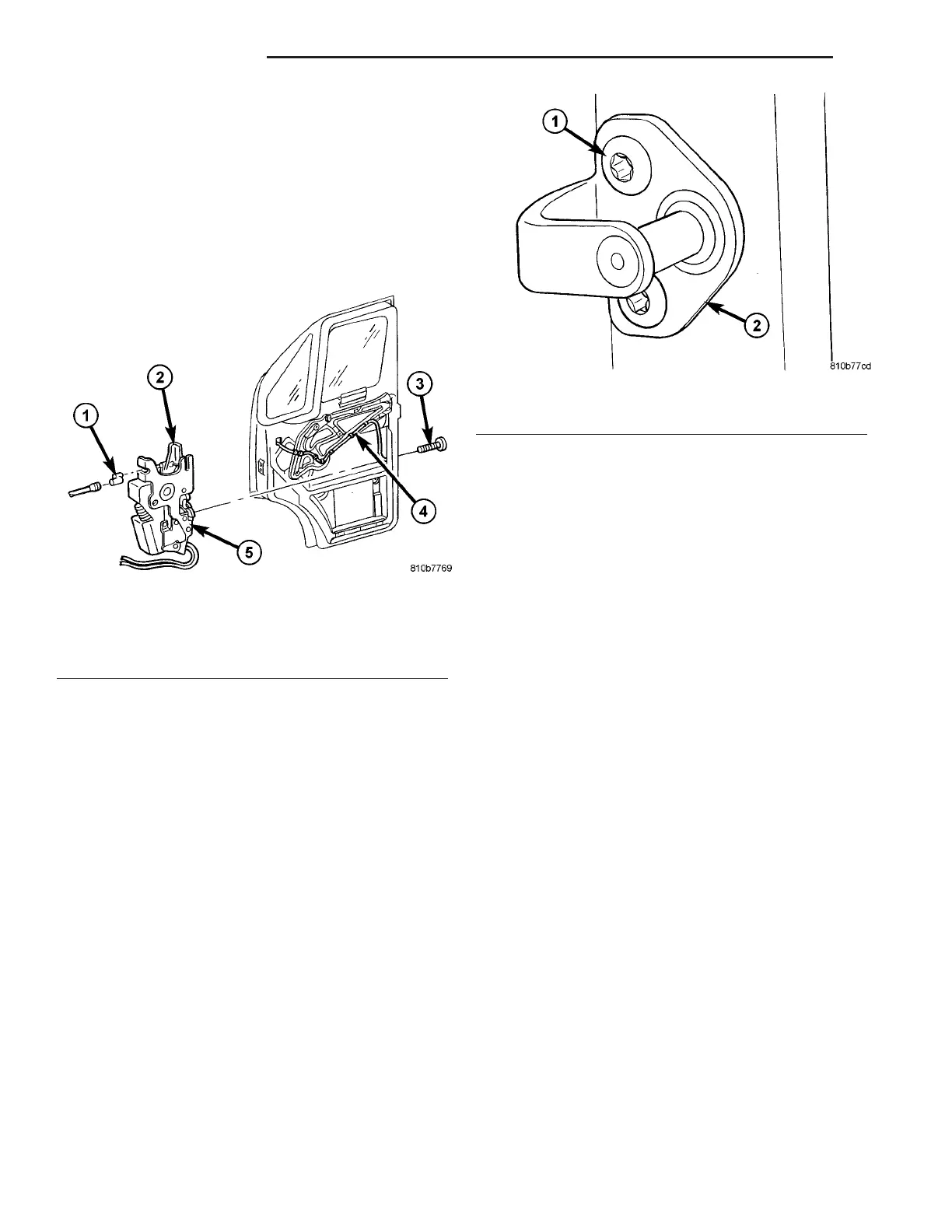
(4) Disconn ect electr ical connect or a nd control
cable. (Fig. 15)
INSTALLATION
(1) Connect elect rica l connect ors and cont rol ca ble.
(2) In st all latch and install bolts.
(3) Tighten bolts to 10 N·m (89 in . lbs.).
(4) In st all exter ior handle. (Refer to 23 - BODY/
DOOR - FRONT/EXTE RIOR H ANDLE - INSTALLA-
TION )
(5) In st all t rim pa nel. (Refer to 23 - BODY/DOOR -
FRONT/TRIM PANE L - INSTALLATION)
LAT CH ST RI K ER
REMOVAL
(1) Usin g a grease pencil or equivalent, ma rk th e
position of the striker to a id installation.
(2) Remove th e bolts and rem ove t he st riker. (Fig.
16)
INSTALLATION
(1) In st all striker and install bolts.
(2) Tighten bolts to 25 N·m (18 ft. lbs.).
(3) Check door for flush and adjust the striker hor-
izon tally if necessary. (Refer to 23 - BODY/BODY
STRUCTURE /GAP AND FLUSH - SPECIF ICA-
TION S)
LOCK CY LI N DER
REMOVAL
(1) Remove exter ior door handle. (Refer to 23 -
BODY/DOOR - FRONT/E XTERIOR HANDLE -
REMOVAL)
(2) Remove lock cylinder from h andle.
INSTALLATION
(1) In st all lock cylinder in to exterior handle.
(2) In st all exter ior handle. (Refer to 23 - BODY/
DOOR - FRONT/EXTE RIOR H ANDLE - INSTALLA-
TION )
TRIM PANEL
REMOVAL
(1) Disconn ect and isolate battery negative ca ble.
(2) Usin g a sma ll flat bladed tool or equiva lent ,
pr ess reta ining clip u pward through cutout in handle
cover an d r emove cover. (Fig. 17)
Fig. 15 FRONT DOOR LATCH
1 - CONTROL CABLE
2 - LATCH LEVER
3 - LATCH BOLTS (3)
4 - WIRE HARNESS
5 - LATCH ASSEMBLY
Fig. 16 LATCH STRIKER
1 - BOLTS
2 - STRIKER
23 - 18 D OOR - F R ON T VA















 To Next Page