The X Axis Drive Assembly
7-56 DSX™ System Service Manual
To Tighten the Belt and Check the Belt Tension:
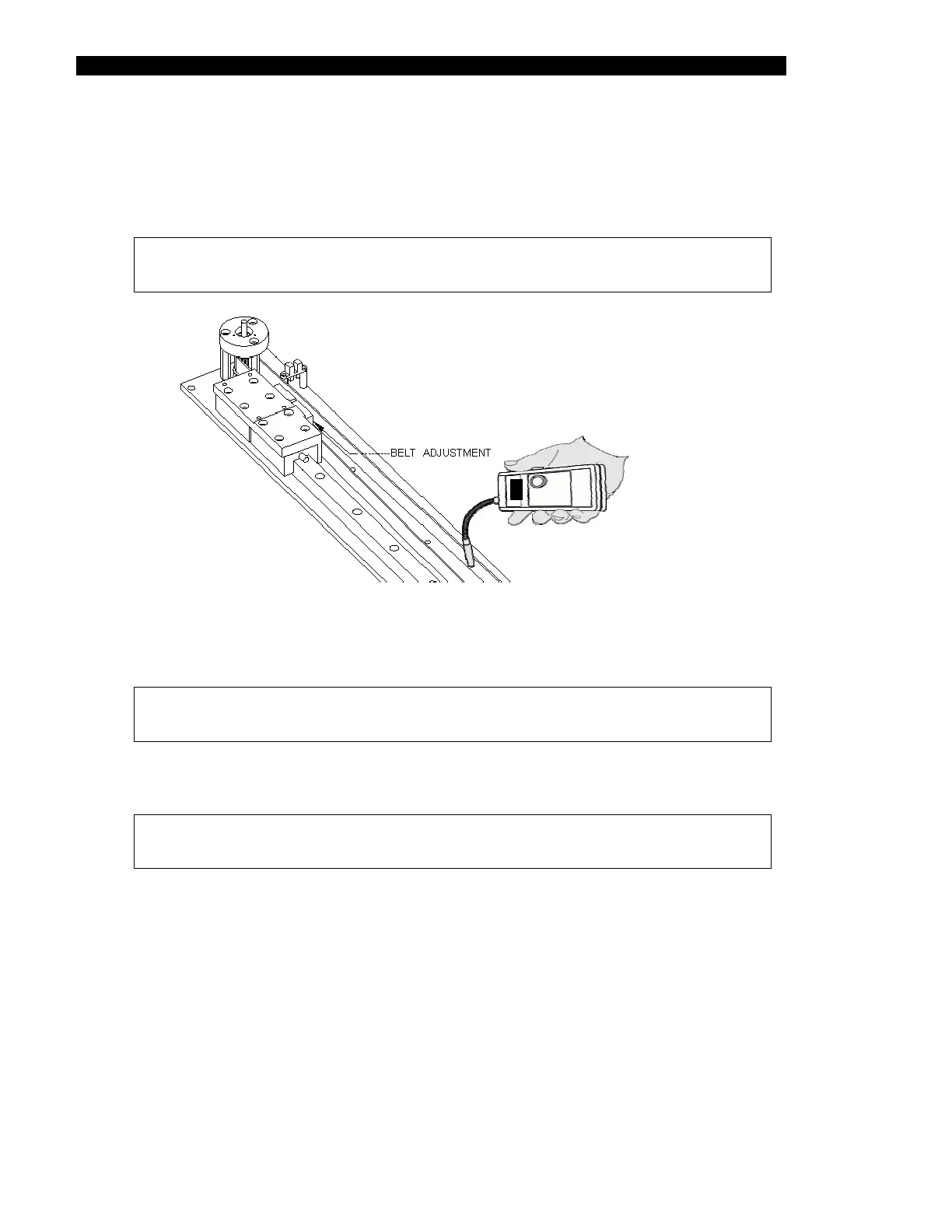
1 Position the Tension Meter (Brecoflex Model SM3) over the rear section of the
X belt as shown in Figure 7-65.
Note: The sensor must be 3 to 6 mm above the belt and perpendicular to
the belt.
Figure 7-65 Checking the Belt Tension
2 Tap the belt to cause it to oscillate.
Note: The belt must only oscillate in the horizontal plane. If the belt twists,
the readings will not be correct.
3 While the belt is oscillating and the sensor is above the belt, press and hold the
red button on the tension meter.
Note: Discard any readings that are less than 14 or greater than or equal
to 40.
4 Record the resulting tension reading.
5 Repeat the above steps until ten valid readings are recorded.
6 Total the readings and divide by ten to calculate the average. Record these
values.
7 If the resulting average is not within 25 ± 0.5, adjust the adjustment screw in
quarter turn increments until the proper tension is read. Then repeat the above
steps to record ten new readings and calculate the average.
8 Tighten the four screws in the adjustable block. Then double-check the belt
tension.



 To Next Page