iPECS eMG80/100& eMG800 & UCP & vUCP
Administration and Programming Manual Issue 2.5
25
Adding Function
This step is divided into 5 steps, and you can make the desired function in each step. The following is the
guide to make a Name and add the function on each step:
English, Numbering, Underscore (_), and Parentheses are available to enter the function name.
Function name has to be filled out.
To enter the step name, English, Numbering, and Special letters except Double quotation marks are
available.
The step name doesn’t need to be filled out, but the function has to be configured for each step.
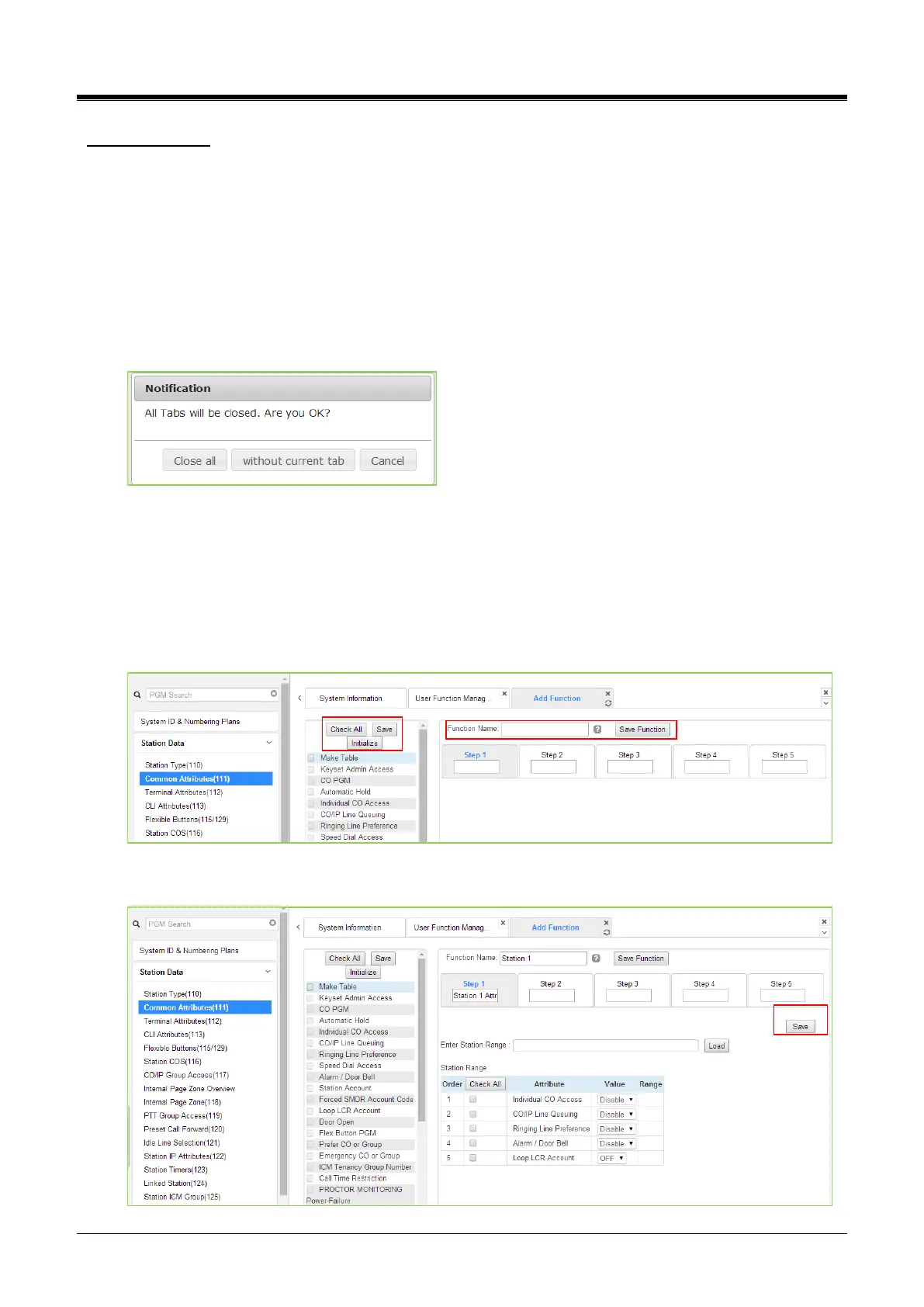
To cancel or close this tab, click the close button (X) and pop up the blow;
1) Click the Add Function button.
2) On the below window, click the desired PGM in the left frame. First, fill out the function name and
step name. To configure step 1, click the Make table to check the desired function and then click
the [Save] button.
Check All: check all functions
Save: Save the checked functions
Initialize: Initialize the checked functions
3) The selected functions are displayed and click the [Save]button after checking each function. The
rest steps are the same as step 1.



 To Next Page