PAPER FEED SECTION
6-25
SM C231/C237/C238
Replacement
and
Adjustment
6.7 PAPER FEED SECTION
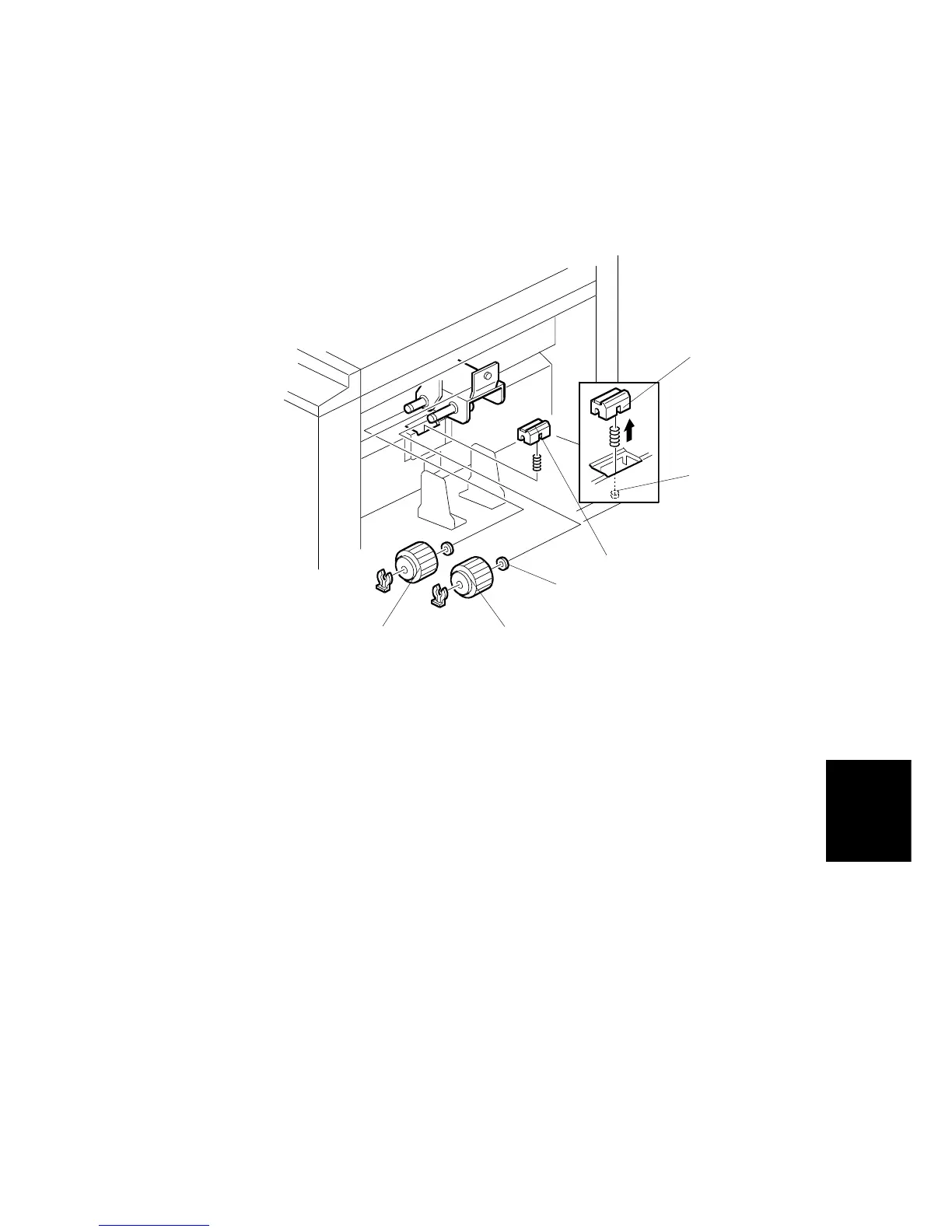
6.7.1 PAPER FEED ROLLER, PICK-UP ROLLER, AND FRICTION
PAD
1. Turn off the main switch and disconnect the power plug.
2. Lower the paper table, and remove the pick-up roller [A] (1 snap ring).
3. Remove the paper feed roller [B] (1 snap ring).
NOTE:
1) Do not lose the small spacers [C] inside the rollers.
2) Install the paper feed roller in the proper way round, due to the one-
way built-in clutch. The clutch faces inside.
4. Remove the friction pad base [D].
NOTE:
Install the friction pad base in the proper direction, as shown. Also, be sure
that the friction pressure spring is properly set into the hole in the friction
pad base [D] and over the projection [E] in the bottom hold. Otherwise,
paper misfeed will occur.
C231R524.WMF
[A]
[B]
[C]
[D]
[D]
[E]



 To Next Page