Service
Tables
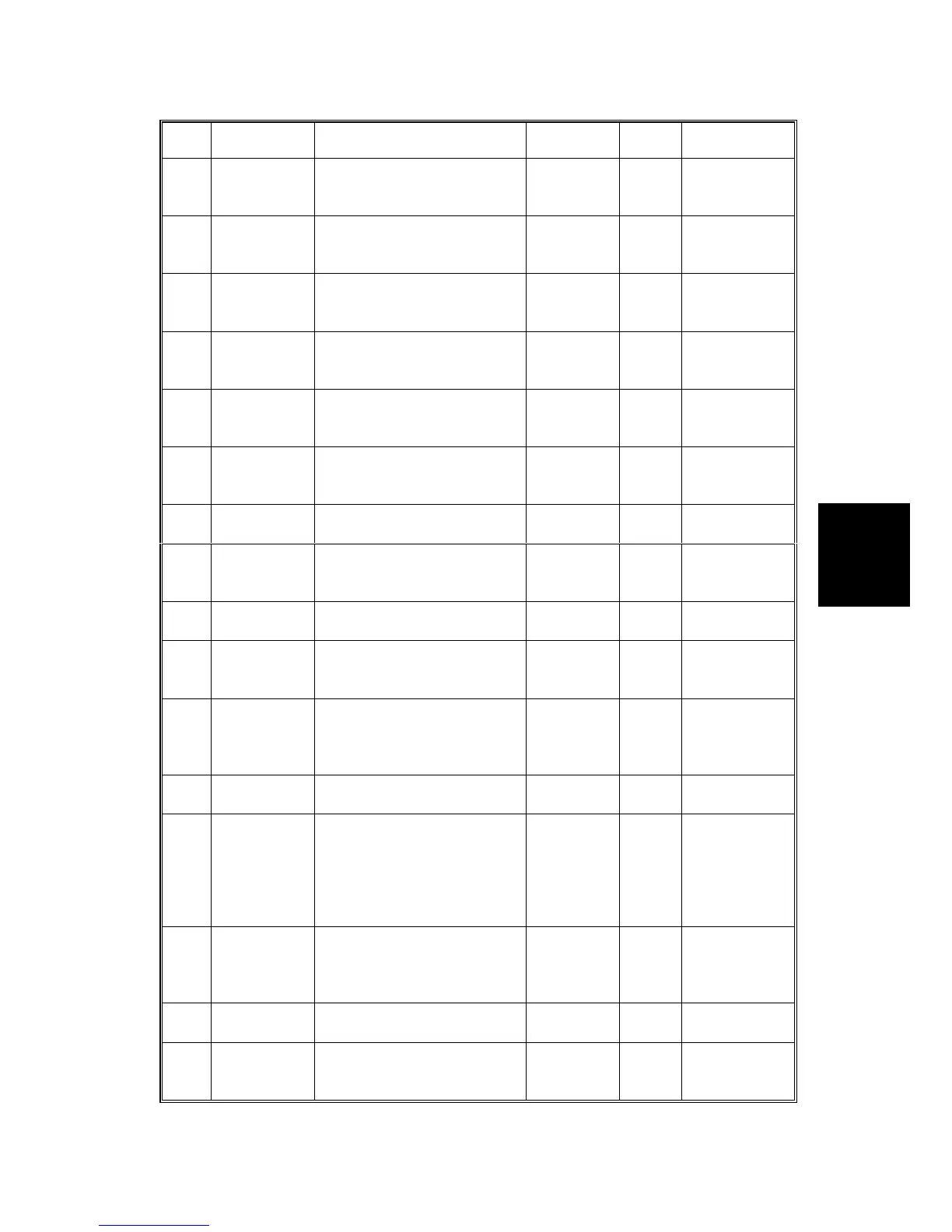
SERVICE PROGRAM TABLE
SM 4-9 C231/C237/C238
No. Display Function Settings
Factory
Setting
Comments
104
On line
Count
Displays the total number of
masters made in On Line
mode.
0
105
Overlay
Count
Displays the total number of
masters made in Overlay
mode.
0
106
Enlarge
Count
Displays the total number of
masters made in Fixed
Enlargement mode.
0
107
Reduction
Count
Displays the total number of
masters made in Fixed
Reduction mode.
0
111
Total Count
Displays the total number of
masters and prints.
0
M: Master
count
P: Print count
*113
Resettable
Count
Used by the customer to
display the total number of
masters and prints.
0
M: Master
count
P: Print count
*114
CLR Reset-
table Count
Clears the resettable total
master/print counters.
0: No
1: Yes
0
115
ADF Mode
Count
Displays the total number of
sheets fed in the ADF
mode.
0
116
Scanner
Mode Count
Displays the total number of
originals set in platen mode.
0
117
Color Drum
Count
Displays the total number of
prints made using the color
drum.
0
119
CLR All Total
Count
Clears the following
counters:
SP Nos. 111, 115, 116, and
117.
0: No
1: Yes
*120
-1
User Code
Mode
Selects user code mode. 0: No
1: Yes
-2
Auto Reset
Time
Selects the auto reset time.
0: Unlimited
1: 1 min.
2: 2 min.
3: 3 min.
4: 4 min.
5: 5 min.
0
Displays only
when "Yes" is
selected in
SP120-1.
*121
UC Count
Displays the total number of
masters and prints made
with each user code.
0
Press the #
key to shift to
another user
code.
*122
Clear UC
Count
Clears the selected user
code counter.
0: No
1: Yes
0
Same as
above.
*123
Total UC
Count
Displays the total number of
masters and prints for up to
20 user codes.
0



 To Next Page