DRUM AND DRIVE SECTION
6-38
C231/C237/C238 SM
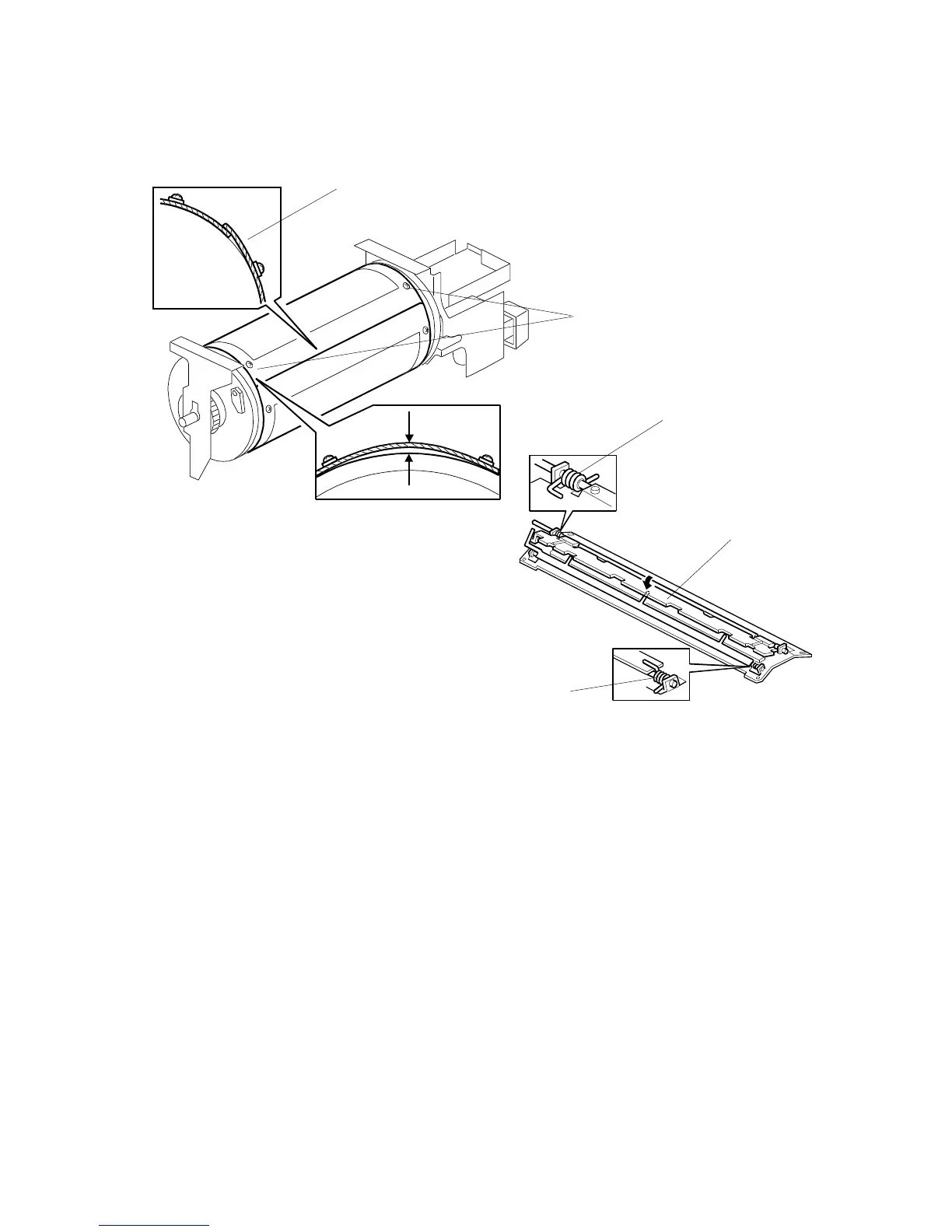
Remarks for drum screen installation
•
Make sure that the correct end of the metal screen is overlapping. (Refer to the
upper left illustration.)
•
The 4 screws holding the drum master clamper are longer than the 12 screws
holding the metal screen, although they are similar in appearance. Be careful not
to mix them up or use the wrong screws.
•
When installing the metal screen, secure the trailing edge first with the 2 screws.
(The two holes [A] on the trailing side of the screen are round holes and the
other holes are oblong holes to allow for the removal of the slack.)Then, tighten
the other screws while removing the slack from the screen. Make sure that the
gap between the drum flanges and the screen is 0.3 mm or less, as shown in the
upper illustration.
•
Position the springs [B] and [D] (one each at the front and rear) as shown when
reinstalling the drum master clamper [C].
•
Do not scratch the cloth screen or metal screen.
C231R537.WMF
C231R555.WMF
[C]
[D]
[B]
The standard position for the metal
screen (the right side overlaps, as
viewed from the non-operation side).
0 to 0.3 mm
[A]



 To Next Page