DRUM AND DRIVE SECTION
6-36
C231/C237/C238 SM
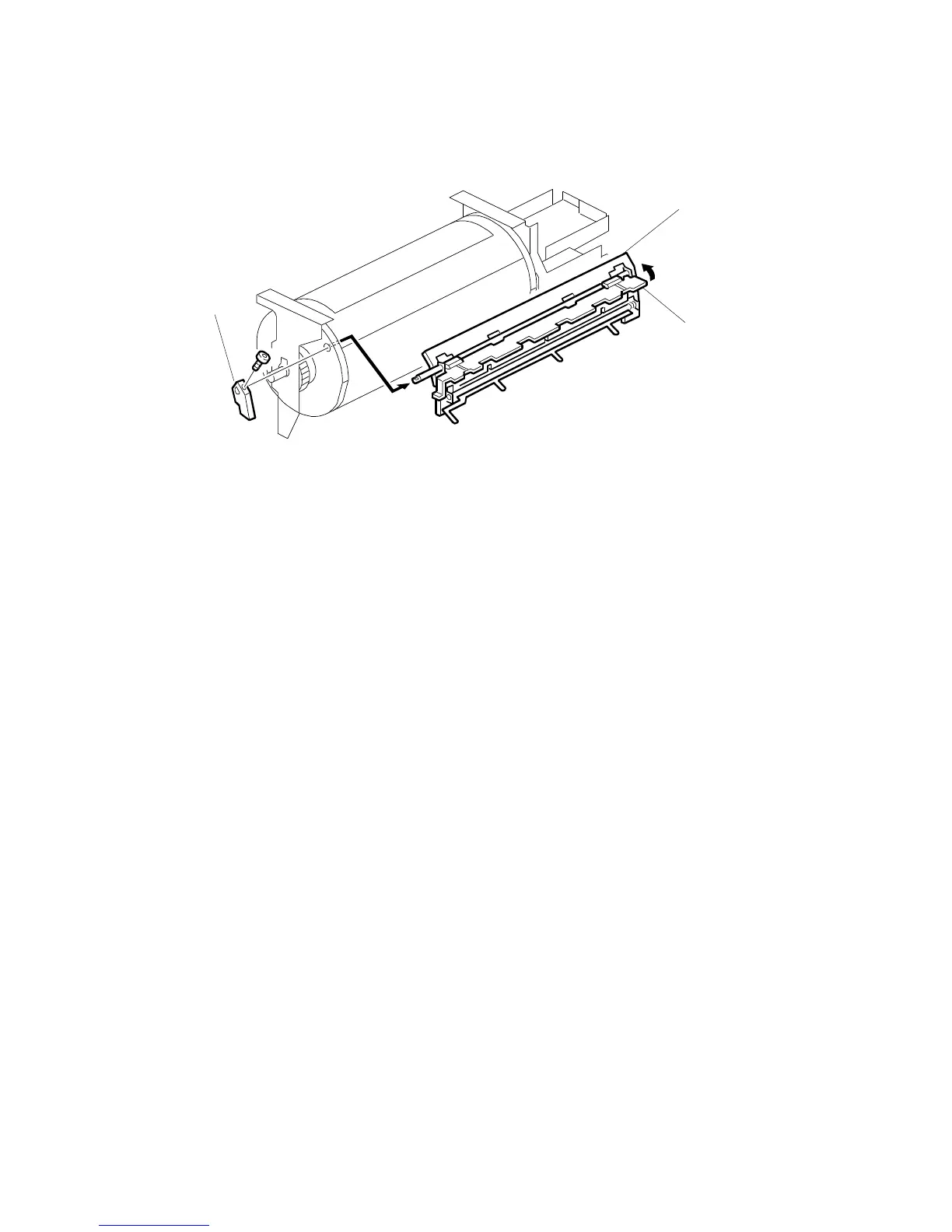
6.9.2 DRUM MASTER CLAMPER AND METAL SCREEN REMOVAL
NOTE:
Do not settle the drum unit upside down. However, if the drum unit was
settled upside down, wipe off the ink around the ink roller beforehand (to
do this, remove the ink cartridge, use SP 140, select OFF in ink detection
mode, and feed paper until the ink supply ends).
1. Turn off the main switch and disconnect the power plug.
2. Remove the drum.
3. Remove the drum screen. (See 6.9.1 Drum Cloth Screen Removal.)
4. Remove the clamper open lever [A] (1 hexagon screw).
5. Remove the drum master clamper [B] while opening the clamping plate [C].
NOTE:
1) Do not allow the inside of the clamping plate [C] to become dirty with
ink. If it is dirty with ink, the master may slip and the image position on
the prints will move toward the trailing edge of the print during a printing
run.
2) Use a cloth dampened with water to clean the inside of the clamping
plate [C]. Never use alcohol or other solvents. The clampin



 To Next Page