PAPER DELIVERY
SM 3-57 C267
C267 Service
Manual
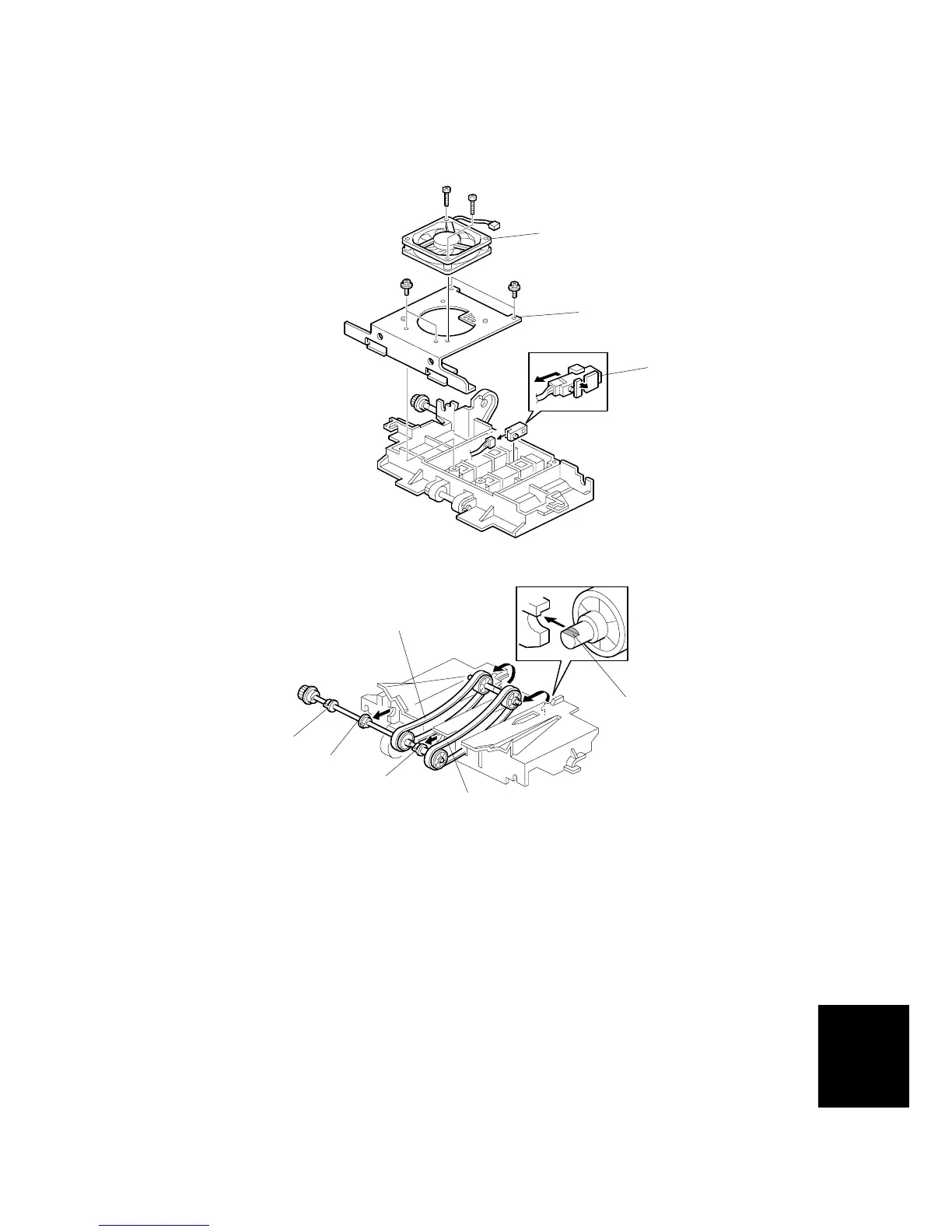
3.10.2 DELIVERY BELT / PAPER EXIT SENSOR / VACUUM FAN
MOTOR / PAPER DELIVERY UNIT BUSHINGS
• Remove the paper delivery unit ( 3.10.1)
[A]: Vacuum fan motor bracket ( x 4)
[B]: Vacuum fan motor ( x 2)
[C]: Paper exit sensor ( x 1)
[D]: Delivery belts ( x 1)
[E]: Paper delivery unit bushings
NOTE:
1) Make sure that you install the vacuum fan [B] the correct way around.
2) Install the delivery belt [D] the correct way around. The writing must be
on the outside surface of the belt.
3) The flat part of the “D” shaped cutout in the shaft [F] must face upwards.
C267R049.WMF
C267R050.WMF
[A]
[B]
[C]
[D]
[F]
[D]
[E]
[E]
[E]



 To Next Page