SP6-32 TO 37: MTF FILTER
C267 5-16 SM
5.7.9 SP6-32 TO 37: MTF FILTER
Sharpens the image, but moiré can become more apparent.
Refer to the following table for the relationship between this SP mode value and
filter strength (the relationship is not linear).
Value Strength of Filter
7 X 4
6 X 2
0 X 1
5 X 1/2
4 X 1/4
3 X 1/8
2 X 1/16
1 X 1/32
5.7.10 SP6-40: INK DETECTION ADJUSTMENT
Ensures that the CPU detects a no ink condition.
CAUTION: Before attempting this procedure, wipe off the ink around the ink roller.
To do this, set SP2-10 (ink detection) to OFF, and feed paper until ink
ends. After finishing the procedure, do not forget to return SP2-10 to
the default (ink detection on).
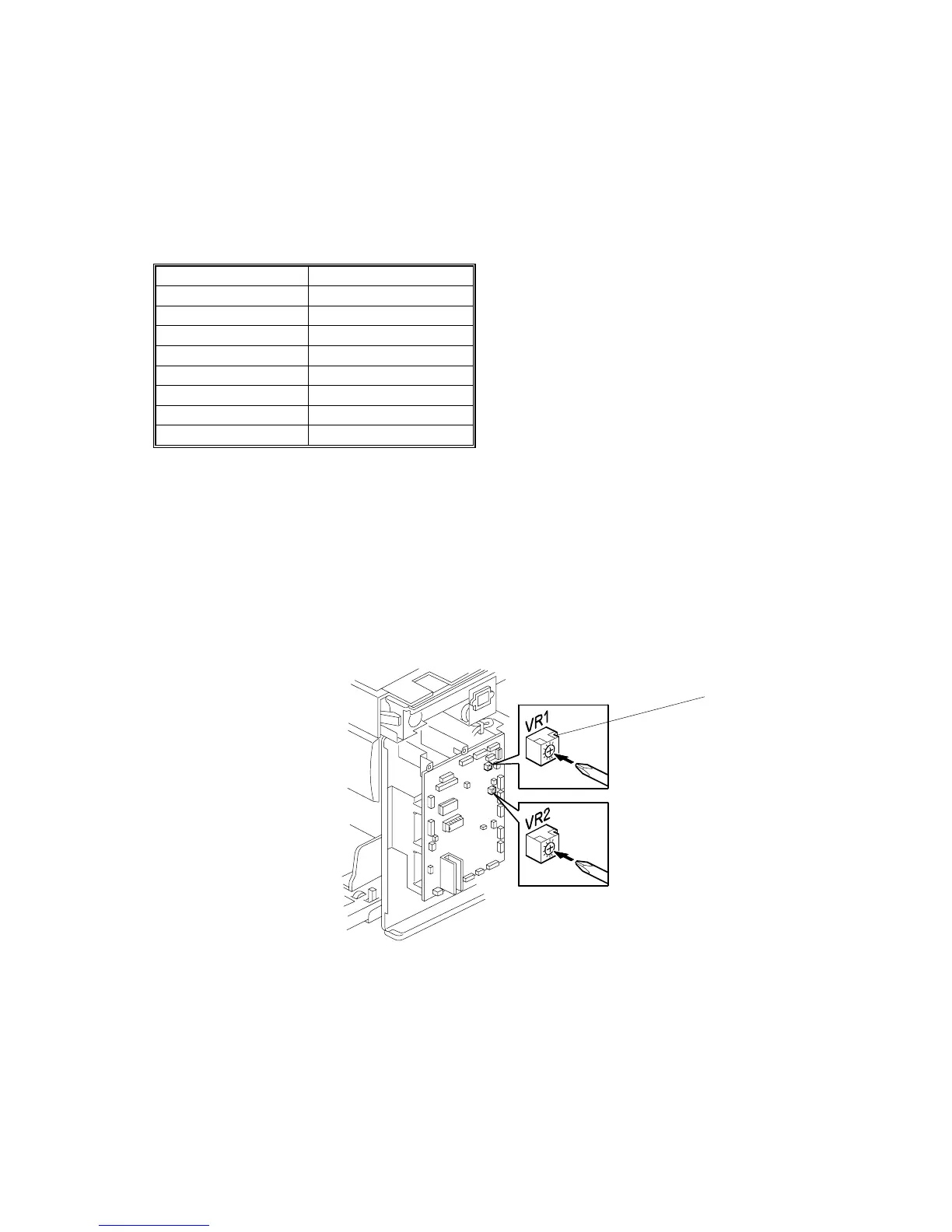
Access SP6-40, and open the door cover. Then turn the VR1 [A] on the MPU board
until the display becomes “4.0 +-0.2 u” (4 μs).
NOTE: When the drum has ink inside, the machine displays “----“.
C267S904.WMF
[A]



 To Next Page