CUTTER REPLACEMENT
7-5
Tape Marker
C532
C532 SM
3. REPLACEMENT AND ADJUSTMENT
3.1 CUTTER REPLACEMENT
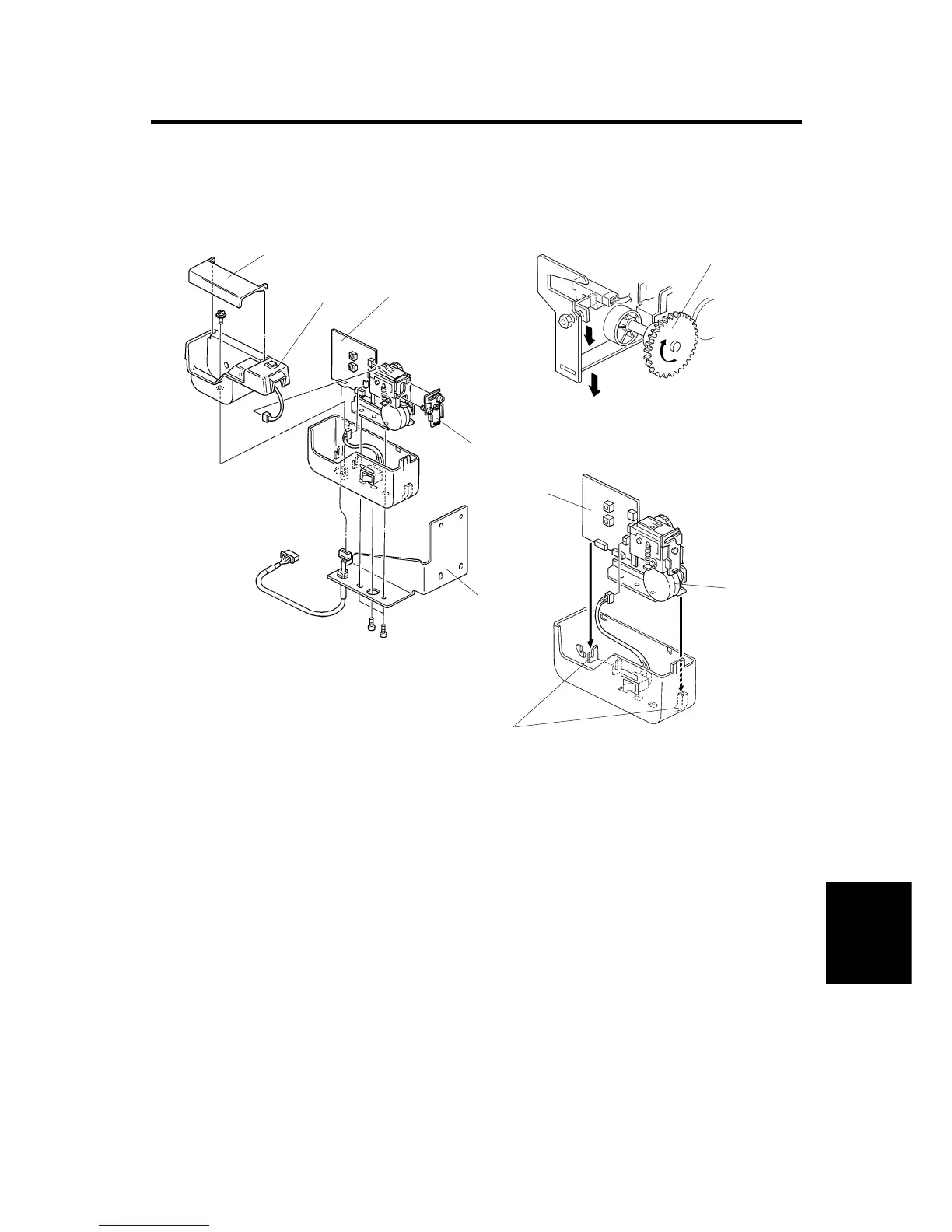
1. Remove the tape dispenser from the main body. (1 connector, 2 screws)
2. Remove the support bracket [A]. (3 screws)
3. Remove the tape dispenser cover [B] and the upper housing [C] (1 screw, 1
connector)
4. Remove the tape dispensing assembly [D]. (2 connectors)
5. Replace the cutter assembly [E]. (2 screws)
NOTE: Make sure that the cutter moves smoothly by rotating the cam drive
gear [F] clockwise manually after the replacement.
6. Reassemble the tape dispenser.
NOTE: Make sure that the tape dispenser board [G] and the tape dispensing
bracket [H] are positioned in lower housing slots [I].
C532R500.PCX
C532R501.PCX
C532R502.PCX
[A]
[B]
[C]
[D]
[E]
[F]
[G]
[H]
[I]



 To Next Page