PAPER DELIVERY SECTION
6-52
C231/C237/C238 SM
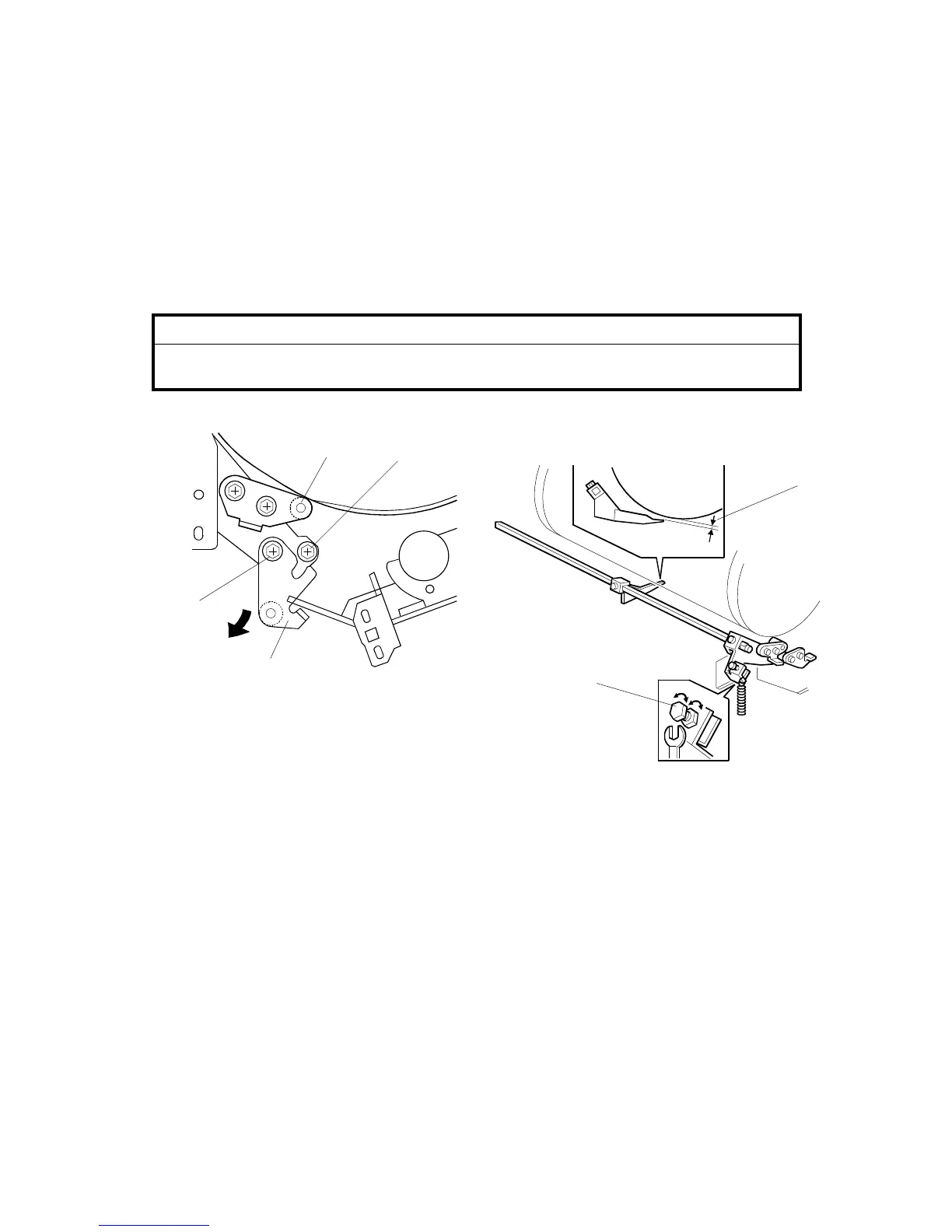
6.10.4 EXIT PAWL CLEARANCE ADJUSTMENT
PURPOSE:
If the clearance is too narrow, the exit pawls may hit the drum screen
and damage it. If it is too wide, paper may wrap around the drum.
ADJUSTMENT STANDARD:
1.15 (
±
0.15) mm
CAUTION
When this adjustment has been performed, check the exit pawl drive
timing.
1. Turn off the main switch and disconnect the power plug.
2. Remove the drum, then remove the front cover (4 screws).
3. Reinstall the drum.
4. Loosen screw [A] then screw [B] in this order (do not remove them). Make sure
that the bracket [C] becomes free from engagement and the cam follower [D]
contacts the drum flange.
5. Using a gap gauge, measure the clearance [E] between the drum surface and
the exit pawls. It should be between 1.0 and 1.3 mm.
6. If the clearance is not correct, loosen the lock nut. Then adjust the clearance by
turning the bolt [F].
7. Reposition the bracket [C] and tighten the screws [A] and [B].
C231R544.WMF
C231R577.WMF
[E]
[F]
[B]
[A]
[D]
[C]



 To Next Page