INSTALLATION PROCEDURE
SM 1-11 C267
C267 Service
Manual
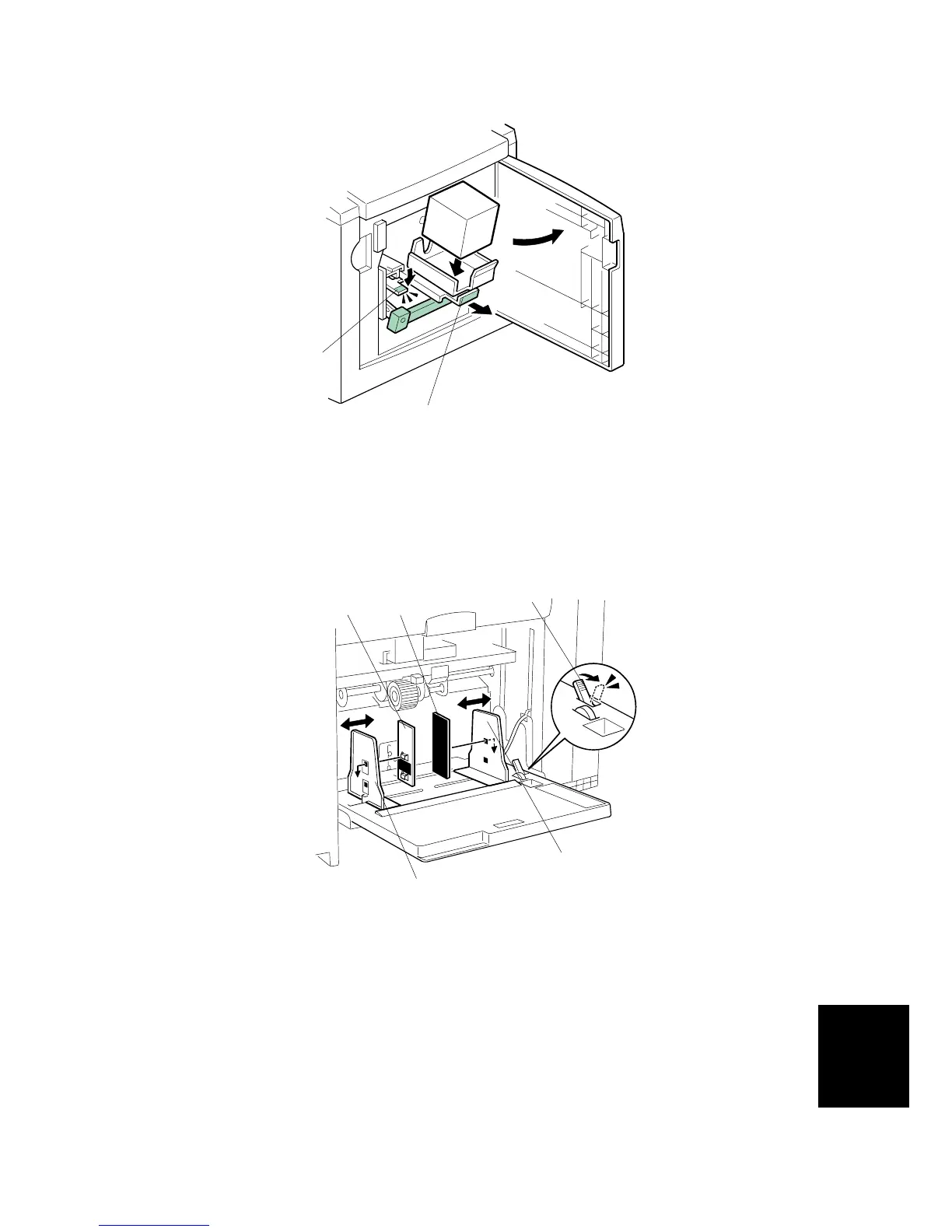
13. Open the front door.
14. Release the ink holder lock lever [E] and pull out the ink holder [F].
15. Remove the cap of the new ink cartridge, and insert a new ink cartridge into the
ink holder.
16. Set the ink holder [F].
17. Load a stack of paper on the paper table.
18. Shift the lock lever [G] in the direction of the arrow. Make sure that the side
plates [H] touch the paper gently.
19. Shift the lock lever [G] to its original position.
NOTE: Two side fence friction pads [I] are included as accessories. They are not
used normally, but if paper multi-feed frequently occurs or thin paper is
used, the side fence friction pads [I] can be installed to apply stopping
pressure to the paper.
C267I107.WMF
C267I155.WMF
[G]
[H]
[E]
[F]
[H]
[I] [I]



 To Next Page