PRINTING SECTION
6-29
SM C231/C237/C238
Replacement
and
Adjustment
6.8 PRINTING SECTION
6.8.1 PRESS ROLLER REMOVAL
CAUTION
Take care to avoid possible injury. If the printing pressure release arms
disengage, the press roller will be pulled upwards suddenly.
1. Turn off the main switch and disconnect the power plug.
2. Remove the drum unit.
3. Remove the front cover (4 screws). (See 6.1.5 Other Covers.)
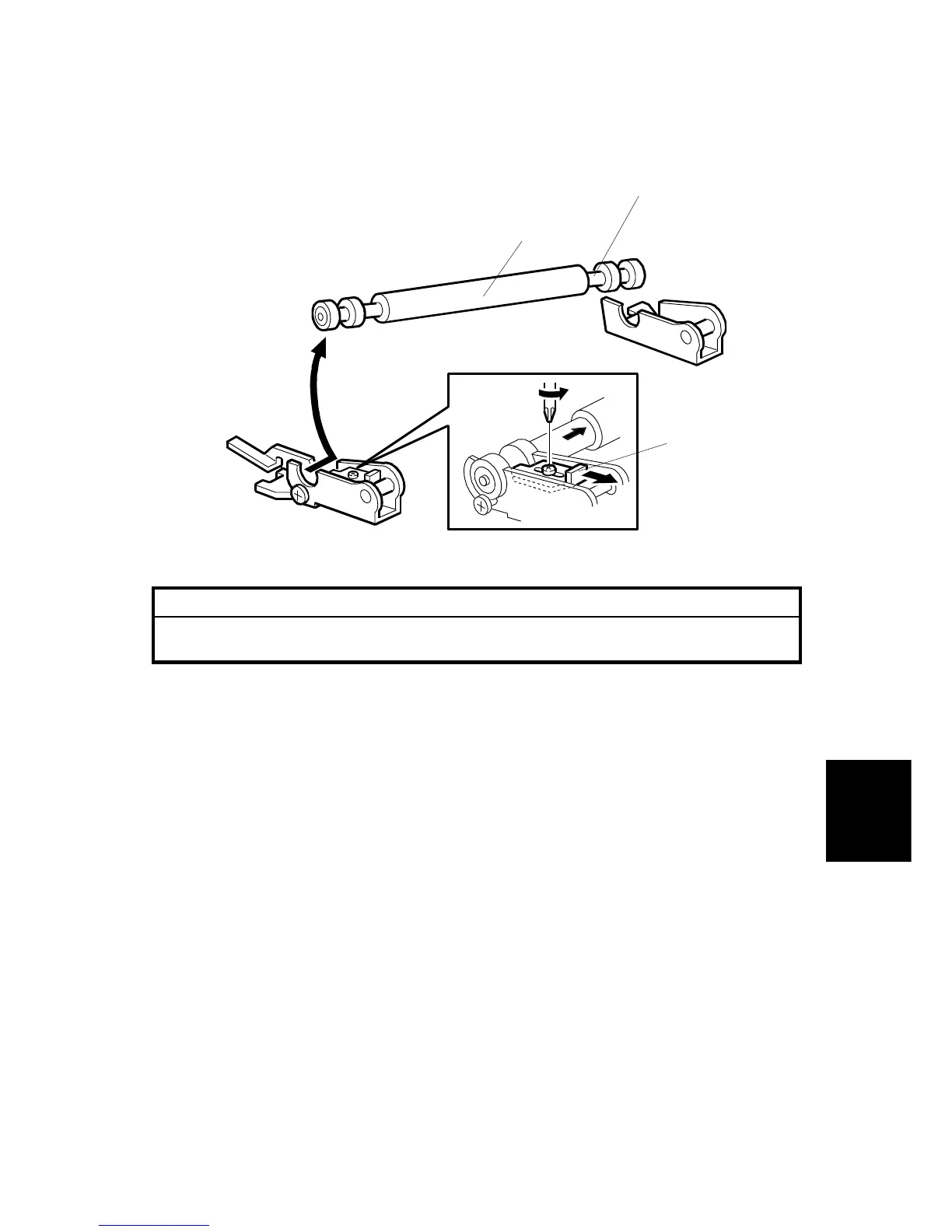
4. Loosen the screw and slide the bracket [A].
5. Remove the press roller [B].
CAUTION:
The length of the exposed shaft on the rear and front differs. During
installation, ensure that the longer exposed shaft [C] is positioned
towards the rear of the machine.
C231R526.WMF
[A]
[B]
[C]



 To Next Page