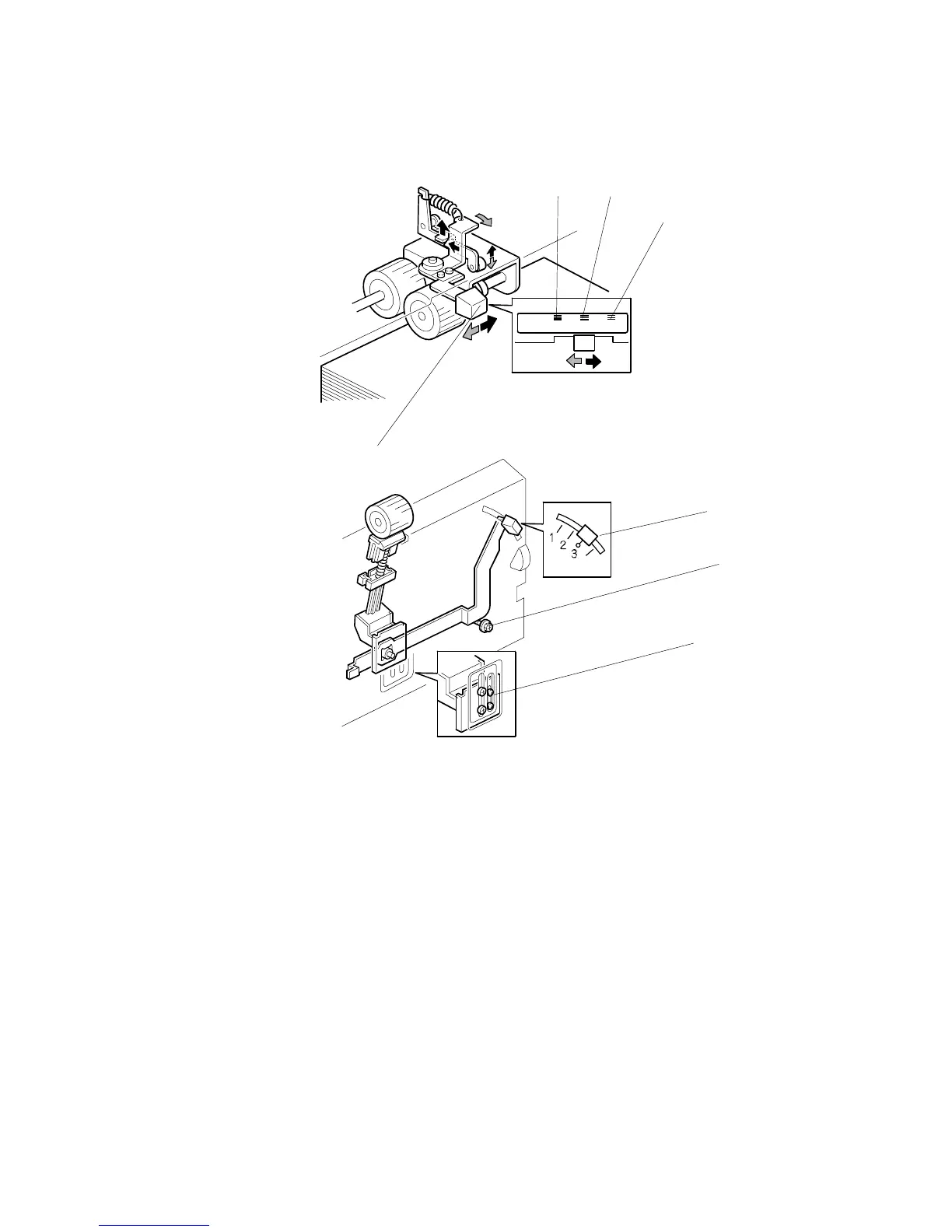
6.9.3 PAPER FEED/SEPARATION PRESSURE ADJUSTMENT
MECHANISM
[A]: Normal position
[B]: Thick paper position
[C]: Thin paper position
• The user can change the pick-up roller pressure by changing the position of the
pressure adjustment lever [D].
• If paper feed jams frequently occur, the lever [D] should be moved to the left or
the right to adjust the pressure.
• If non-feed or multi-sheet feed problems still occur, the paper separation
pressure can also be adjusted by the lever [E].
• If there is still a paper feed problem, the technician can adjust the paper
separation pressure by loosening then moving the screw [F] up or down.
• For the Chinese model, the separation pressure adjustment lever [E] has 4 levels.
For the other models, a screw [G] is attached so that the lever [E] cannot move
down more than level 3.
Feeder
Thick paper Standard Thin paper
C267D003.WMF
C267D001.WMF
[A][B]
[C]
[D]
[E]
[F]
[G]



 To Next Page