SERVICE PROGRAM TABLE
C231/C237/C238 4-8 SM
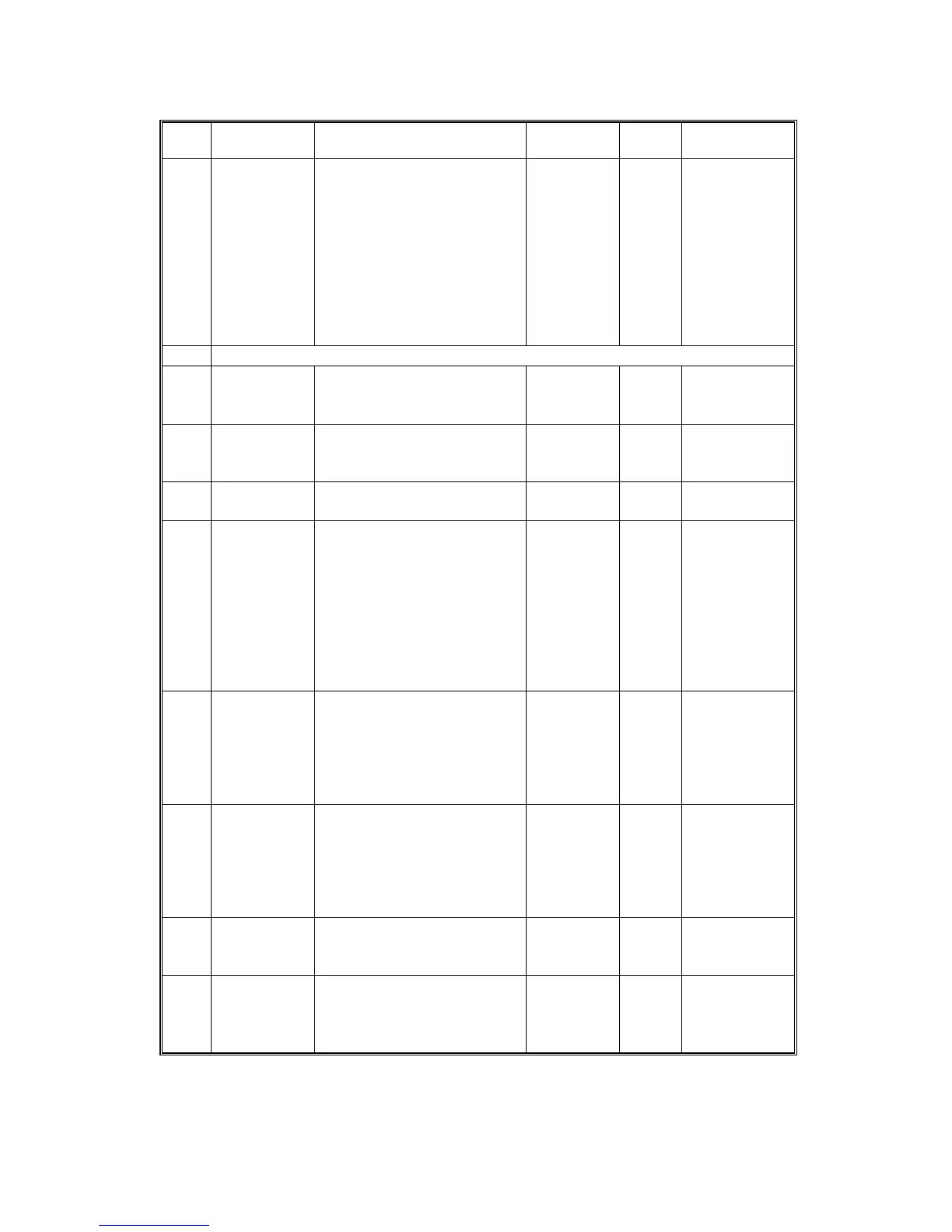
No. Display Function Settings
Factory
Setting
Comments
*84
Auto Multi
Copy
Specifies the initial mode for
the Combine 2 Originals
mode.
0: No
1: Yes
(Two
identical
images
are made if
the Master
Making key
is pressed
once.)
0
***85
Not used for C237 model
*87
Memory
Print
Specifies the printing
operation when in Memory
mode.
0: Memory
1: Stack
0 See remark 4
*88
Auto
Memory/
Class
Specifies whether the
Memory/Class mode is
used.
0: No
1: Yes
0 See remark 5
90
Thermal
Head Test
Select "1" to carry out the
thermal head test.
0: Off
1: On
0
91
CIS Test Select "1" to carry out the
CIS test. Select the photo
mode and make a new
master. If the CIS is
damaged, white or black
lines corresponding to
damaged pixel elements will
appear on prints.
0: Off
1: On
0 The mode is
cancelled
once a master
is made or the
power is
turned off.
95
Scanner
Free Run
Carries out a scanner free
run test.
Start with
the Print
Start key.
Stop with
the Stop
key.
0
96
ADF Original
Feed
Carries out an ADF original
feed test.
Start with
the Print
Start key.
Stop with
the Stop
key.
98
Economy
Count
Displays the total number of
masters made in Economy
mode.
0
103
Margin
Erase Count
Displays the total number of
masters made with the
Margin Erase key.
0


 To Next Page