DRUM AND DRIVE SECTION
6-42
C231/C237/C238 SM
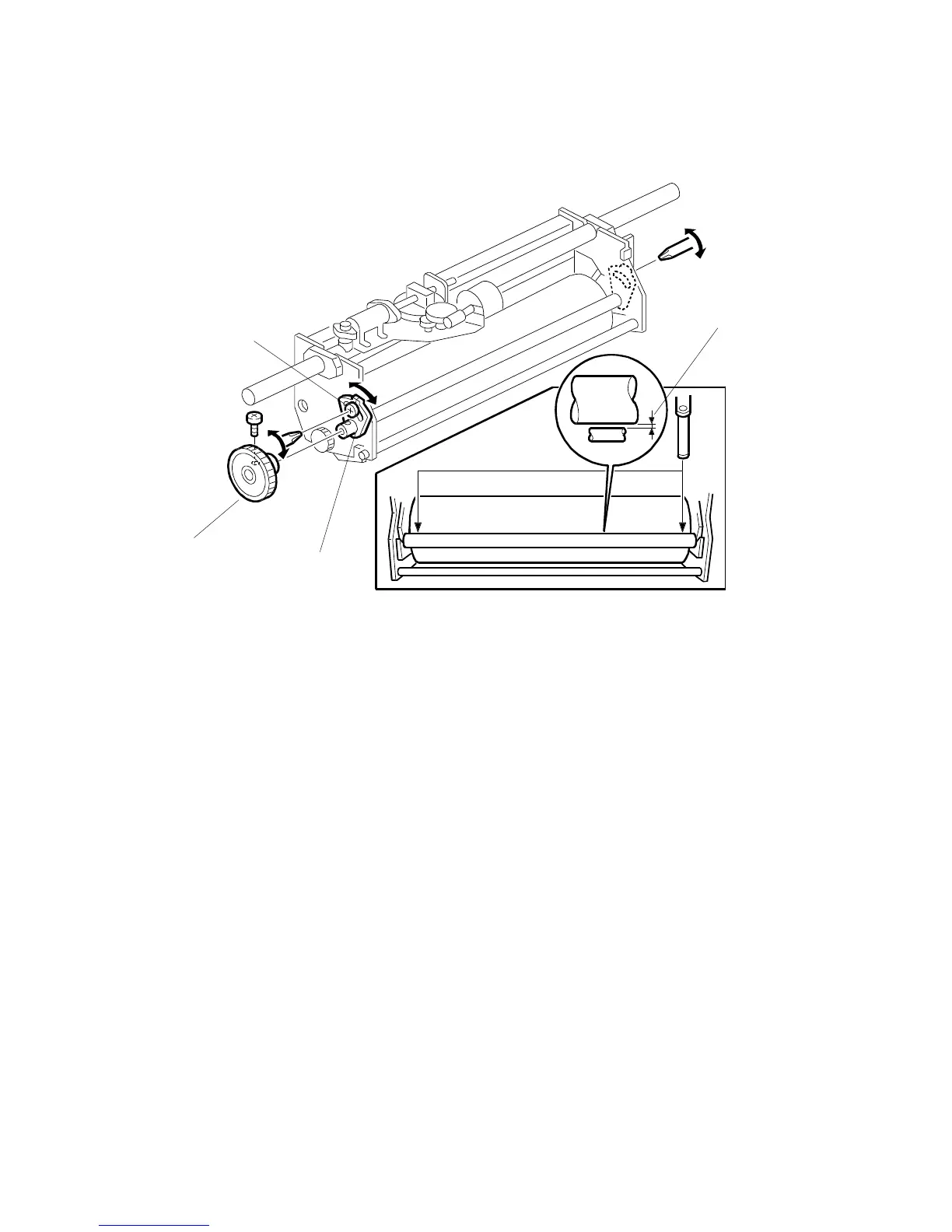
5. Make sure that a 0.07 mm gap gauge goes through the gap [A] between the ink
and doctor rollers, and that a 0.09 mm gap gauge does not.
NOTE:
1) The
ap should be checked at both ends of the doctor roller. Insert a
gap gauge at each end of the roller. The gap tends to be larger for
the center.
2) While the gap gauge is inserted, hold the doctor and ink rollers with
your fingers in order to stop the rollers from rotating.
3) While the gap gauge is inserted, hold the end of the gap gauge.
6. If the gap is out of the standard, after removing gear [D], loosen the screw [B]
and adjust the gap by turning the cam bushing [C] for the front and for the rear.
NOTE:
Make sure to repeat the adjustment for both ends of the rollers.
NOTE:
If the ink detection off mode has been selected with SP 140, do not forget
to return it to the default (detection on).
C231R527.WMF
[A]
[B]
[C]
[D]



 To Next Page