155
18-2. Executing Macros
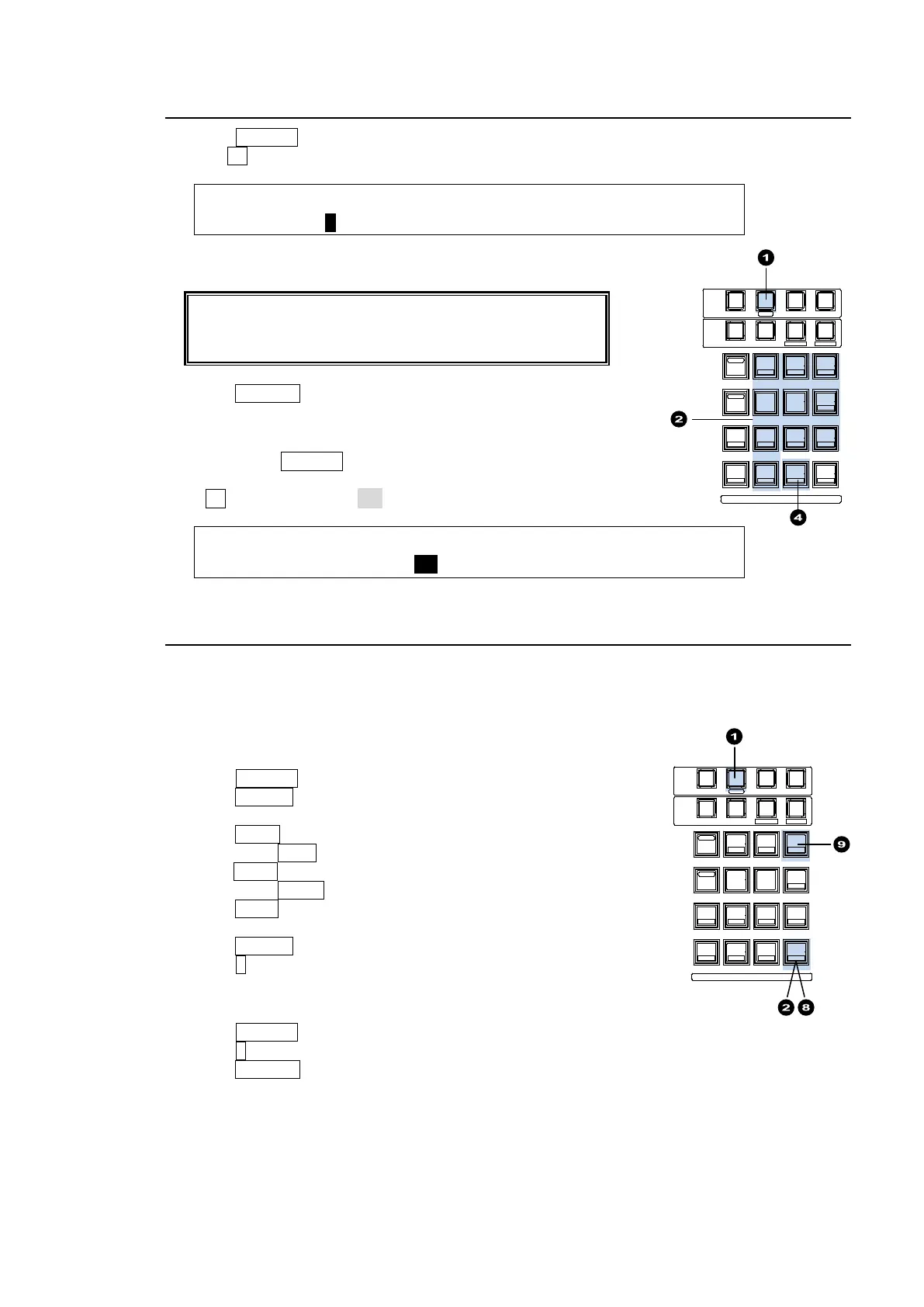
(1) Press MACRO in the MEMORY block.
(2) Turn F1 to select an event page in the [MACRO MEMORY] menu.
MACRO : PAGE :DIRECT :PAGECLR: : 1/3
MEMORY : =0 : =OFF : =OFF : :
(3) Press the number button to which the needed data is to be stored.
If DIRECT mode is ON, macros are executed by just
pressing number buttons on the Keypad. See "To Set
DIRECT to ON" below.
(4) Press RECALL to execute the macro.
To Set DIRECT to ON:
When pressing MACRO in the MEMORY block, the [MACRO
MEMORY] menu is automatically displayed.
Turn F2 to set DIRECT to ON.
MACRO : PAGE :DIRECT :PAGECLR: : 1/3
MEMORY : =0 : =ON : >CRNT : : L=0
18-3. Operation Example 1
Recording Actions as Macro 09
Let's perform the following actions and record them as Macro 09 (PAGE 0, No. 9).
-Select M/E2 PGM for AUX1.
-Select M/E2 PREV for AUX2.
-Press KEY1 AUTO in the M/E2 transition section.
(1) Press MACRO.
(2) Press STORE (ENTER) on the keypad to start recording.
(3) Press AUX1 in the Bus Select section.
(4) Press M/E2 PGM.
(5)Press AUX1 in the Bus Select section.
(6) Press M/E2 PREV .
(7) Press KEY1 (AUTO) in the M/E2 transition section.
(8) Press STORE (ENTER) to stop recording.
(9) Press 9. The actions are saved as Macro 09.
Executing Macro 09
(1) Press MACRO.
(2) Press 9 on the keypad. (The macro is executed if DIRECT is set to ON.)
(3) Press RECALL to execute Macro 09.
Note that if the KEY1 image is already displayed on the program screen, it will be cleared from
the screen.
SELECT / KEYPAD
5
2
RECALL
PASTE
4
1
6
3
DEC
SEQUENCEEVENTWIPE MACRO
CON TROL
MEMORY
MENU USER BUTTON COPY/SWAP SEQ EDIT
987
ATTACH
INC
MENU
COPY
STILL MATT
SWAP NEW
FILE
INS
KEY4KEY3KEY2KEY1
DETTACH
ADDDELCUTPLAY
+/-
CLE AR
WIPE
STOP
0
COPY
STO RE
ENTER
OVWR
SELECT / KEYPAD
5
2
RECALL
PASTE
4
1
6
3
DEC
SEQUENCEEVENTWIPE MACRO
CON TROL
MEMORY
MENU USER BUTTON COPY/SWAP SEQ EDIT
987
ATTACH
INC
MENU
COPY
STILL MATT
SWAP NEW
FILE
INS
KEY4KEY3KEY2KEY1
DETTACH
ADDDELCUTPLAY
+/-
CLE AR
WIPE
STOP
0
COPY
STO RE
ENTER
OVWR



 To Next Page