67
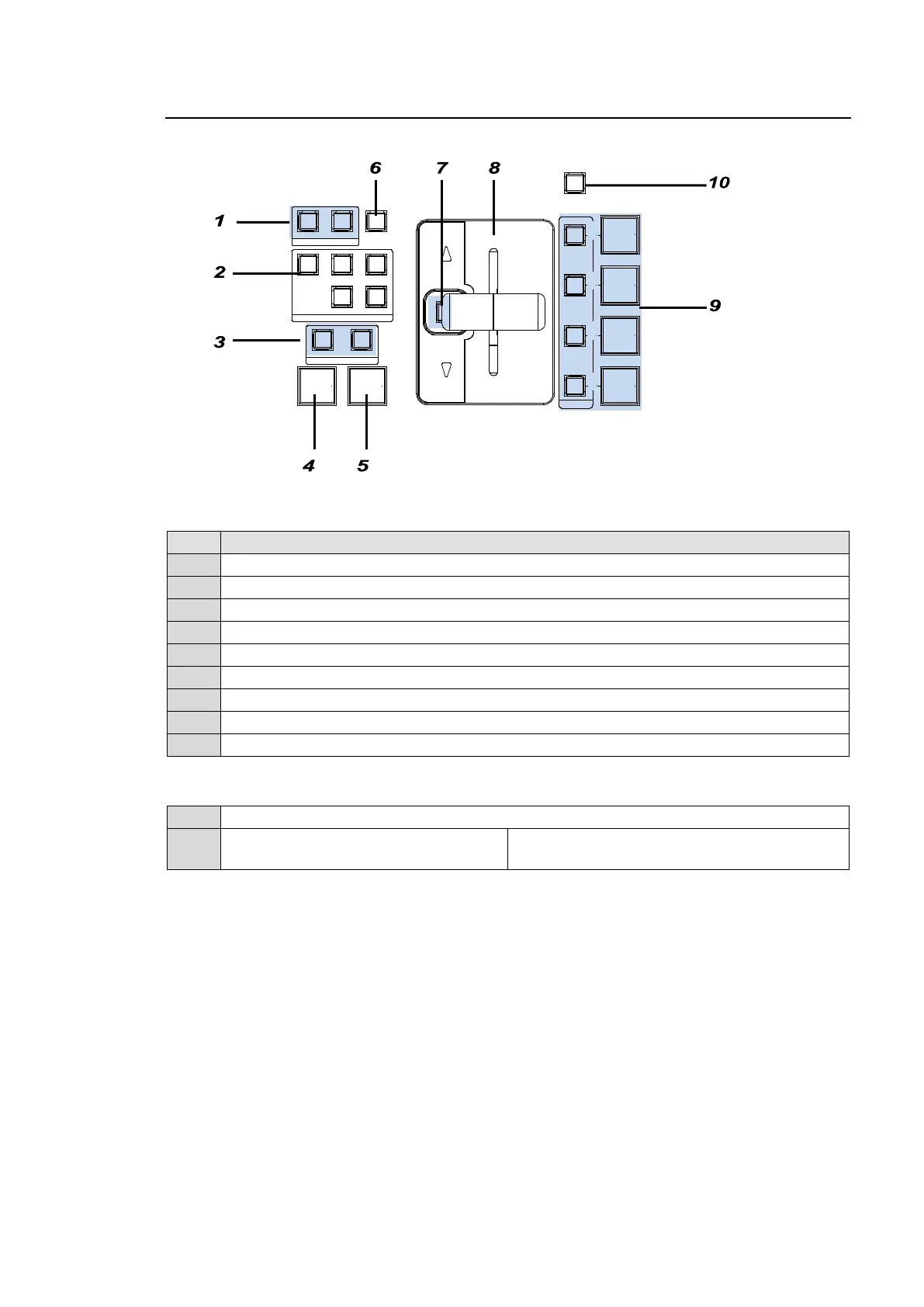
8-1. Transition Block Description
Transition block
No. Description
1 For pattern transition direction setting
2 For next transition bus selection
3 For transition type selection
4 AUTO transition button for BKGD and KEY
5 CUT transition button for BKGD and KEY
6 For pattern selection
7 Fader limit ON/OFF button
8 BKGD and KEY fader lever
9 ON AIR and AUTO transition buttons and DVE indicators for KEY1-4
Other Transition Related Buttons
10 For transition rate setting. Pressing the button opens the related menu.
-
BLACK TRANS button
(Located on the left next to the joystick)
For BLACK transition use.
‚c‚u‚d
AUTO CUT
MIX WIPE
TRANSITI ON TYPE
NEXT TRANSI TION
ON AI R
KEY 4
KEY 3
KEY 2
DVE
DVE
KEY 1
DVE
FADER LIMIT
KEY4KEY3
KEY2KEY1BKGD
DIRECTION
REV NOR/REV
PATTERN
TRANSITION
RAT E



 To Next Page