84
9-3. Pattern Modify Example 1 (Pattern 20)
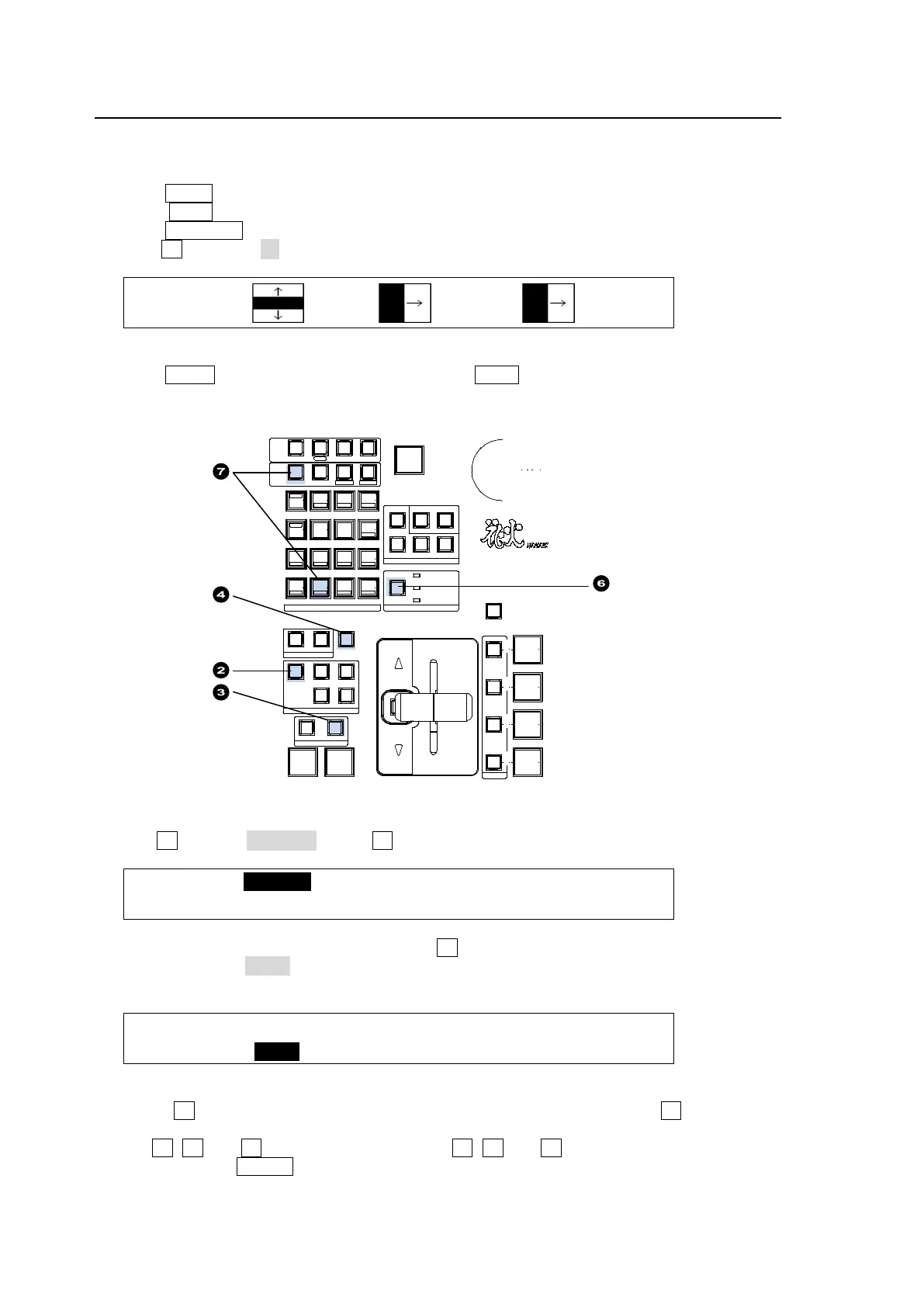
This modification example adds a border effect to the background transitions using Pattern 20.
(1) Select a desired signal on the M/E1 PST bus.
(2) Press BKGD in the NEXT TRANSITION block.
(3) Press WIPE.
(4) Press PATTERN to display the [WIPE PATTERN] menu.
(5) Turn F1 to select 20.
WIPE:BKGD :KEY1 :KEY2 : 1/1
PATT:20 :00 :00 :
(6) Press the WIPE CHANNEL button to turn BKGD to ON.
(7) Press MENU in the CONTROL block, then press WIPE in the Keypad to display the [WIPE]
menu.
(8) Turn F1 to select BORDER. Press F1 or the page down button.
ME1 WPBG:>BORDER >POS/ANGL>MULTI >SUB EFF
No.020 :>CG WIPE >INIT
(9) The [WIPE - BORDER] menu appears. Turn F1 to select the signal used for the border under
SIGNAL. Select MATT in this example. Set the border width under WIDTH and border
softness under SOFT.
ME1 WPBG:SIGNAL : WIDTH : SOFT : : 1/2
BORDER : =MATT : =5.0 : =2.0 : :
(10) Press the page down button to go to PAGE 2.
(11) Turn F4 to select a border color among eight standard colors. Press F4 to apply the
selected color. If you want to adjust the selected color or set the color by entering HSL values,
turn F1, F2 and F3 to adjust values or press F1, F2 and F3, enter a value in the Keypad,
and then press ENTER in the Keypad. Users can also set these three parameters in the
JOYSTICK block. (See section 4-2-4. "Changing Settings or Values Using the Joystick.")
‚c‚u‚d
AUTO CUT
MI X WIPE
TRANSI TION TYPE
NEXT TR ANSI TION
ON AIR
KEY 4
KEY 3
KEY 2
DVE
DVE
KEY 1
DVE
FADER LIMIT
KEY4KEY3
KEY2KEY1BKGD
DIRECTION
REV NOR/REV
PATTERN
TRANSITION
RATE
WIPE CH ANNEL
BKGD
KEY1
KEY2
SELECT / KEYPAD
5
2
REC ALL
PA STE
4
1
6
3
DEC
BLACK
TRANS
SEQUENCEEVENTWIPE MACRO
CONTROL
MEMORY
ME NU USER BUT TON COPY/ SWAP SEQ EDIT
987
ATT ACH
INC
ME NU
CO PY
STILL MA TT
SW AP NEW
FILE
INS
KEY4KEY3KEY2KEY1
DET TACH
KEYER
(2D DVE)
ROTP OSWIPE POS
MENU FINE DEF
JOYSTICK
AD DD ELCUTPL AY
+/-
CLEAR
WIPE
ST OP
0
CO PY
STORE
ENTER
OVWR
HVS-390HS
DIGIT AL VIDE O SWITCHER



 To Next Page