232
33-2. Connecting Control Panels
Up to three control panel units (HVS-392OU / HVS-392ROU / HVS-391OU) can be connected to
the HVS-390HS via Arcnet. The HVS-390HS stores three sets of panel settings, which allow you
to control the MU in the same way or differently from the control panels.
To change the Arcnet ID of a control panel, connect the control panel and HVS-390HS
one to one. The Arcnet ID numbers and OU NO
must be unique. Do not assign the
same ID number to two different devices. See section 3-3. "How to Connect between
MU and OU Units."
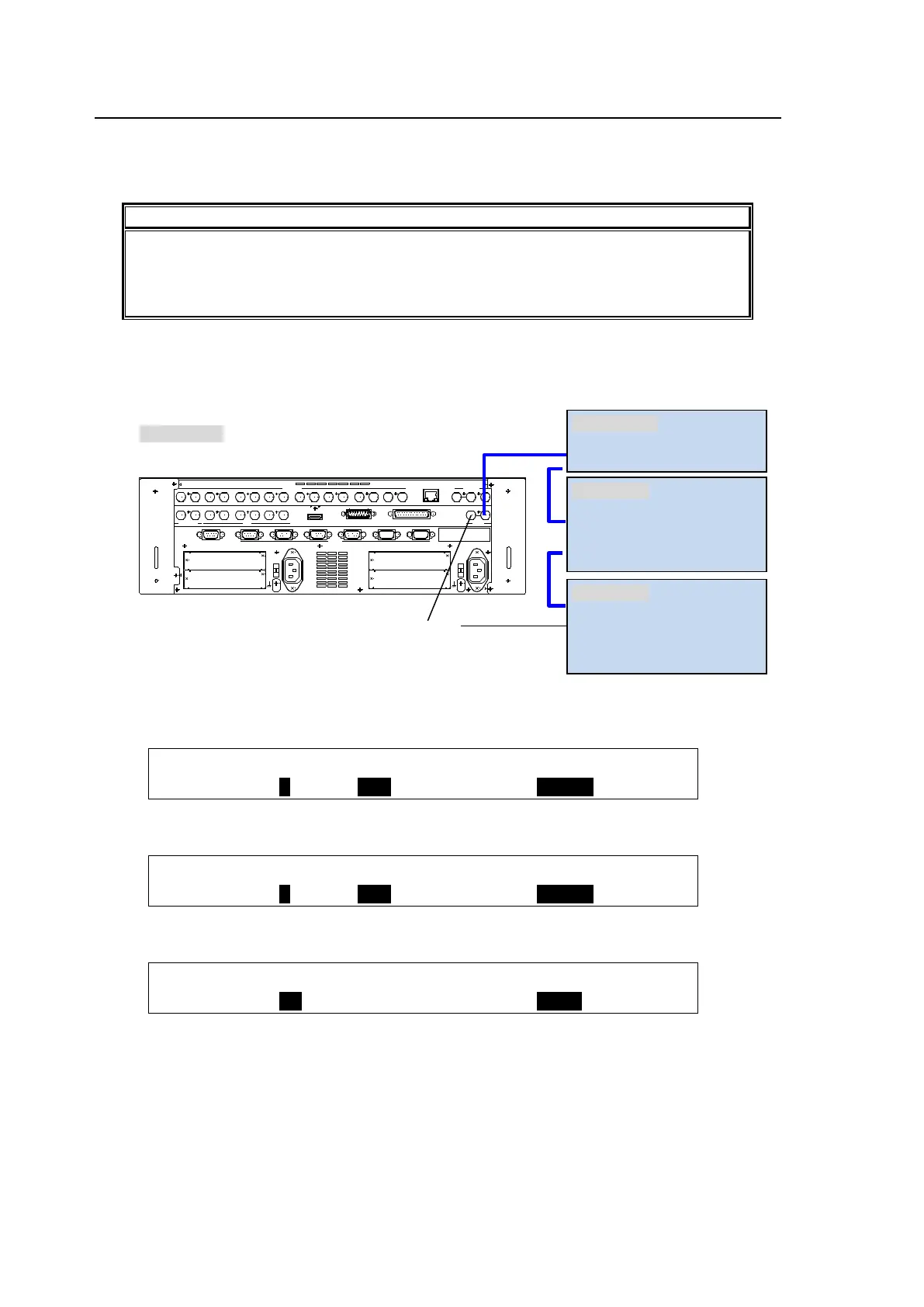
Each control panel can use different assignments for bus buttons and user buttons, and two
HVS-30OU units can control the MU differently, one for M/E1 and the other for M/E2, as shown
below.
To set up the above configuration, proceed as follows:
(1) Connect the first HVS-30OU and set the ARCNET menu as shown below:
SYSTEM : OU ID : OU NO :CTRL MU: GROUP : 1/2
ARCNET : = 2 : =OU2 : =250 : =390HS:
(2) Connect the second HVS-30OU and set the ARCNET menu as shown below:
SYSTEM : OU ID : OU NO :CTRL MU: GROUP : 1/2
ARCNET : = 3 : =OU3 : =250 : =390HS:
(3) Set the [SETUP - INPUT - ASSIGN] menu for the second HVS-30OU as shown below:
INPUT :SELECT : SHIFT : LINK :CONTROL: 6/6
ASSIGN : =OU : =OFF : =OFF : =M/E2 :
(4) Connect the HVS-390HS and all control panels. Each control panel uses a different set of
settings in its assignments to control the MU.
EDITOR
OPTION SLOT
AC100- 240V 50/60Hz IN
2
RS-422
AUX HDMI GPI INSDI OUTPUT
1 2
A
B
1 2 1 2 1 2
1 2 3 4 5 6 7 8
SDI INPUT
9 10 11 12 13 14 1615
GPI/TALLY OUT
OPTION SLOT
C
D
1
AC100- 240V 50/60Hz IN
RATING LABEL
T O OU
GENLOCK
REF IN REF OUT
L AN
1 2 3 4 5 6
termination
OU ID=1 (default)
OU NO =OU1 (default)
OU ID=2
OU NO =OU2
GROUP=390HS
CONTROL = M/E1
OU ID=3
OU NO =OU3
GROUP=390HS
CONTROL = M/E2
Arcnet ID=250 (default)



 To Next Page