10
WEB CONTROL
No. Name Description >> Manual
(6) TRANSITION OFF: Disables the bus playback in a sequence.
AUTO: Performs all bus controls in a sequence.
MANUAL: Performs bus controls in a sequence, but bus
transitions are performed manually on the control panel.
17-1-4
XPT ON: Uses signals saved in a sequence.
OFF: Uses signals set on the control panel.
INTERP CUT: Uses no interpolation between steps.
LINE: Uses linear interpolations between steps.
SMOOTH: Uses curve interpolation between steps.
17-1-7
(7) TOTAL TIME
Sets the sequence playback time (in min. /sec. / frames).
Sequences are played back while keeping the step duration
ratios the same.
17-1-7
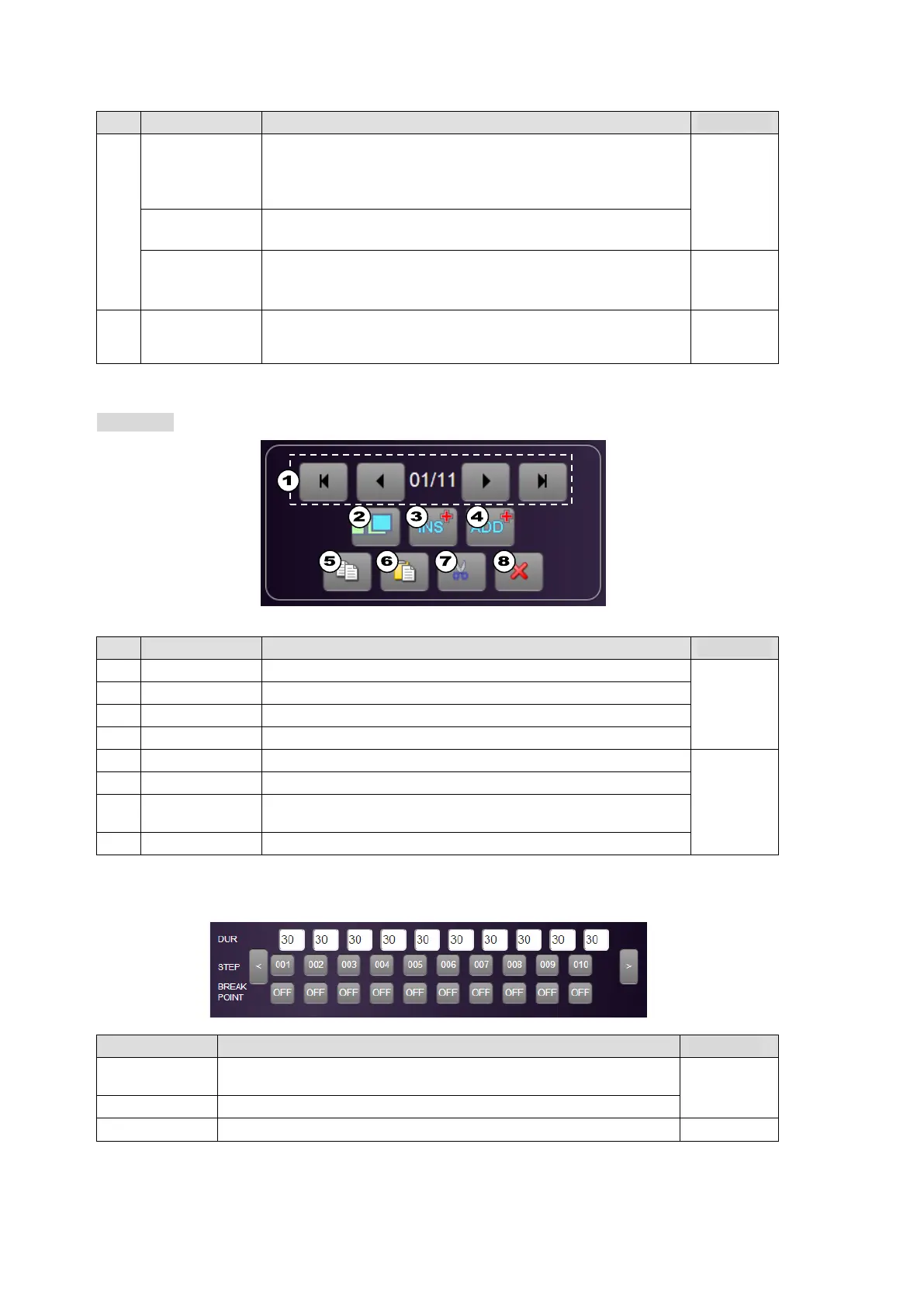
To Edit Sequences (Editing and Deleting Steps)
>> Manual Sec. 17-1-5. "Editing Sequences"
No. Name Description >> Manual
(1) Step selection Selects a step for editing. 17-1-5
(2) OVERWRITE Overwrites the current step.
(3) INSERT Adds a new step, which is inserted in front of the current step.
(4) ADD Adds a new step, which is inserted after the current step.
(5) COPY Copies the current step. 17-1-6
(6) PASTE Adds the copied step in front of the current step.
(7) CUT
Deletes a step while keeping the intervals in front and back of
the step.
(8) DELETE Deletes a step by clearing the next step interval.
To Edit Sequences (Step Duration and Break Points)
Name Description >> Manual
DUR
Sets each step duration. (Note that an actual step duration during
sequence playback is determined by the TOTAL TIME.)
17-1-7
STEP Double-clicking each number selects the relevant step.
BREAK POINT Enables/disables the break point of each step. 17-1-4



 To Next Page