iPECS eMG80/100& eMG800 & UCP & vUCP
Administration and Programming Manual Issue 2.5
140
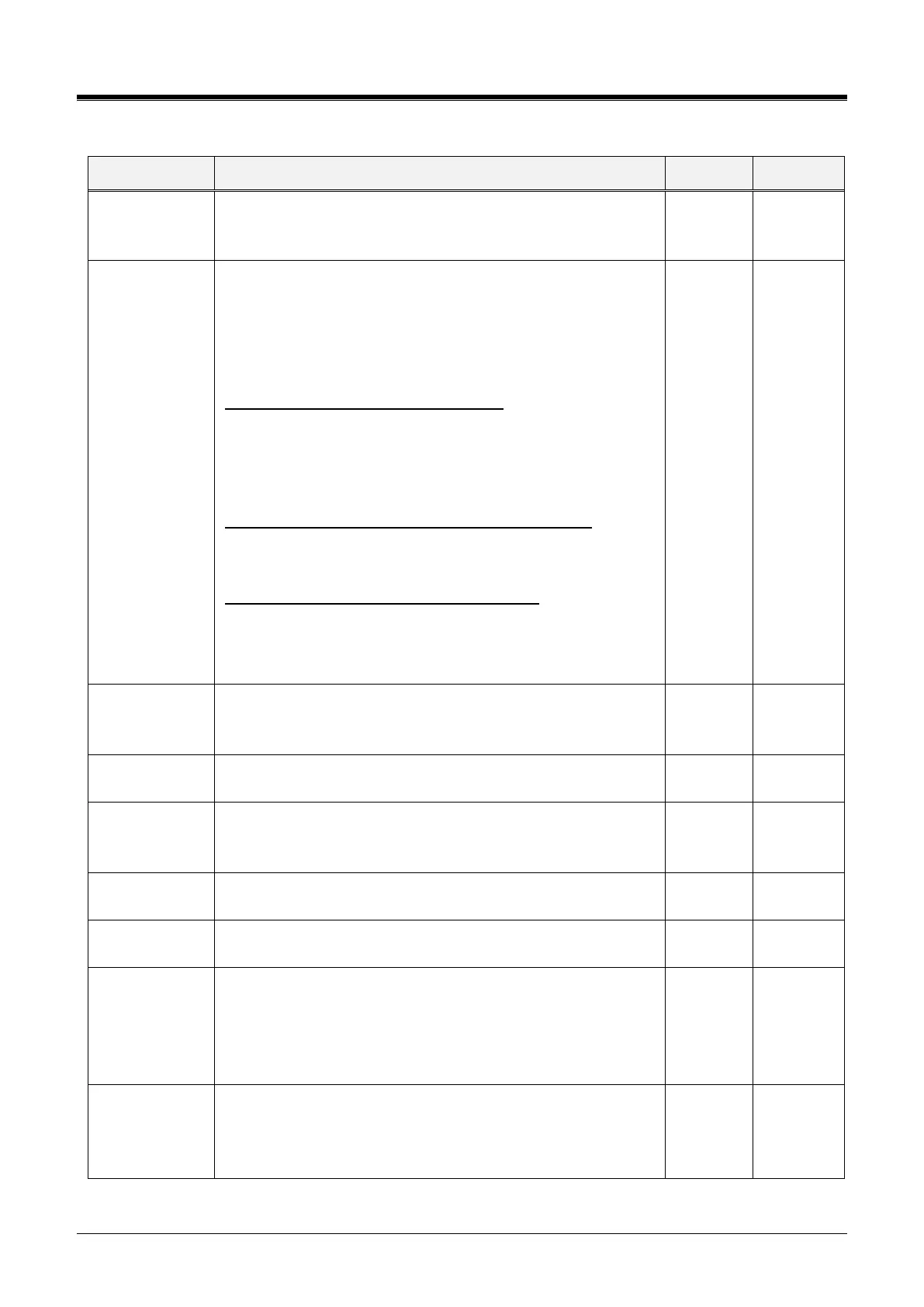
Table 4.4.5.1-1 SYSTEM ATTRIBUTES
The XML port used to support Web callback, call-through, and
iPECS Click Call application for MSVC (Mobile Service) must be
defined.
Security (option
for MSVC XML
Port)
It is security option for MSVC XML Port. (7878)
If it is “TLS1.2,” then the system accepts only TLS 1.2.
Other TLS1.1( or below) and SSL will be rejected.
The “Default” option is used for application compatibility as
below.
UCS version that can support TLS1.2:
UCS Win Client: 6.1.5
UCS Mac Client: 6.1.3
UCS Android Client: 6.1.6
UCS iOS Client: 6.1.3
iPECS Click Call version that can support TLS1.2:
1.0Ar
2.0Ac
Report plus, CCS that can support TLS1.2:
(TBD: it will be supported in 2019 Q2)
So, if both UCS and report plus are used, then “Default” should
be used before the new report plus/CCS package is released.
IPCR Announce
for recording
warning
When ON, the IPCR server Call Recording notification
announcement is played to the caller in place of the warning
tone.
IPCR Announce
for only incoming
Users can select IPCR Announce only when it’s incoming by
setting ON.
Mobile EXT CO
Access
Password Check
When a mobile extension places an external call using an
iPECS CO/IP Line, the user may be required to enter a valid
Authorization code to place the call.
When ON, the Hold key is used for paging.
Device Info
Request Interval
The system checks the status of each device with a polling
message at intervals of this timer.
The Dial by Name feature allows stations in any ICM tenancy
group to call a station in the ICM Tenancy group. When desired,
Dial by Name can be limited to function within allowed Tenancy
calling groups, PGM 125.
All, Accessible ICM Group only
Dial By System
Speed Name List
If this value is set to "Accessible System Speed Zone Only," the
system speed dial number of Accessible system speed zone
(System Speed Zone (232)) is displayed in {Dial by Name}.
All/ Accessible System Speed Zone Only



 To Next Page