iPECS eMG80/100& eMG800 & UCP & vUCP
Administration and Programming Manual Issue 2.5
98
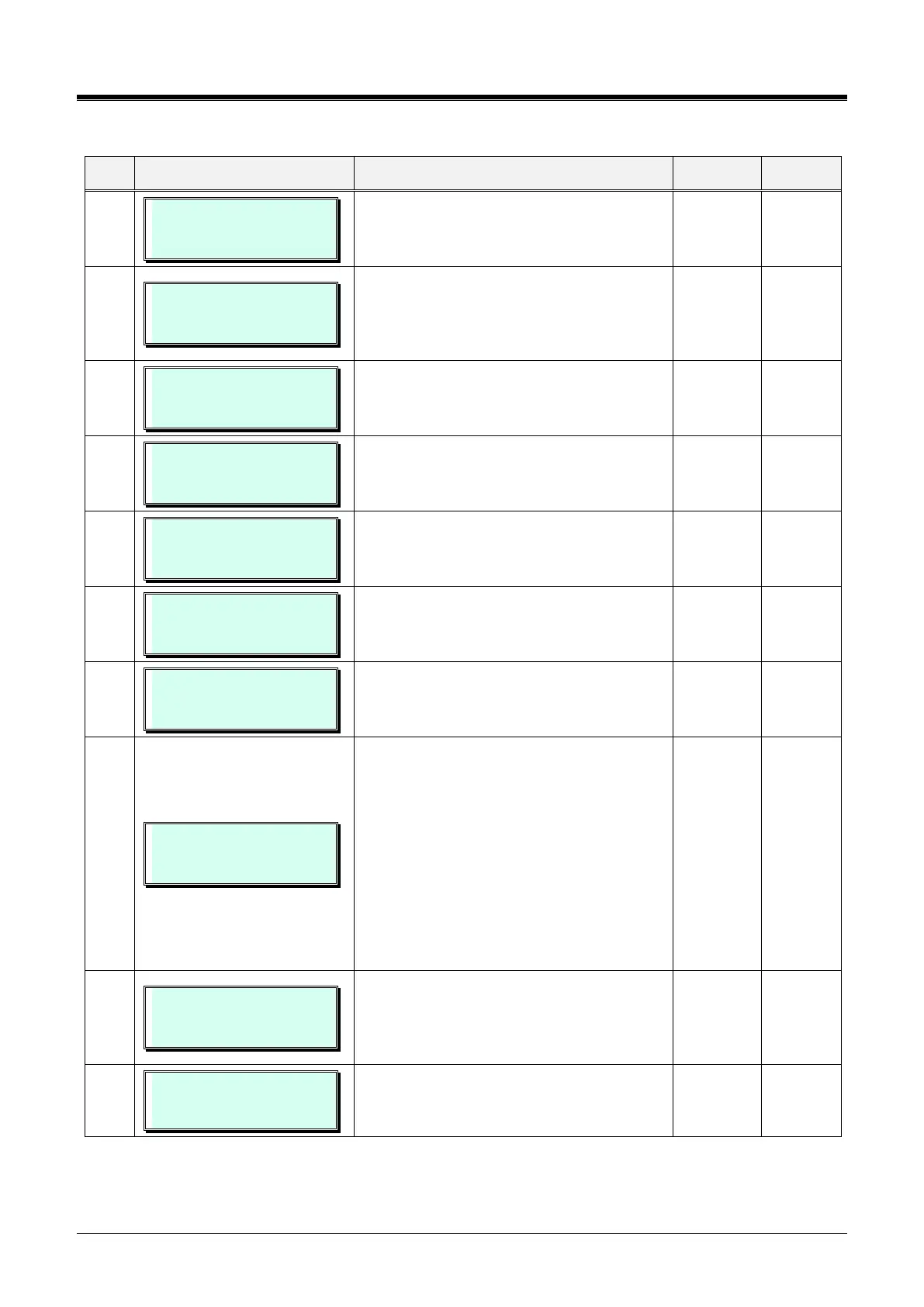
Table 3.3.3.2-3 STATION ATTRIBUTES III (PGM 113)
100-110 VSF ACCESS
(1:EN/0:DIS) : ENABLE
Permits station access to the built-in AA/VM.
100-110 GROUP LISTEN
(1:EN/0:DIS) : DISABLE
Enables Group Listens to feature. Audio is
sent to both the handset and speaker with
the handset microphone active and
speakerphone microphone OFF.
100-110 OVERRIDE
(1:EN/0:DIS) : DISABLE
Enables intrusion to gain access to an active
CO/IP call.
100-110 SMDR HIDE
(1:EN/0:DIS) : DISABLE
Enables hiding dialed digits in SMDR output.
100-110 VOICE OVER
(1:EN/0:DIS) : ENABLE
Enables use of Voice Over by station.
100-110 PRIME LINE
(1:HOT/0:WARM) : WARM
Enables Delayed Prime Line (Idle Line)
activation. See PGM 121, Idle Line Selection,
and PGM 182-button 6 for Prime-Line timer.
100-110 ALARM/DOORBEL
(1:EN/0:DIS) : DISABLE
Assigns station to receive Alarm/Doorbell
signal.
100-110 CALL WAIT
(0-3) : For Ext/Int
When a busy station receives a call, the call
may queue to the station instead of receiving
a busy tone. With Call Wait, the caller will
hear Ring-back, and the user sees the CO
line LED flash. If this option is set to a
station, and a co-line is ring assigned to the
station, second ring assigned call CLI will
show in the station’s LCD.
0: OFF, 1:For External/Internal
2:For External, 3:For Internal
100-110 LEFT MSG EXEC
(1:ON/0:OFF ) : ON
When a call is forward to the secretary of an
Executive/Secretary pair, messages can be
left for the Executive (ON) or secretary
(OFF).
100-110 E&MIC HEADSET
(1:ON/0:OFF ) : OFF
Select E&MIC Headset mode.



 To Next Page