Call logging (CL)
272
System functions and features as of R4.1
syd-0570/1.2 – R4.1 – 08.2016
See also:
"Output formats", page 282.)
8. 3. 1 General OCL settings
Printout as of a specific charge value
One of four possible surcharge calculators can be allocated in each case for business
and private calls, based on users. However, the printout is only made as of a specific
charge value. These minimum charges can be individually configured with the general
charge settings( =b4).
The ICC, however, logs all the call charges and allocates them to the cumulative coun-
ters.
Mitel Advanced Intelligent Network:
In an AIN the charge values as of which a printout is made can be adapted specifically for each
node with the regional settings ( =zz). Please note that the values throughout the AIN are
indicated in the same currency, defined throughout the system (see also AIN note on
page 267).
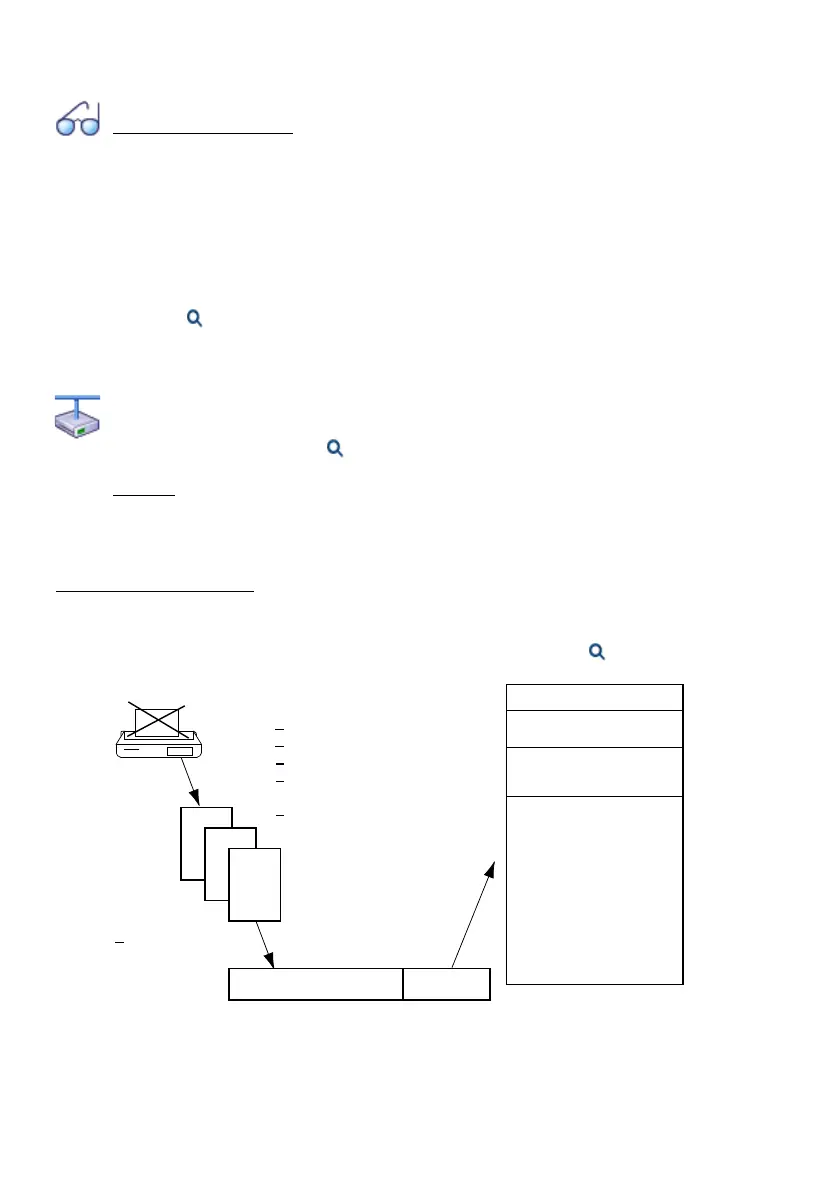
Digit barring if output is blocked
If for whatever reason the printer cannot print or the PC cannot receive data (see
"Printer faults", page 281
), the next calls are stored internally in the communication
server. If the call data memory is full (value depends on the system), the selected dial
control (e.g. 1) becomes active. In this case, only the numbers which allow this dial
control can be dialled (Parameter Call control if buffer is full in the ( =b4) view.
Fig. 147 Situation if output is blocked
-.;.-.,-.,-.
,-.,-.,.,
,-.-.,-.,-.,
•
•
•
F1 111 S1 ......
F2 116 S2 ......
F3 117 S3 ......
F4 118 S4 ......
F5 140 S5 ......
F6 144 S6 ......
F7 ...... S7 ......
F8 ...... S8 ......
F9 ...... S9 ......
F10 ...... S10 ......
......1......
1
1
2
External barred-code check
The charge data of a maximum
number of calls are stored
Paper out
Paper jam
Mains failure
Printer fault
if maximum
reached...
max.
all disable (s)
all enable (f)
Service and emergency
numbers
becomes active!



 To Next Page