Features
422
System functions and features as of R4.1
syd-0570/1.2 – R4.1 – 08.2016
9. 6. 20. 1 Locking / unlocking terminals (telephone lock)
The phone lock inhibits or restricts the following operating possibilities:
• Dialling possibilities for internal and external calls, by activating internal and external
digit barring.
• Operation of terminal settings.
The dialling restriction can be lifted by entering a PIN:
• The PIN is valid for all a user’s terminals.
• Default PIN: "0000"
• Make sure you change the PIN the first time the feature is activated
• PIN syntax (all terminals): 2 to 10 digits, digits 0 to 9
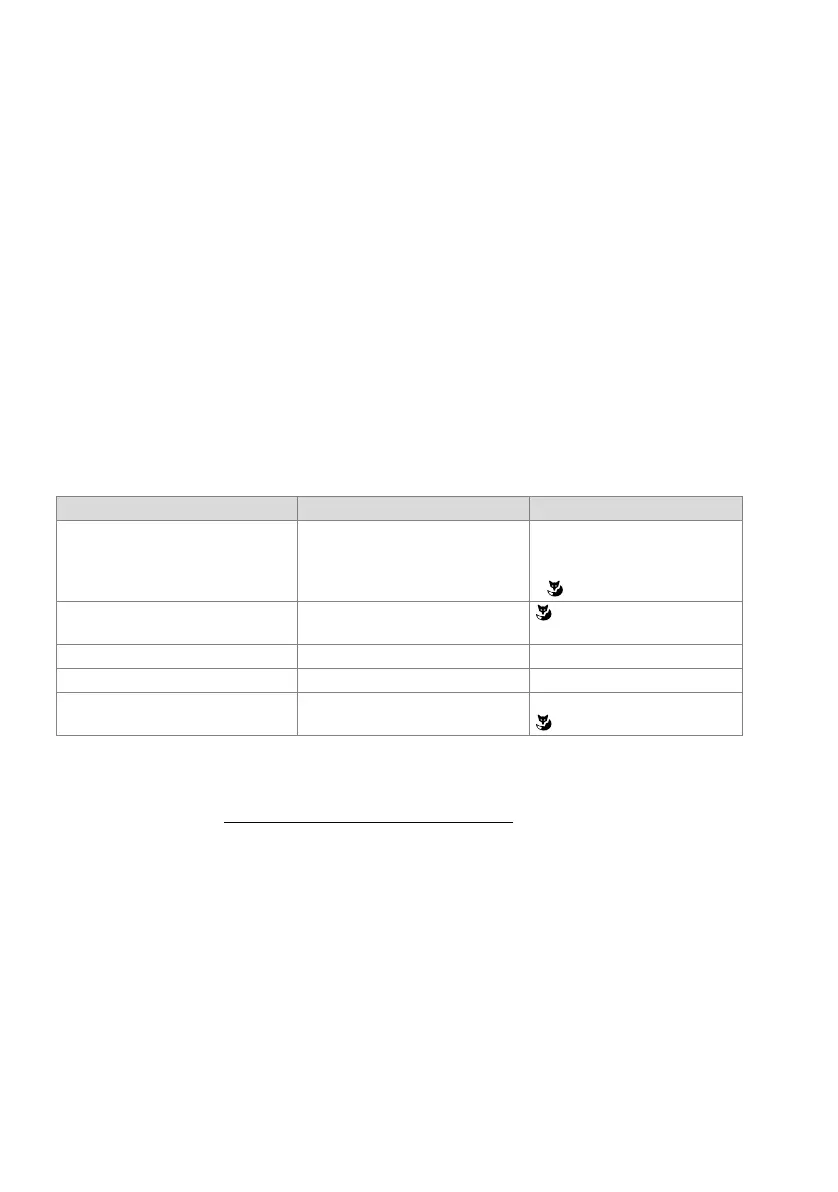
Functions
Tab. 244 Phone lock: Functions
The "Change PIN" feature can be remote-controlled, which means it can also be used
for virtual users (see "Remote control features", page 472
).
Lock variants for system phones
For system terminals with display the use of device settings can be locked separately
(Lock settings).
A partial lock is also available for some system terminals (Lock phone partially). This is
particularly useful in the hotel/hospitality sector. Locking locks all menus and settings,
except call lists, voice mail input and local phone book.
The two lock variants can be lifted by entering a PIN.
Functions Function codes System phones
Lock terminal (activate phone lock) *33 <PIN> # Office 45:
• With the code key
System phones with display:
•
Unlock terminal (deactivate phone
lock)
#33 <PIN> #
Lock all user's terminals *33 * <PIN> # *33 * <PIN> #
Unlock all user's terminals #33 * <PIN> # #33 * <PIN> #
Change PIN *47 <old PIN> * <new PIN> * <new
PIN> #
1)
1)
For reasons of data protection no entry is made in the redial register.
System phones with display:
(*47 also works)



 To Next Page