Features
480
System functions and features as of R4.1
syd-0570/1.2 – R4.1 – 08.2016
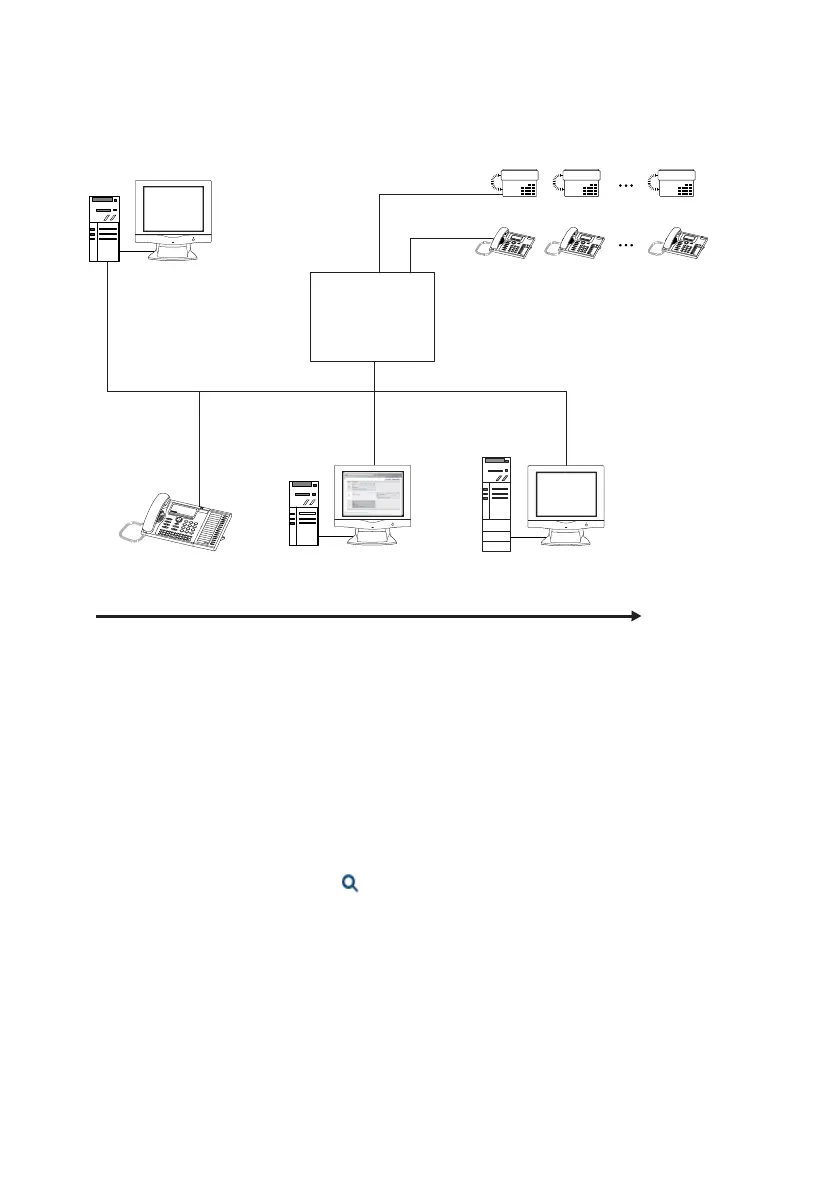
The diagram below provides an overview of the various configuration and operating
possibilities:
Fig. 245 Overview of configuration and operating possibilities
Once the basic configuration is in place, you have the possibility to log in to the
WebAdmin as Hospitality Administrator. This function contains all views that are re-
quired to set up Mitel 400 Hospitality Manager and the Reception menu in
MiVoice 5380 / 5380 IP and to define the default values. You can also use a menu item
to launch the Mitel 400 Hospitality Manager.
If you log in to the WebAdmin as Receptionist, the Mitel 400 Hospitality Manager starts
directly.
In the WebAdmin online help under Hospitality/Hotel you will find the descriptions of
the individual parameters as well as instructions on room processing and on the crea-
tion of billing forms and maintenance code table.
Menu
16:
5
8
WE 23
A
ug Week 34
Oce
8
0
I
P
LAN
DSI
FXS
WebAdmin
Room phones
Communica-
tion server
FIAS
protocol
Number of rooms
PMS system
Hospitality
Manager
Reception phone
MiVoice 5380 / 5380 IP



 To Next Page