Features
497
System functions and features as of R4.1
syd-0570/1.2 – R4.1 – 08.2016
Hotline alarm
Note:
This function is used mainly by nursing staff in the health sector.
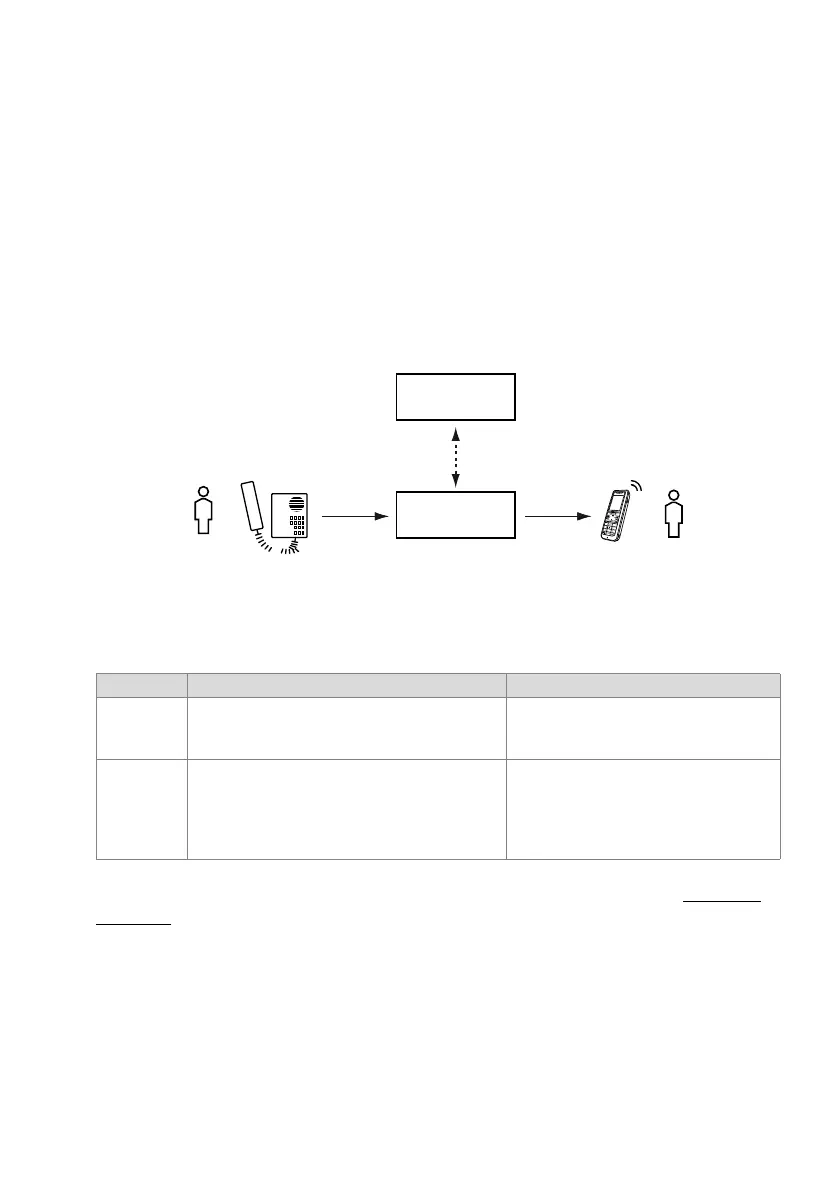
Situation:
Patient A requires assistance and picks up his handset. Once an adjustable delay has
elapsed, the configured hotline destination number is dialled automatically. It can be
the call number of a nurse B or a user group comprising several call numbers of nurs-
ing staff. The Mitel Alarm Server detects the call from the patient to the hotline destina-
tion via CSTA interface and responds in accordance with its configuration. A nurse an-
swers the call and is now connected through to the patient.
Fig. 254 Hotline alarm
Detailed Description
Tab. 330 Hotline alarm
In principle the hotline alarm is nothing other than the hotline feature (see "Hotline",
page 405) combined with the use of an Mitel Alarm Server and the corresponding con-
figurations. Listed below are a few configuration notes:
• On the patient phone activate the Force call waiting parameter. Call waiting will then
automatically be signalled if the hotline destination is busy. This will be registered by
the Mitel Alarm Server.
• In the case of a user group do not enter the user group number directly as a hotline
destination, but enter a call distribution element instead. This ensures that if the
End point Operating sequence / signalling on terminal Scope
A The patient automatically triggers a call to the hotline
destination by picking up his handset or pressing the
hands-free key on his phone.
Phones supported:
All system phones, DECT phones, analogue
phones and Mitel SIP phones
B The call is signalled on the hotline destination. The
Mitel Alarm Server detects the call via CSTA interface
and responds in accordance with its configuration.
The nurse answers the call and is connected through
to the patient.
Phones supported:
All phones that can be monitored via CSTA
interface.
Mitel Alarm
Server
B
A
Communication
server



 To Next Page